The 1% Moru is a design-first keyboard, not a spec sheet
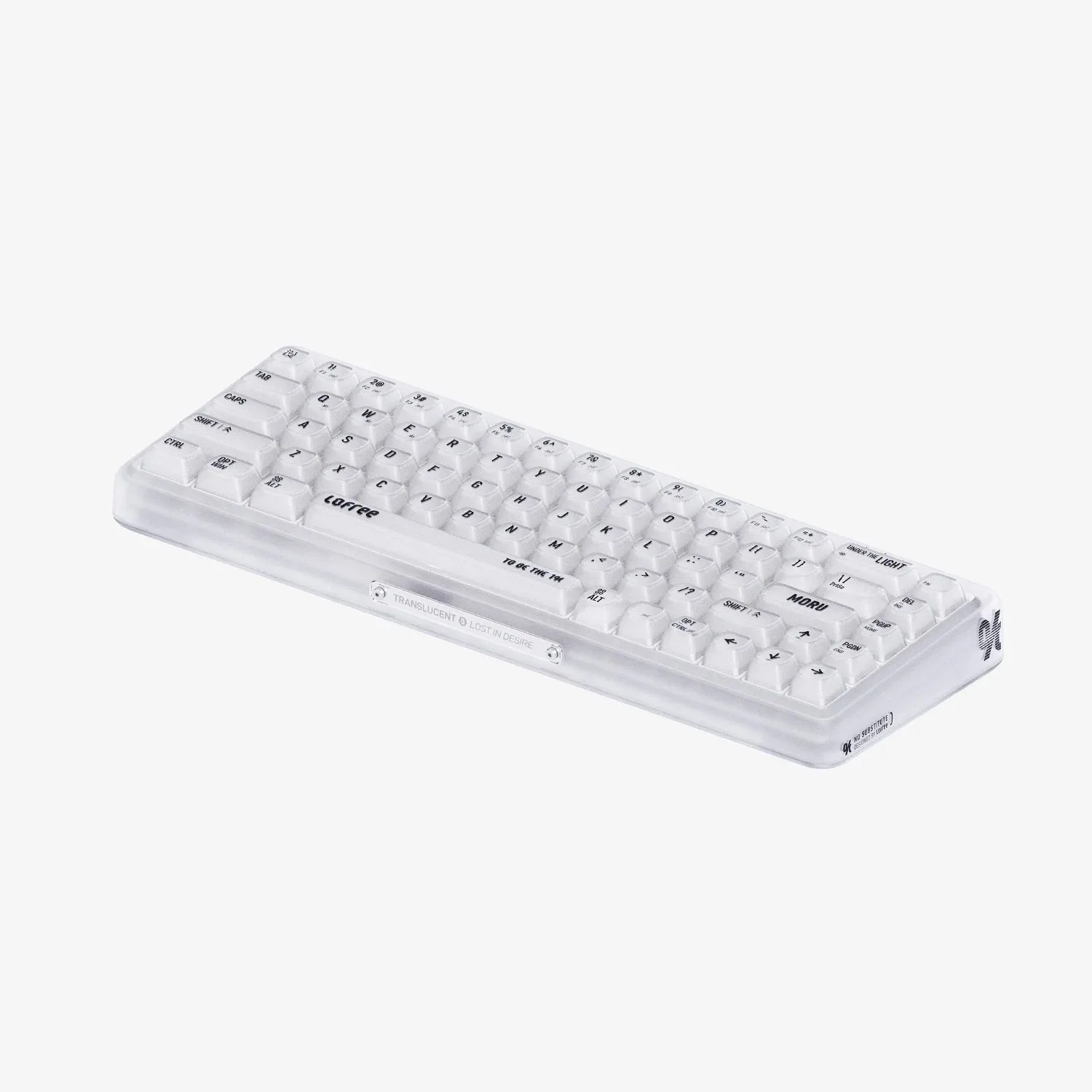
The LOFREE 1% "Moru" Transparent Mechanical Keyboard is aimed at people who want their desk to look as considered as it feels. Its keycaps carry stripes inspired by traditional glasswork, and the catalog describes it as adding classic elegance to any workstation. That is the strongest confirmed reason to buy it.
If you are shopping primarily for switch weight, layout size, or connectivity details, this guide will be less useful than a full specification sheet. The supplied catalog does not list those details for the Moru, so treat them as open questions to confirm before you order rather than assuming a standard setup.
What the Moru catalog actually confirms
-
1% Moru Mechanical Keyboard: The LOFREE 1% "Moru" Transparent Mechanical Keyboard adds classic elegance to any workstation. This is the product's stated purpose: visual polish for a desk setup, not raw performance claims.
1% Moru Mechanical Keyboard
-
1% Moru Mechanical Keyboard: Inspired by Moru Glass, it features keycaps with stripes reminiscent of traditional glasswork, all beneath a comfortable typing surface. The striped keycaps are the defining design feature, and the catalog describes the typing surface as comfortable.
-
1% Moru Mechanical Keyboard: 7 LED effects recreate a warm, traditional atmosphere - perfect for the home office. Lighting is confirmed as a feature, with seven effects, and the catalog positions the keyboard for home-office use.
-
1% Moru Mechanical Keyboard: Plus, IXPE foam and rubber pads make it a silent companion for your workspace. The catalog explicitly describes the Moru as quiet, which matters if you share a room or take calls nearby.
Who will get the most from the 1% Moru
Buy the Moru if your priority is a keyboard that looks like a deliberate piece of desk decor. The glass-inspired stripes and warm LED effects are the kind of details that show up in photos, video calls, and the general atmosphere of a home office. The catalog frames it as a stylish, comfortable companion for your workspace, and that is the use case it is built around.
It also suits anyone who wants a quieter mechanical keyboard without giving up visual character. The IXPE foam and rubber pads are listed specifically as what makes it a silent companion, so if noise is a concern at home, this is the most relevant confirmed feature after the design.
Who should pause before buying
- Shoppers who need confirmed switch or layout details: The supplied catalog does not list switch type, actuation weight, or layout size for the Moru. If those are deal-breakers, confirm them with the seller before ordering.
- People who need confirmed connectivity options: Wired, Bluetooth, or 2.4 GHz support is not stated in the supplied information. Do not assume a wireless mode is included.
- Buyers who want a documented battery life figure: No battery capacity or runtime is supplied, so this guide cannot tell you how long it runs untethered, or whether it runs untethered at all.
- Anyone planning a specific keycap swap: Keycap material, profile, and stem compatibility are not confirmed in the supplied catalog, so plan a swap only after checking those details.
How to judge the price against what you know
The catalog lists the Moru at USD 152.96 against a comparison price of USD 239.00. That is a meaningful gap, but the right question is not whether the discount looks large. It is whether the confirmed features, a glass-inspired design, seven LED effects, and a quiet build with IXPE foam and rubber pads, are the things you actually value.
If you are comparing the Moru with another compact mechanical keyboard, put the confirmed features side by side rather than guessing at the Moru's missing specs. A designer mechanical keyboard earns its price through the experience it creates at your desk, and the Moru's case rests on appearance, lighting, and quiet operation.
A short pre-purchase check for the Moru
- Confirm the layout and switch details: Ask the seller for the layout size and switch type, since the supplied catalog does not state them.
- Confirm how it connects: Check whether the version you are buying is wired, wireless, or both before you plan your desk around it.
- Decide whether quiet matters more than sound character: The catalog describes the Moru as a silent companion, so if you want a loud, clicky typing experience, look elsewhere.
- Match it to your desk's look: The striped, glass-inspired keycaps and warm LED effects are the main reason to choose this keyboard over a plainer one.