Why a standard HDMI cable fights a wall-mounted TV
When a TV sits close to the wall, the HDMI ports on the back or side often face straight out or down into a narrow gap. A normal cable connector needs several centimeters of clearance behind the plug, and bending the cable sharply to fit can put constant pressure on the TV's port. That pressure is the problem a right angle adapter is designed to remove.
The 8K HDMI Right Angle Adapter from Innov8 Wholesale Ltd changes the exit direction by 90 degrees. Its male HDMI connector plugs into the TV, and the female end accepts your existing cable, so the cable leaves parallel to the wall instead of sticking straight out. That can make the difference between a cable that kinks and one that routes cleanly.
Right angle or left angle: match the adapter to the port, not the room
The same adapter is available in two styles: Right Angle and Left Angle. The style name describes which way the female end turns relative to the male plug. Before ordering, look at the HDMI port on your TV or monitor and decide which direction gives the cable a clear path away from the panel. If the port faces downward and the cable needs to run to the left, a right angle adapter may point the wrong way; the left angle version would be the better fit.
This is a physical fit decision, not a performance one. Both styles carry the same HDMI 2.1 compatibility and 8K support in the supplied product record. If you are unsure, check the port orientation with the TV mounted or test-fit the adapter before running the cable through a wall or conduit.
What the supplied record confirms
-
8K HDMI Right Angle Adapter HDMI Male to Female 90 Degree: HDMI male to HDMI female right angle adapter with a 90 degree angled design The male end goes into the TV or monitor; the female end accepts your existing HDMI cable, so you do not need a new cable to change the exit direction.
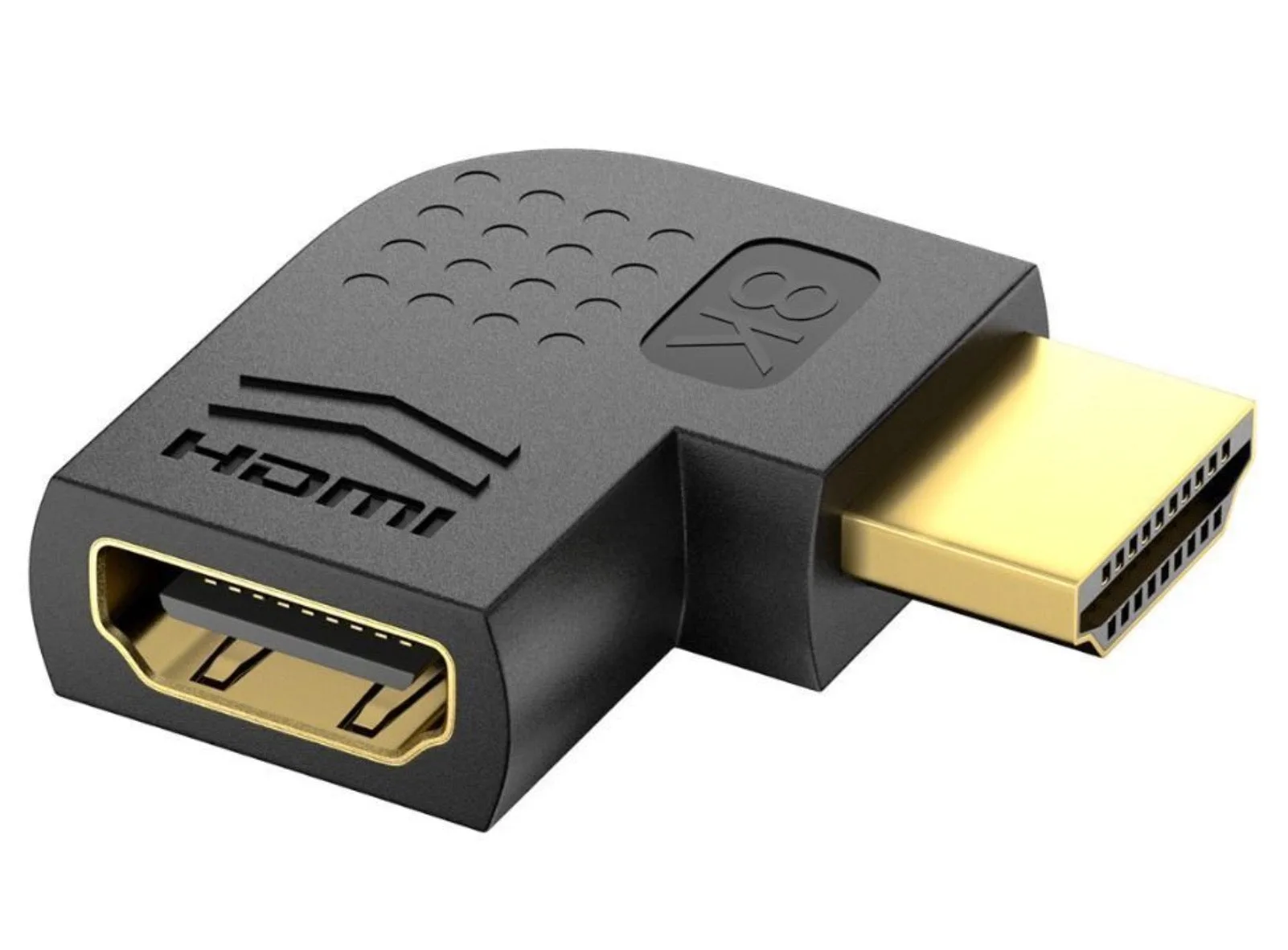
8K HDMI Right Angle Adapter HDMI Male to Female 90 Degree
-
8K HDMI Right Angle Adapter HDMI Male to Female 90 Degree: Supports up to 8K Ultra HD resolution and is HDMI 2.1 compatible, with support for HDR and high refresh rates If your display and source already support 8K, HDR or high refresh rates, the adapter is rated to pass those signals rather than limiting you to an older standard.
-
8K HDMI Right Angle Adapter HDMI Male to Female 90 Degree: Compatible with HDMI-enabled TVs, monitors and projectors, and with HDMI 2.1 and earlier HDMI standards The adapter is not tied to one generation of equipment, so it can serve a new 8K TV or an older 1080p projector in the same install.
-
8K HDMI Right Angle Adapter HDMI Male to Female 90 Degree: Gold-plated connectors and durable housing Gold plating is supplied as a corrosion-resistance feature for stable signal transmission; it is not a claim about cable length or signal boost.
Where the adapter earns its place behind a TV
The clearest use case is a wall-mounted display where the HDMI port sits in a recessed area or close to the mounting bracket. The adapter reduces cable bending and port strain by changing the cable's exit angle. That matters for gaming setups and AV installations where cables are plugged in once and left alone for years.
It also helps in tight spaces where a standard connector cannot fully seat because the wall or bracket blocks it. The compact body of the adapter takes up less depth than a straight connector plus a bent cable. For monitors on articulated arms, the same logic applies: a right angle adapter can keep the cable from pulling against the port as the arm moves.
What the adapter does not solve
An angled adapter changes direction, not signal strength. If your cable run is already too long for the resolution and refresh rate you want, adding an adapter will not extend that limit. The supplied record does not state a maximum cable length, so treat the adapter as a connector solution and keep your existing cable within the length your equipment supports.
The record also does not confirm active signal processing, Ethernet channel support, or specific audio return channel behavior. If you rely on those features, check your TV, cable and source documentation rather than assuming the adapter adds them. The safest reading is that the adapter is passive and passes the HDMI signal according to its HDMI 2.1 compatibility claim.
Finally, the adapter is not a mount or a strain-relief bracket. It reduces bending at the connector, but a heavy cable still needs support along its run. Use cable ties or clips to take weight off the port, especially if the cable hangs downward.
A short pre-order check for tight wall-mount spaces
- Look at the port direction: Decide whether the cable needs to exit left or right, then choose the Right Angle or Left Angle style to match.
- Measure the gap behind the TV: The adapter adds a small amount of depth at the port. Confirm there is room for the adapter body plus the cable connector before the wall or bracket.
- Confirm your source and display standard: The adapter supports HDMI 2.1 and earlier standards, but your TV, cable and source must also support the resolution and features you want to use.
- Plan cable support: The adapter reduces port strain at the plug, but the cable still needs clips or ties so its weight does not hang from the connector.