Why pouch sag usually starts at the panel, not the pouch
If your chest-mounted pouch keeps drooping or wobbling, the problem is often not the pouch itself but how the MOLLE platform underneath is mounted and tensioned. The ADAPT MOLLE Panel gives you a rigid thermoplastic composite surface for MOLLE webbing on the chest of The Slickster, but only when the panel is seated correctly and the webbing is tightened in the right sequence.
This guide walks through the supported mounting path for the ADAPT MOLLE Panel and then shows how to re-tension your webbing to reduce pouch sag. It stays within what the supplied product information confirms, so you can tell the difference between a mounting issue and a webbing issue before you start adjusting.
Check your Slickster version before anything else
The ADAPT MOLLE Panel is only compatible with The Slickster that has the vertical Laser slots beside the loop velcro on the chest. It is not compatible with the old version Slickster that uses webbing. If your carrier does not have those vertical Laser slots, the panel's wing tabs have nothing to tuck into, and no amount of webbing tightening will give you a stable MOLLE platform.
This is the first checkpoint: confirm the slots exist. If they do not, the panel is the wrong accessory for your carrier, and pouch sag is a mounting mismatch rather than a tension problem.
What the panel gives you to work with
-
ADAPT MOLLE Panel: The ADAPT MOLLE Panel is made of a thermoplastic composite that offers a safe and rigid MOLLE platform. A rigid platform is the foundation for stable webbing. If the panel is not seated flat, the webbing cannot hold tension evenly.
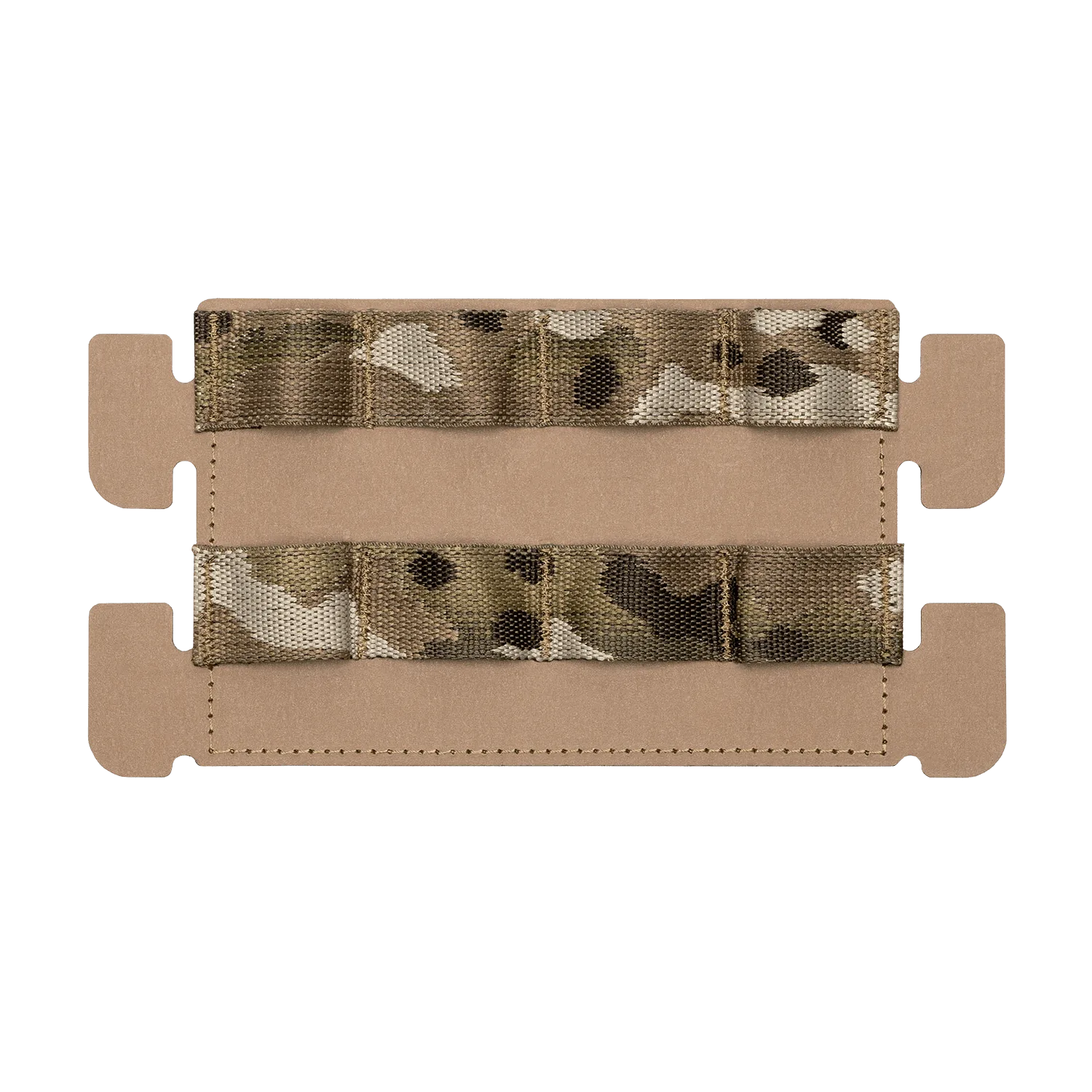
ADAPT MOLLE Panel
-
ADAPT MOLLE Panel: The panel mounts with hook velcro, and the wing tabs tuck into the laser slots on the chest to secure the corners. Both the velcro and the wing tabs need to be fully engaged before you tighten any webbing. Skipping either one lets the panel shift and creates sag.
-
ADAPT MOLLE Panel: The panel is fully compatible with both Kagwerks and Juggernaut Cases with their MOLLE mounts, and it is intended to allow the warfighter the use of smartphone technology. If you are mounting a phone case, the panel's rigidity matters even more, because a device adds concentrated weight that can pull loose webbing downward.
Mount the panel before you touch the webbing
- Confirm the Laser slots: Check that your Slickster has the vertical Laser slots beside the loop velcro on the chest. The old webbing version is not compatible.
- Seat the hook velcro: Press the panel onto the loop velcro on the chest so the hook side engages fully across the panel's back.
- Tuck the wing tabs: Slide the wing tabs into the vertical Laser slots on the chest to secure the corners. The panel should sit flat with no lifted edges.
- Check for movement: Before adding pouches, press on each corner. If the panel rocks or lifts, reseat the velcro and tabs. A panel that moves at this stage will cause pouch sag later.
Re-tension webbing in the right order
Once the panel is seated, load the pouch you plan to carry and then work the webbing from the center outward. Start with the middle rows of MOLLE webbing, pulling each strap snug against the panel surface, then move to the outer rows. Tightening from the edges first can leave the center loose, which is where sag usually begins.
Work in small increments and check the pouch after each pass. The goal is even tension across the pouch's attachment points, not maximum tightness on one strap. If one strap feels much tighter than its neighbors, loosen it slightly and rebalance.
Checkpoints that tell you tension is right
- The panel does not lift when you pull the pouch: Gently tug the pouch forward. If the panel's corners lift away from the carrier, the wing tabs are not fully seated or the velcro is not engaged.
- The pouch stays level: A properly tensioned pouch should sit level without drooping at one corner. If it tilts, one side of the webbing is looser than the other.
- No gap between pouch and panel: Check that the pouch's MOLLE straps are flush against the panel. A visible gap means the webbing is not pulled through evenly.
When the sag is not a tension problem
If you have reseated the panel and re-tensioned the webbing evenly but the pouch still sags, the cause may be outside what the supplied information covers. The ADAPT MOLLE Panel record does not include a weight limit, a specific webbing tightening procedure, or guidance for every pouch design. It also notes that the panel does not reflect under IR light or NOD, which matters for signature management but not for pouch stability.
In that case, check whether the pouch's own mounting hardware is compatible with the panel's MOLLE field, and whether the pouch is simply heavier than the webbing can support without additional retention. The supplied record does not confirm a maximum load, so treat any heavy device setup as something to test carefully before relying on it.
Color and compatibility notes
- ADAPT MOLLE Panel: The panel is available in Multicam, Multicam Black, Coyote Brown, Ranger Green, and Black. Color does not change tension or fit, but matching your carrier's scheme keeps the setup consistent.
- ADAPT MOLLE Panel: The panel is compatible with The DOPE Front Flap. If you run a front flap, confirm it does not interfere with the panel's wing tabs or velcro seating before you tighten webbing.
- ADAPT MOLLE Panel: The panel is made in the USA and is Berry Compliant. These are sourcing facts, not performance claims, but they may matter for unit procurement.