Quick answer
The AMPS hole pattern is a rectangular four-hole mounting interface, typically 30 mm by 38 mm, used to attach cradles, bases, and device holders. If your device or base has that four-hole footprint, it is AMPS-compatible. Check the hole spacing on your device and the mount base before buying; adapters exist when the patterns do not match.
If you have ever looked at the back of a GPS unit, a phone cradle, or a mount base and seen four small holes arranged in a rectangle, you were looking at an AMPS pattern. It is one of the most common mechanical interfaces in mobile mounting, and understanding it takes the guesswork out of matching holders to bases.
This guide answers the questions that come up most often: what the pattern actually is, how to measure it, when AMPS and VESA can be used together, and which RAM Mounts products rely on it. No jargon, just the dimensions and checks you need before you order.
What is the AMPS hole pattern?
AMPS stands for Advanced Mobile Phone System, an early cellular standard. The hole pattern that carries the name is a four-hole rectangle originally used to bolt mobile phones into vehicle cradles. Today it appears on GPS units, tablets, radios, cameras, and countless aftermarket holders. The pattern is defined by the distance between the centers of the holes, not by the size of the plate itself.
The most common version is often called the AMPS 4-hole pattern. It uses four holes arranged in a rectangle, and the spacing is usually 30 mm by 38 mm. Some manufacturers describe it in inches, which is why you may see references to roughly 1.181 inches by 1.496 inches. The holes are typically sized for M4 or #6 screws, though the exact hardware depends on the device.
- Measure center-to-center, not edge-to-edge, when checking hole spacing.
- A plate can be larger than the hole rectangle; only the hole positions matter for compatibility.
How do I measure AMPS hole spacing?
Use a ruler or caliper and measure from the center of one hole to the center of the hole diagonally across from it, then measure the horizontal and vertical distances. The short side is usually about 30 mm and the long side about 38 mm. If your numbers are close but not exact, you may be looking at a variant pattern or a manufacturer-specific layout.
Do not measure the outside edges of the plate. A base with a 2.5-inch diameter round plate, for example, can still carry a standard AMPS hole rectangle inside it. The plate size tells you how much surface area you have; the hole spacing tells you what will bolt to it.
- Write down both the horizontal and vertical center-to-center distances.
- If the holes are threaded, note the screw size so you can match hardware.
Is my device AMPS-compatible?
A device is AMPS-compatible if it has four mounting holes that match the standard rectangle or if it ships with an adapter plate that provides that rectangle. Many rugged tablets and GPS units include an AMPS-compatible mounting plate or a dock that presents the pattern. If your device has no such holes, you may need a holder that grips the device instead of bolting to it.
Check the device manual or the mounting section of its specifications. If the manufacturer lists an AMPS pattern, confirm the hole spacing because some devices use a smaller or larger variant. When in doubt, measure the holes directly rather than relying on the label.
- Devices with no mounting holes need a cradle or grip-style holder, not a bolt-on plate.
- Adapters can convert a non-AMPS device to the pattern if the device has a compatible accessory plate.
AMPS vs VESA: what is the difference?
AMPS and VESA are both hole patterns, but they serve different size classes. VESA patterns are standardized for monitors and televisions and are usually much larger, such as 75 mm by 75 mm or 100 mm by 100 mm. AMPS is a smaller pattern used for mobile devices and mounting arms. The two are not directly interchangeable without an adapter plate.
If you are mounting a small monitor or a tablet in a vehicle, you may encounter both. A VESA-compatible monitor will not bolt directly to an AMPS base unless you use a VESA-to-AMPS adapter. Conversely, an AMPS device will not fit a VESA bracket without an adapter. Always match the pattern to the base, then use an adapter only when the weight and leverage are safe.
- VESA is measured in millimeters and is usually 75x75 or larger; AMPS is typically 30x38 mm.
- Adapters add stack height and can reduce stability if the load is heavy.
Which RAM Mounts products use the AMPS pattern?
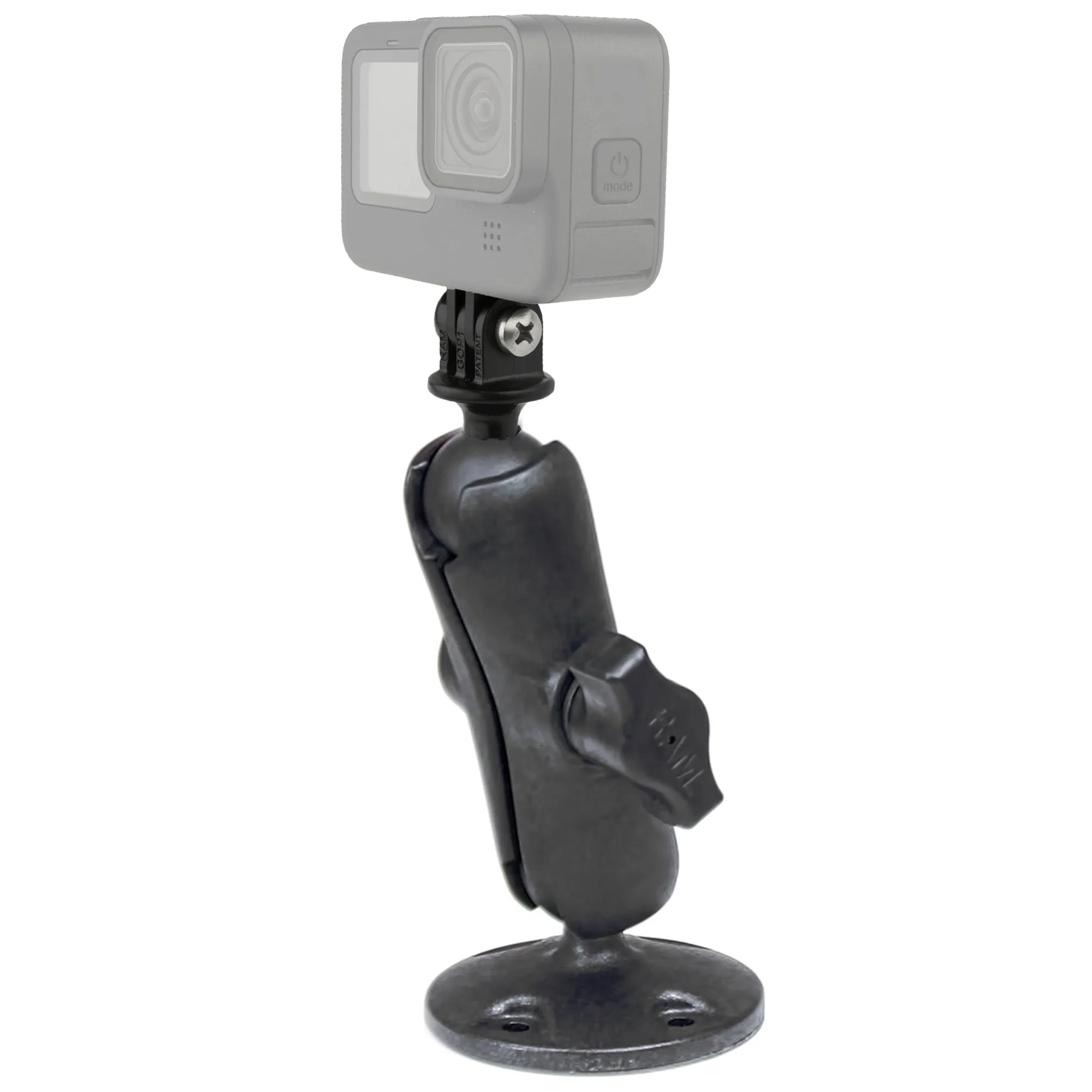
Many RAM Mounts bases and cradles include the AMPS hole pattern. The RAM Quick-Grip phone mount with diamond base, for example, uses a 2-hole diamond drill-down base that integrates the industry-standard AMPS hole pattern, so it can connect to any flat surface or to the side of a RAM Tough-Tray. The RAM Composite Drill-Down Mount with Universal Action Camera Adapter uses a 2.5-inch diameter round base with the universal AMPS hole pattern, giving you a stable platform for a GoPro-style camera.
The RAM Double Ball Mount for Raymarine A50, A50D, A57D & A70 also uses a round base with the universal AMPS hole pattern and includes hardware to attach those chartplotters. If you are building a system, look for the phrase AMPS hole pattern in the product description; it tells you the base or holder will accept standard AMPS accessories.
- AMPS-compatible bases often accept both 2-hole and 4-hole accessories depending on the plate.
- Check the ball size and arm length separately; the hole pattern only covers the mounting interface.
What if my device or base is not AMPS?
If your device lacks the AMPS pattern, you have three practical options. First, use a holder that grips the device, such as a spring-loaded cradle or an X-Grip style holder. Second, add an adapter plate that converts your device or base to the AMPS rectangle. Third, choose a mount system that offers a device-specific cradle, which is common for phones and tablets.
If your base is not AMPS but your device is, look for an adapter that goes from your base pattern to AMPS. Keep the total load in mind: adapters and multiple plates add length and leverage, which can make the mount feel less rigid. For heavy devices, a direct AMPS-to-AMPS connection is usually the most stable choice.
- Grip-style holders avoid the need for mounting holes on the device.
- Adapters are fine for light devices but check the weight rating of the arm and base.
AMPS pattern quick checks
Measure center-to-center
Use a ruler or caliper to measure the distance between hole centers, not the plate edges. The standard AMPS rectangle is about 30 mm by 38 mm. If your measurements match, the device or base is AMPS-compatible.
Confirm the screw size
AMPS holes are often sized for M4 or #6 screws, but the exact hardware varies by device and base. Check whether the holes are threaded or pass-through. Matching the screw prevents stripped threads and loose mounts.
Check the load path
Adapters and long arms add leverage. For heavy devices, connect AMPS directly to AMPS and keep the arm as short as practical. A rigid connection reduces vibration and sag.
AMPS pattern in practice: three RAM Mounts examples
- RAM® Composite Drill-Down Mount with Universal Action Camera Adapter: The RAP-B-138-GOP1 consists of a 2.5-inch diameter round base with the universal AMPS hole pattern, a STANDARD size double socket arm, and a 1-inch diameter ball with a custom GoPro Hero adapter. You can bolt the round base to any flat surface that has the AMPS hole pattern, then adjust the camera angle at both ends of the arm. The 1-inch ball system is the same size used across many RAM Mounts components, so you can swap the camera adapter for another holder later.
- RAM® Double Ball Mount for Raymarine A50, A50D, A57D & A70: The RAM-D-101-RM1U consists of a 3.68-inch diameter round base with the universal AMPS hole pattern, a STANDARD length double socket arm, and a 3.68-inch round base, and includes hardware to attach Raymarine chartplotters. The large round base spreads the load and the included hardware matches specific Raymarine models, so you do not have to source screws separately. The 2.25-inch ball and socket system provides adjustment at both ends of the arm for viewing angles.
- RAM® 18" Flex Arm with Double Ball Mount and 1/4"-20 Threaded Stud: The RAM-B-141-1890 combines an 18-inch flex arm with a double ball mount and a 1/4-inch-20 threaded stud, using a B Size 1-inch ball. The threaded stud connects to compatible RAM Mounts bases and holders, including many that use the AMPS hole pattern. The flex arm lets you position a light device away from the base, which is useful when the mounting surface is offset from where you want the device.
The AMPS hole pattern is a simple four-hole interface that makes it possible to mix and match bases, arms, and holders across brands. Measure your hole spacing, confirm the screw size, and choose a base or adapter that matches. When the pattern lines up, installation is straightforward; when it does not, an adapter or a grip-style holder solves the problem.