Start With Your Reticle and Turret Capabilities
Before you decide between holding over and dialing elevation, confirm what your scope actually offers. The Apollo Atlas 10–60×50 uses precision turrets with ±25 MOA of elevation and windage travel and a 1/8 MOA (0.125 MOA) click value. That fine click value supports small, repeatable adjustments, but the total travel limits how much elevation you can dial before relying on the reticle.
The supplied information does not specify the reticle subtensions or whether the reticle is in the first or second focal plane. Without that, you cannot calculate exact holdover values from the reticle alone. Use the guidance below to choose a method, then verify your reticle’s actual subtensions from the manufacturer’s documentation or by testing at the range.
Apollo Atlas adjustment facts that shape your choice
-
Apollo Atlas 10–60×50: Precision Turrets — Elevation & windage with ±25 MOA travel and 1/8 MOA (0.125 MOA) click value for fine adjustments. The 1/8 MOA click value gives you fine control for precise dialing, while the ±25 MOA total travel defines how much elevation you can dial before you must hold over.
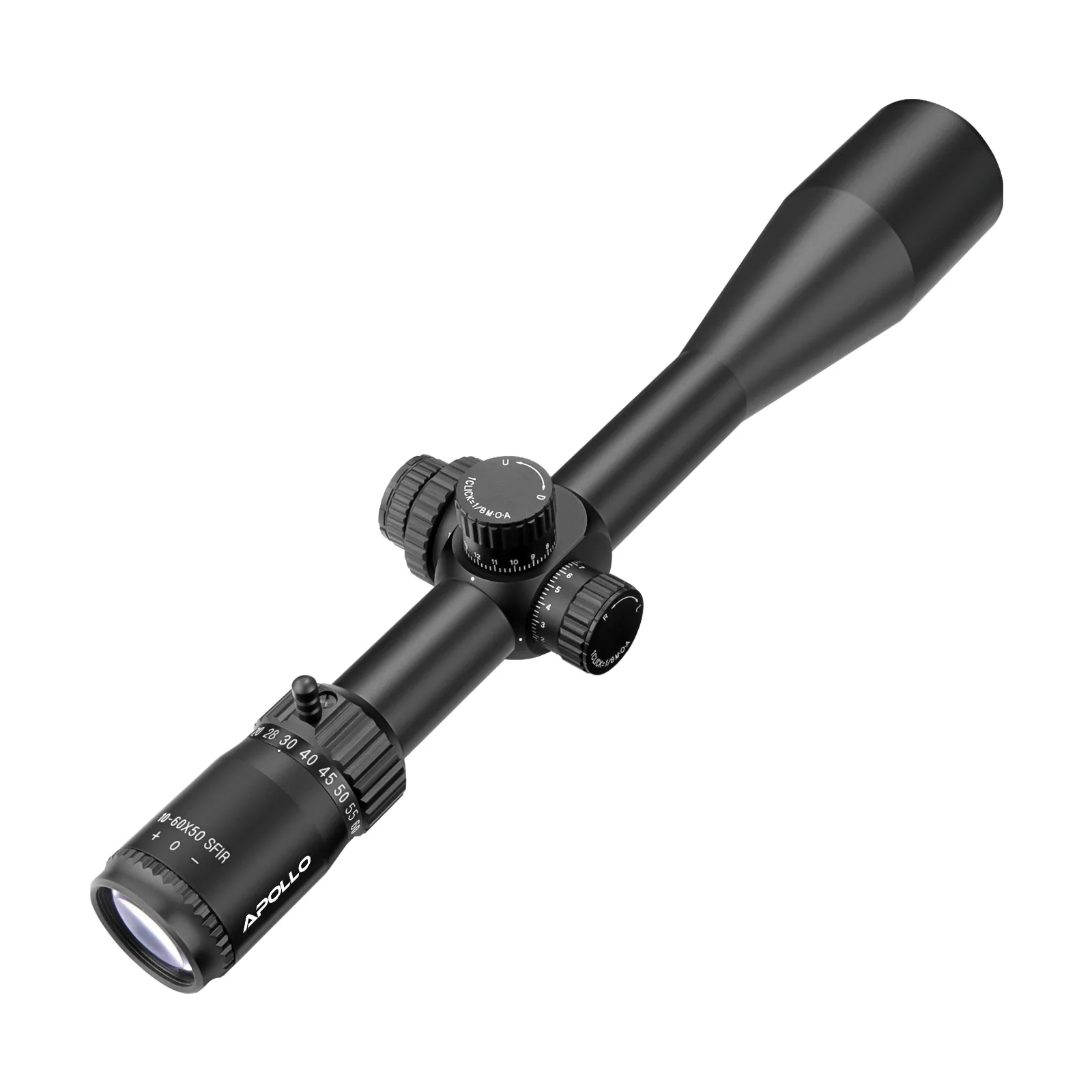
Apollo Atlas 10–60×50
-
Apollo Atlas 10–60×50: Side Parallax — Adjustable from 10 yds to infinity for accurate focus and parallax-free shooting at all ranges. Parallax adjustment helps you keep your eye aligned behind the scope at distance, which makes both holdover and dialing more consistent.
-
Apollo Atlas 10–60×50: Locking Mechanism — Push-pull self-lock turrets for secure settings that resist accidental movement. Locking turrets protect your dialed elevation from being bumped, an important advantage when you choose to dial rather than hold over.
Holdover vs dialing elevation: trade-offs on the Atlas
Both methods work, but they suit different situations. Use this comparison to pick the approach that fits your shooting style and the Atlas’s adjustment range.
- Reticle holdover: You aim with a mark below the center to compensate for bullet drop. This is fast and keeps your turrets set, but it requires a reticle with known subtensions. The supplied Atlas information does not confirm reticle subtensions, so you must verify them before relying on holdover.
- Dialing elevation: You turn the elevation turret to add the needed MOA for the distance. The Atlas offers ±25 MOA of travel and 1/8 MOA clicks, so you can dial precisely. Dialing is slower than holding over but keeps your aim point centered and works with any reticle.
- Combining both: For distances beyond your available turret travel, you can dial as much as possible and then hold over the remainder. This requires knowing both your drop in MOA and your reticle’s subtensions, which are not supplied here.
How to set up your Atlas for either method
Follow these steps to prepare your scope and gather the information you need. The Atlas’s fine 1/8 MOA clicks and locking turrets support both approaches, but you must first establish your actual point of impact and confirm your reticle’s behavior.
- Zero your rifle at a known distance: Start with a solid zero at a distance you can shoot consistently, such as 100 yards. This gives you a baseline for both holdover and dialing.
- Confirm your turret click value: The Atlas uses 1/8 MOA clicks. That means four clicks equal 0.5 MOA and eight clicks equal 1 MOA. Verify this by counting clicks while watching the point of impact shift at the range.
- Record your elevation travel: The Atlas has ±25 MOA of elevation travel. Note how much of that travel you have available after zeroing, since that limits how far you can dial before needing to hold over.
- Test your reticle’s holdover marks: Set up targets at known distances and see where your shots land relative to the reticle marks. Because the supplied information does not list reticle subtensions, you must determine them empirically or from the manufacturer’s documentation.
- Use the locking turrets: The push-pull self-lock turrets on the Atlas resist accidental movement. Lock them after dialing to protect your setting, especially when moving through terrain.
When to choose holdover on the Atlas
Choose holdover when you need speed, when your target distance changes quickly, or when you want to keep your turrets set and locked. The Atlas’s 10–60× magnification and 50 mm objective give you a bright, detailed view at high power, which helps you see reticle marks precisely. However, because the supplied information does not confirm the reticle’s subtensions or focal plane, you cannot assume that the holdover marks correspond to specific MOA or mil values. Verify them before depending on them for a shot.
If you plan to hold over, practice at multiple distances and record where your shots impact relative to each reticle mark. This is especially important at high magnification, where small aiming errors are magnified.
When to dial elevation instead
Dialing elevation is a good choice when you have time, when you want to use the center of the reticle for precision, or when your reticle lacks confirmed holdover marks. The Atlas’s ±25 MOA of elevation travel and 1/8 MOA clicks let you make fine adjustments, and the locking turrets help prevent accidental changes. Keep in mind that ±25 MOA may not be enough for extreme distances, depending on your cartridge and zero. In that case, you can dial what you can and then hold over the remainder, but only if you have confirmed your reticle’s subtensions.
Because the Atlas has a side parallax adjustment from 10 yards to infinity, dial it to match the target distance before finalizing your aim. Proper parallax correction reduces aiming error that can otherwise be mistaken for a holdover or dialing error.
Apollo Atlas features that support precise aiming
- Apollo Atlas 10–60×50: Extreme Zoom Range — 10–60× magnification for pinpoint work from mid-range to extreme distances. High magnification helps you see small reticle marks and target details, which is useful for both holdover and dialing at long range.
- Apollo Atlas 10–60×50: Large 50 mm Objective — Bright, detailed sight picture even at high magnification. A bright image makes it easier to distinguish reticle marks against the target, especially in low light or at high power.
- Apollo Atlas 10–60×50: Generous Eye Relief — 86–102 mm eye relief for safe, comfortable shooting across positions. Consistent eye relief helps you maintain a full sight picture, which is important for precise holdover or turret adjustments.
A note on missing reticle data
The supplied information for the Apollo Atlas 10–60×50 does not include reticle subtensions or focal plane details. That is a limitation for calculating holdover values in advance. It does not mean the scope lacks a usable reticle—only that you should not assume specific subtensions without confirming them. Use the turret dialing method if you need a guaranteed adjustment, or verify the reticle’s behavior at the range before relying on holdover for a critical shot.