Unboxing and First Look: Forged Carbon Fiber Build
The ATTACK SHARK R68 HE arrives in a compact box that reflects its 60% layout. Inside, you'll find the keyboard itself, a USB-C cable, a keycap puller, and a quick-start guide. The first thing you notice is the weight and texture of the Forged Carbon Fiber Composite top case. It feels dense and premium, with CNC-machined aluminum accents that give it a futuristic, industrial look. The 60% layout with dedicated arrow keys is a thoughtful compromise—it frees up desk space for low-DPI mouse movements without sacrificing navigation keys.
The keyboard is available in four color variants: Ink Shade, Ice Ninja, Lake Green, and Black. Each variant uses Forged Carbon Fiber Composite keycaps, which contribute to the overall sound and feel. The keycaps have a slightly matte, textured surface that resists fingerprints. If you're coming from a full-size keyboard, the transition to 60% will take a day or two, but the dedicated arrow keys help ease the adjustment.
Key Specs at a Glance
-
ATTACK SHARK R68 HE Carbon Fiber Rapid Trigger Keyboard Magnetic Switch: Extreme 8000Hz Polling & 0.08ms Latency This polling rate and response time mean every keystroke registers almost instantly, giving you a competitive edge in fast-paced games.
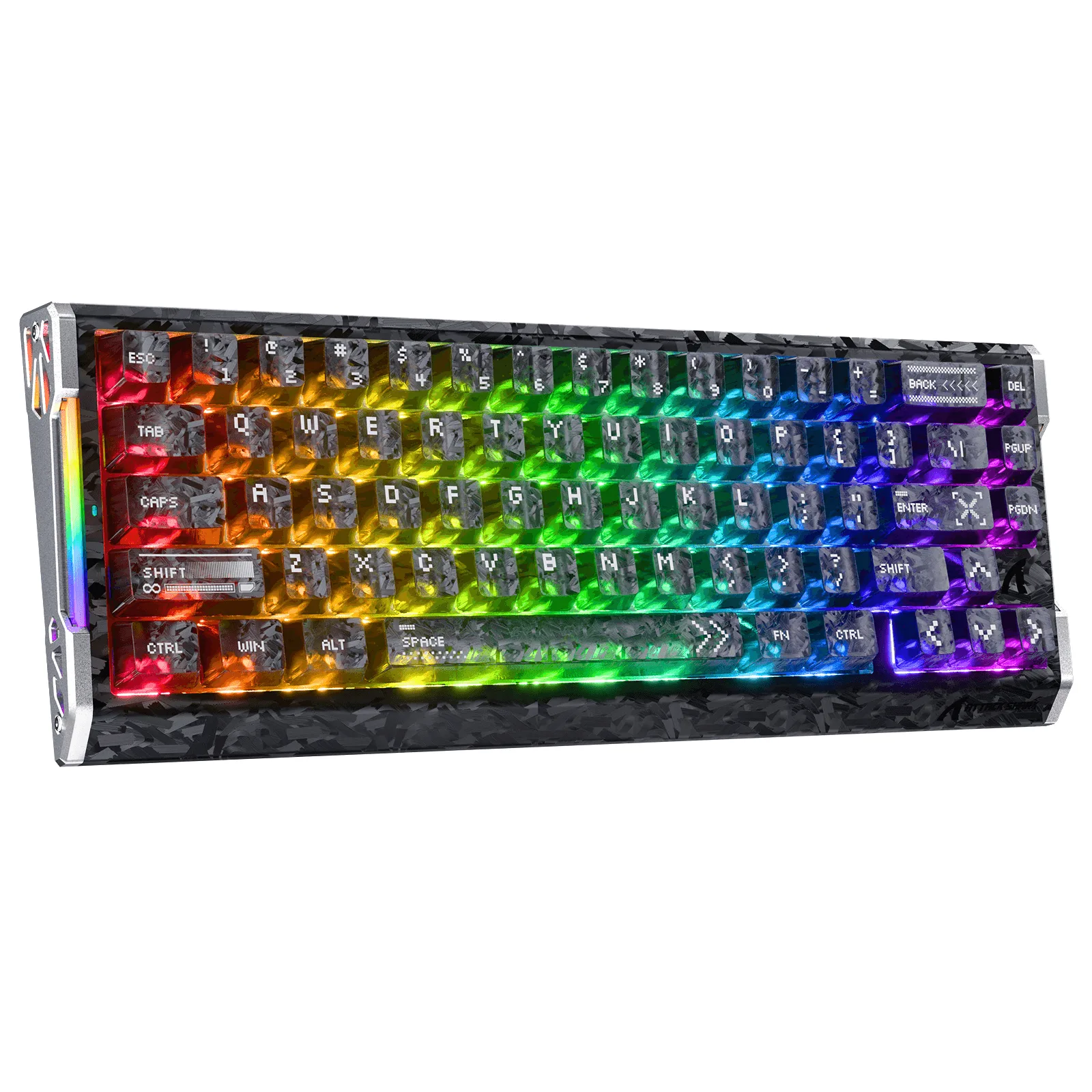
ATTACK SHARK R68 HE Carbon Fiber Rapid Trigger Keyboard Magnetic Switch
-
ATTACK SHARK R68 HE Carbon Fiber Rapid Trigger Keyboard Magnetic Switch: 0.005mm RT, Snap Tap & Adjustable Actuation Hall Effect sensors provide 0.005mm precision for Rapid Trigger adjustments, letting you fine-tune actuation distance for precise in-game movements.
-
ATTACK SHARK R68 HE Carbon Fiber Rapid Trigger Keyboard Magnetic Switch: Forged Carbon Fiber & CNC Aluminum Build The combination of carbon fiber composite and aluminum delivers durability and a premium feel that stands out on any desk.
-
ATTACK SHARK R68 HE Carbon Fiber Rapid Trigger Keyboard Magnetic Switch: Compact 60% Layout with Dedicated Arrow Keys Maximizes mouse space for low-DPI swipes while retaining essential navigation keys, balancing gaming performance with daily productivity.
-
ATTACK SHARK R68 HE Carbon Fiber Rapid Trigger Keyboard Magnetic Switch: Signature "Thocky" Sound & 6-Layer Acoustic Stack The 6-layer sound-dampening stack eliminates hollow metallic noise, delivering the deep, clean "thocky" typing sound preferred by custom keyboard enthusiasts.
Setting Up the R68 HE: Wired Connection and First Power-On
The R68 HE is a wired keyboard, so setup is straightforward. Follow these steps to get started:
- Connect the USB-C cable: Use the included USB-C to USB-A cable. Plug the USB-C end into the keyboard's port (located on the top edge) and the USB-A end into your computer. The keyboard is recognized immediately without additional drivers.
- Check for power and lighting: Once connected, the per-key RGB backlighting and dual-zone side strips will light up by default. The keyboard is ready to type and game right out of the box.
- Test the default profile: The on-board memory stores factory Rapid Trigger and RGB settings. Type a few keys to confirm each switch registers. The magnetic switches feel linear and smooth, with a consistent actuation point.
Customizing Rapid Trigger and Actuation via Software
To unlock the full potential of the R68 HE, use the web-based driver or desktop app. The software lets you adjust actuation distance, enable Rapid Trigger, and configure Snap Tap. Rapid Trigger allows near-instant key resets by detecting release and re-press without returning to the top of the switch travel. This is especially useful for strafing in FPS games where quick direction changes matter.
The on-board memory saves your settings directly to the keyboard. Once configured, you can unplug the keyboard and use it on another PC without re-installing software. This is a key advantage for gamers who attend LAN events or play on multiple systems.
First Impressions: Sound, Feel, and Performance
Typing on the R68 HE is a tactile and auditory experience. The 6-layer acoustic stack eliminates pinging and hollow resonance, producing a clean, deep "thocky" sound. The FR4 plate and custom magnetic switches contribute to a stable, responsive feel. The 8000Hz polling rate is noticeable in competitive games—input lag feels nonexistent, and every keypress registers instantly.
The 60% layout with dedicated arrow keys is a practical choice. It saves desk space without forcing you to rely on function layers for navigation. The dual-zone side strips add ambient underglow that reflects off the desk, enhancing the overall aesthetic. If you're upgrading from a standard mechanical keyboard, the magnetic switches and adjustable actuation will feel like a significant step forward.