Quick answer
Install the August Wi-Fi Smart Lock onto your existing deadbolt, then attach the Navis Paddle as the exterior handle to enjoy true hands-free entry. Follow the step-by-step process below to avoid common installation mistakes.
Why the Navis Paddle matters
The Navis Paddle is not just a decorative handle—it completes the hands-free experience. While the August Wi-Fi Smart Lock auto-unlocks as you approach, the paddle lets you push the door open without fumbling for a knob or key. This bundle is designed for convenience, so getting the paddle aligned correctly is essential for smooth operation.
The bundle is available in Satin Nickel, which pairs well with most modern door hardware. If you're replacing an existing deadbolt, the installation process is straightforward, but you need to ensure your door prep matches the paddle's requirements.
Trade-off: Smart lock vs. traditional deadbolt
Switching to a smart lock means giving up the physical key override that some users prefer. The August Wi-Fi Smart Lock relies on your smartphone or the auto-unlock feature, so you'll want to keep the August app updated and your phone charged. If you lose your phone or the battery dies, the physical key slot on the August lock still works—but the Navis Paddle replaces the exterior thumb turn, so you'll need to use the key that comes with the lock.
Another consideration: the Navis Paddle is designed for push-to-open operation, which works best on doors that swing inward. If your door swings outward, the paddle may not be the ideal choice, and you might want to consider a traditional knob or lever instead.
Setup steps for the August Wi-Fi Smart Lock + Navis Paddle
- Remove your existing deadbolt: Unscrew the interior and exterior plates of your current deadbolt. Keep the screws and the deadbolt latch, as you'll reuse them. Common mistake: losing the screws or mixing them up—use a small container to keep them organized.
- Install the August Wi-Fi Smart Lock: Attach the August lock to the interior side of your door, aligning the mounting plate with the existing deadbolt hole. Secure it with the provided screws. Check that the lock's tailpiece engages the latch correctly by testing the manual turn knob. If the lock feels loose or the tailpiece doesn't turn, re-check alignment before tightening fully.
- Mount the Navis Paddle on the exterior: Place the Navis Paddle over the exterior mounting plate, ensuring the paddle's spindle connects with the lock's drive mechanism. Tighten the screws evenly. Common mistake: over-tightening, which can bind the paddle and prevent smooth push-to-open operation. Test the paddle's movement before final tightening—it should push inward with minimal resistance.
- Power up and connect to Wi-Fi: Insert the included batteries into the August lock, then download the August app. Follow the in-app prompts to connect the lock to your home Wi-Fi network. Ensure your phone's Bluetooth is on for initial pairing. Place your Wi-Fi router within range; if the lock drops connection, consider a Wi-Fi extender.
- Calibrate auto-unlock: In the August app, enable auto-unlock and set your phone as the trusted device. Walk away from the door and return to test that the lock unlocks as you approach. Common mistake: not adjusting the geofence radius, causing the lock to unlock too early or too late. Adjust the radius in the app until the unlock timing feels natural.
- Test hands-free entry: With the lock unlocked, push the Navis Paddle to open the door. If the paddle feels stiff, check that the spindle is properly seated and the screws are not over-tightened. If the door doesn't open smoothly, inspect the latch alignment and adjust the strike plate if needed.
Product facts
-
August Wi-Fi Smart Lock + Navis Paddle in Satin Nickel: The August Wi-Fi Smart Lock unlocks the door for you, then you just push to open with the Navis Paddle. This bundle delivers a truly hands-free entry experience—no keys, no codes, just approach and push.
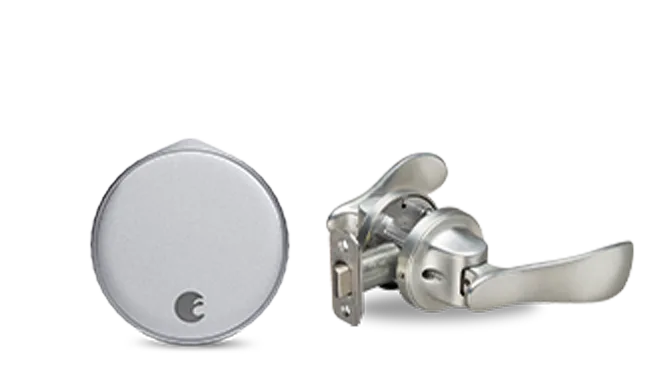
August Wi-Fi Smart Lock + Navis Paddle in Satin Nickel