Quick Answer
Bar mount spacers are essential for adapting your motorcycle mount to different handlebar diameters and ensuring a tight, vibration-resistant fit. Install them correctly to prevent your phone from loosening or shifting while riding.
Why Spacers Matter for a Secure Fit
Handlebar mounts are designed to fit a range of bar sizes, but without spacers, the gap between the mount and a smaller diameter bar leaves room for movement. This can cause your phone to wobble or even slip out of position, especially on rough roads.
Spacers fill that gap, creating a snug fit that distributes clamping pressure evenly. This reduces vibration and keeps your mount securely in place, protecting your phone from damage.
Choosing the Right Spacer Size
Spacers are not one-size-fits-all. You need to match the spacer to your handlebar's diameter. Common sizes include 7/8", 1", 1-1/8", 1-1/4", and 1-1/2". Using the wrong size can leave gaps or make the mount too tight, both of which compromise stability.
If you're unsure, measure your handlebar's outer diameter with a caliper or tape measure before ordering. Many mounts come with a set of spacers, but if you're replacing lost ones or outfitting another bike, a dedicated set like the Bar Mount Spacers (Set of 5 for 1.5" handlebar mount) is a reliable choice.
Common Mistakes to Avoid
One common mistake is over-tightening the mount when you don't have the right spacer. This can crack the mount or damage your handlebar. Another is using spacers that are too thick, which prevents the mount from closing fully.
Always check that the spacers sit flush against the handlebar and that the mount's clamp closes evenly. If you feel any rocking, you likely need a different spacer size.
Step-by-Step Spacer Installation
- Identify Your Handlebar Diameter: Measure the outer diameter of your handlebar where you plan to mount. Use a caliper or a tape measure for accuracy. Common sizes are 7/8", 1", 1-1/8", 1-1/4", and 1-1/2". Checkpoint: Write down the measurement and keep it with your mount for future reference.
- Select the Correct Spacer(s): Choose spacers that match your handlebar diameter. If you have a set with multiple sizes, pick the ones that fit snugly without forcing. For a 1.5" mount, the included spacers cover all standard sizes. Checkpoint: Test-fit the spacer by placing it around the bar before mounting.
- Position the Spacer on the Mount: Place the spacer inside the clamp of the mount, aligning it with the handlebar. Ensure it sits flat and covers the full contact area. Checkpoint: The spacer should not protrude or leave gaps—if it does, try a different size.
- Attach the Mount to the Handlebar: Slide the mount with the spacer onto the handlebar. Position it where you want, then tighten the clamp evenly. Use a torque wrench if specified by the manufacturer. Checkpoint: Avoid over-tightening; the mount should be secure but not so tight that it risks cracking.
- Test for Stability: Before mounting your phone, give the mount a firm shake and try to twist it. If there's any movement, loosen and re-check the spacer fit or tighten the clamp slightly. Checkpoint: A stable mount should not move even with firm pressure.
Product Spotlight
-
Bar Mount Spacers (Set of 5 for 1.5" handlebar mount): This replacement set includes five spacers designed for the 1.5" Motorcycle Handlebar Mount, compatible with handlebar sizes from 7/8" (22mm) up to 1-1/2" (38mm). Having a set of spacers ensures you can achieve a precise, vibration-resistant fit on various handlebar diameters, whether you're replacing lost parts or setting up a new bike.
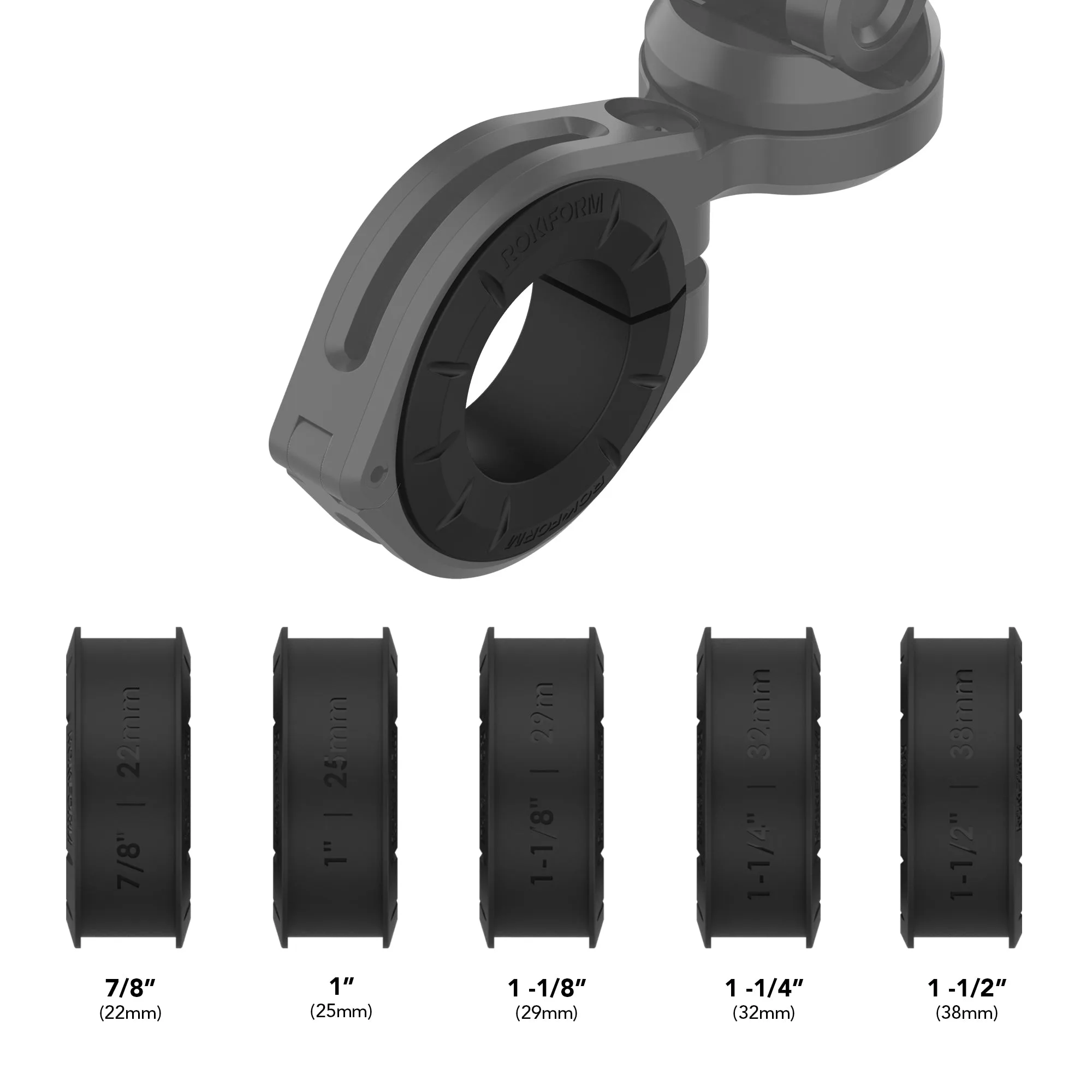
Bar Mount Spacers (Set of 5 for 1.5" handlebar mount)