The short version: same layout, different priorities
The original GameCube controller is the reference point for anyone playing GameCube games, but it is a wired pad built for one console generation. The Retro Fighters BattlerGC Pro Glacier keeps the familiar GameCube stick layout while adding dual wireless, Hall effect sticks, and extra buttons. The comparison is less about which is 'better' and more about which trade-offs fit how you play.
The Glacier edition is the color variant of the BattlerGC Pro, so the features below apply to that model. The supplied catalog confirms the core hardware and compatibility, but it does not include a full teardown or a list of every game-specific quirk. Where that information is missing, this comparison says so rather than guessing.
What the BattlerGC Pro Glacier adds
-
Retro Fighters BattlerGC Pro - Glacier: Dual wireless with 2.4 GHz and Bluetooth compatibility, plus a 30 foot wireless range. This is the biggest practical departure from the original wired pad: you can play untethered, and the 30 foot range is the catalog's stated figure.
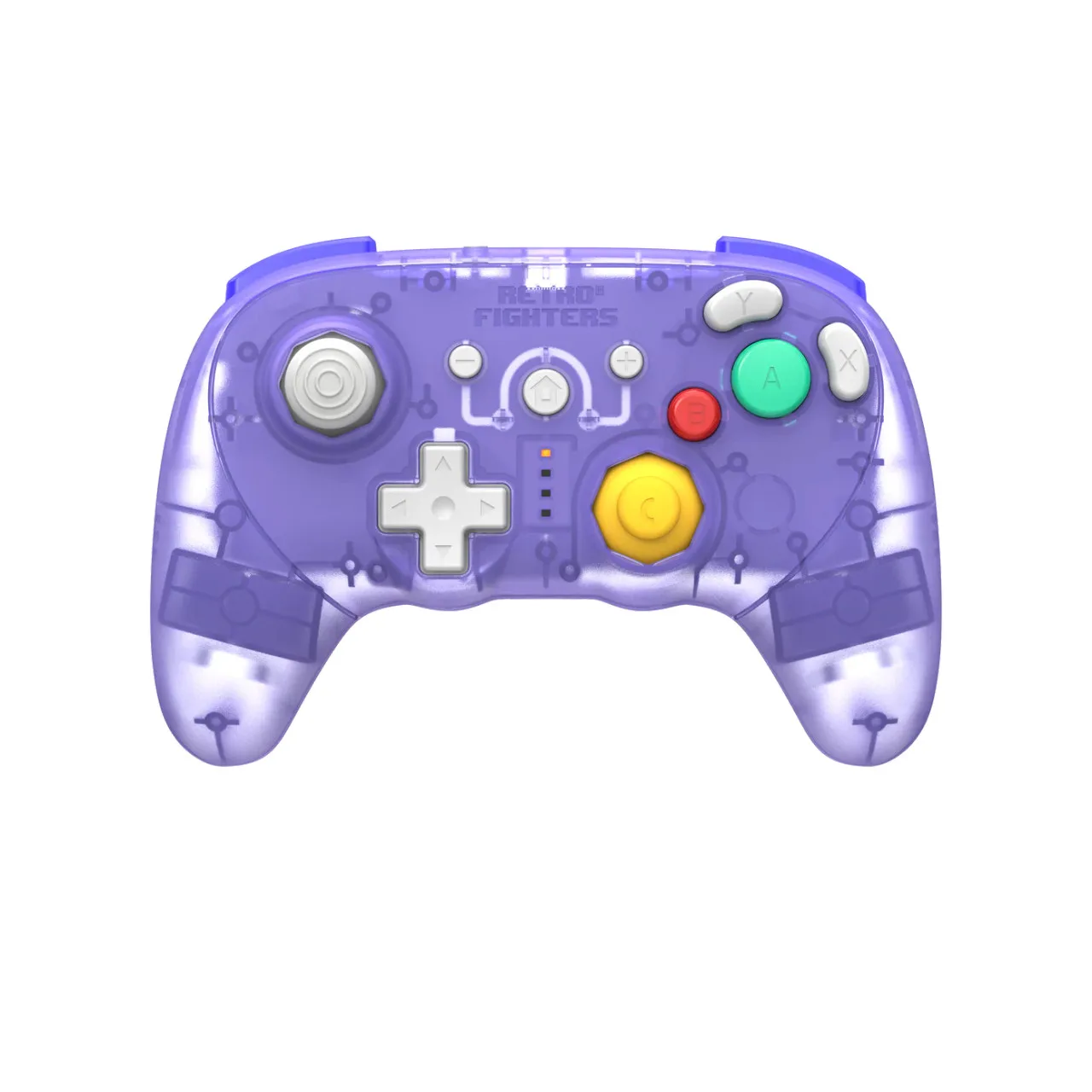
Retro Fighters BattlerGC Pro - Glacier
-
Retro Fighters BattlerGC Pro - Glacier: Hall effect analog sticks with no drift, plus a custom built C-Stick and GC style stick. Hall effect sensors address one of the most common long-term wear issues on analog sticks, and the GC-style stick shape keeps the feel familiar.
-
Retro Fighters BattlerGC Pro - Glacier: Full analog triggers with a 'click' in digital button. This gives you both analog travel and a digital click point, which matters for games that read trigger input differently.
-
Retro Fighters BattlerGC Pro - Glacier: Added P1/P2 back buttons, dual 'Z' shoulder buttons, and wireless vibration feedback. These are extra inputs and feedback that the original GameCube pad does not offer, but they also change the back and shoulder layout.
BattlerGC Pro Glacier vs original GameCube pad: key differences
- Connection: The BattlerGC Pro Glacier is wireless over 2.4 GHz or Bluetooth. The original GameCube controller is a wired pad. The catalog confirms the BattlerGC Pro's wireless modes but does not describe a wired mode for it.
- Sticks: The BattlerGC Pro uses Hall effect analog sticks and a custom C-Stick. The original pad uses standard potentiometer sticks. Hall effect is the meaningful upgrade here for drift resistance over time.
- Triggers: The BattlerGC Pro has full analog triggers with a digital click. The original GameCube pad has analog triggers without that click. If you rely on the original trigger feel, the click is a difference to test rather than assume.
- Extra inputs: The BattlerGC Pro adds P1/P2 back buttons and dual Z shoulder buttons. The original pad has a single Z button and no back buttons. More inputs can help in some games, but they also mean a busier layout.
- Battery and charging: The BattlerGC Pro has a rechargeable battery rated at 10+ hours per charge and a USB-C charging port. The original pad has no battery. The catalog does not state a charge time, so plan around the 10+ hour figure rather than a fixed recharge schedule.
- Compatibility: The BattlerGC Pro is listed as compatible with GameCube, Game Boy Player, Switch, and PC. The original GameCube pad is built for GameCube hardware. The catalog does not confirm every adapter or console combination for the BattlerGC Pro, so check your specific setup before relying on it.
Where the Glacier edition fits into a GameCube setup
If you play GameCube games on original hardware or a Game Boy Player, the BattlerGC Pro Glacier's 2.4 GHz mode is the most direct wireless option in the supplied information. For Switch and PC, Bluetooth compatibility gives you a second path. The catalog lists both modes, but it does not say which mode is best for each platform, so treat that as a setup choice to test with your own equipment.
The original GameCube pad remains the simplest choice if you want the exact feel you already know and do not want to manage a battery. The BattlerGC Pro is the more flexible option, but flexibility comes with charging, pairing, and a different shoulder and back layout.
Trade-offs to weigh before choosing
- You gain wireless freedom, but you take on battery management.: The BattlerGC Pro's 10+ hours per charge is a solid session window, but it is still a battery you need to charge over USB-C. The original pad never needs charging.
- Hall effect sticks reduce drift concern, but the catalog does not promise a specific lifespan.: The supplied information says 'no drift' as a feature of the Hall effect sticks. It does not provide a wear rating or a warranty period, so treat that as a design advantage rather than a guarantee.
- Extra buttons are useful only if you use them.: P1/P2 back buttons and dual Z buttons add options, but they also change the back grip and shoulder reach. If you prefer the original pad's simpler layout, those additions may not be a benefit for you.
- The Glacier color is cosmetic.: The catalog lists the Glacier as a color variant of the BattlerGC Pro. The features above are the model's features, not unique to the Glacier finish.
What the supplied information does not settle
The catalog does not include a weight comparison, a latency figure, or a game-by-game compatibility list for the BattlerGC Pro Glacier. It also does not confirm whether every GameCube title behaves identically with the added back buttons or the digital trigger click. Those are legitimate unknowns, not hidden flaws. If any of them are decisive for you, test the controller with your own games or ask the store for clarification before buying.
For most players, the decision comes down to whether wireless play and Hall effect sticks are worth the charging routine and the changed button layout. The original pad wins on simplicity and familiarity; the BattlerGC Pro Glacier wins on flexibility and stick longevity. Neither choice is wrong, but they serve different priorities.