What These Rubber Strips Do for Your Sim Rig
A rubber dust strip or edge trim is a simple upgrade that adds protection, reduces vibration, and improves grip on aluminum profile (T-slot) sim racing cockpits. Trak Racer offers two color options: a blue strip and a black strip. Both share the same core function but differ in appearance and minor details. This guide compares them to help you choose the right one for your rig.
Key Similarities Between Black and Blue Rubber Strips
Both strips are designed for the same purpose and fit the same rigs. Here are the shared features:
- Protective edge trim: Both shield exposed aluminum profile edges from scratches, wear, and metal-on-metal contact.
- Anti-slip surface grip: Both add friction between the profile and mounted accessories like trays, button boxes, and shifter mounts.
- Vibration and noise reduction: Both act as a dampening layer to reduce vibration transfer, contributing to a quieter, smoother simulator experience.
- Tool-free installation: Both press easily into the channel or gap of T-slot aluminum extrusion. No tools required.
- Universal compatibility: Both fit all Trak Racer aluminum cockpits (TR80, TR120, TR160, TRX, TR8 Pro, etc.) and most third-party T-slot rigs.
- Length and warranty: Both are supplied in the length appropriate for your rig or accessory and are covered under Trak Racer’s standard accessory warranty.
What Makes Them Different
The main difference is color, but there are a few other distinctions worth noting.
- Color and visual accent: The blue strip adds a "striking visual accent" to your rig, according to Trak Racer. The black strip offers a more understated, professional finish.
- Price: The blue strip is priced at USD 14.25 (catalog comparison price USD 19.00), while the black strip is USD 13.49 (catalog comparison price USD 19.00). The black strip is slightly more affordable.
- Ideal use case emphasis: The blue strip is specifically noted for simulation centers, esports arenas, and enthusiast home rigs. The black strip is highlighted for esports centers, commercial simulators, and enthusiast home rigs.
Product Evidence at a Glance
-
2m/79" Blue Rubber Dust/Design Strip – Anti-Slip Protective Edge Trim for Aluminium Profile Sim Rigs: Blue Rubber Strip – 2m/79" length, flexible, high-grip, designed to protect aluminum profile cockpits, reduce vibration, and improve grip. Adds a vibrant blue visual accent while providing the same protective and dampening benefits as the black version.
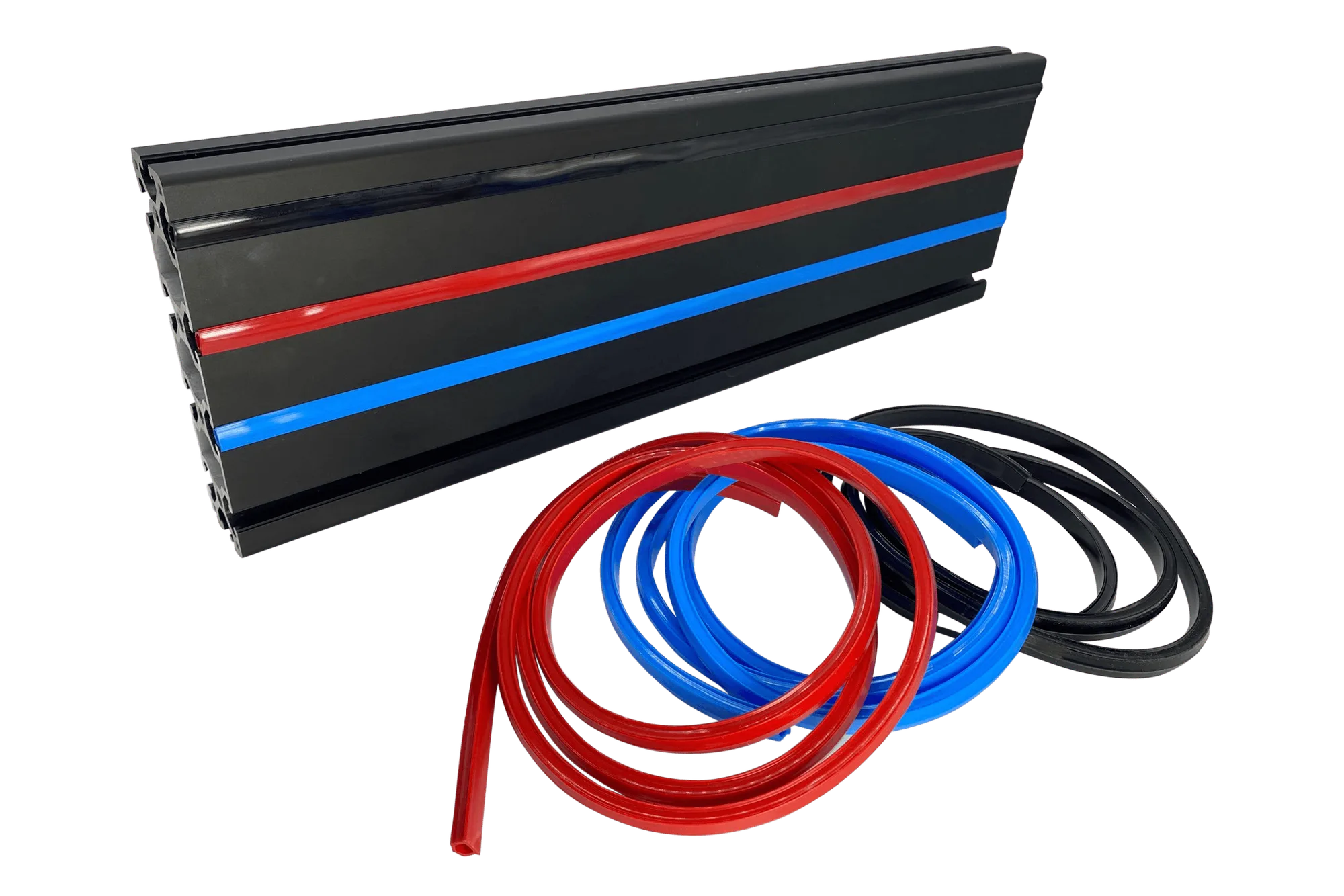
2m/79" Blue Rubber Dust/Design Strip – Anti-Slip Protective Edge Trim for Aluminium Profile Sim Rigs
-
2m/79" Black Rubber Dust/Design Strip – Anti-Slip Protective Edge Trim for Aluminium Profile Sim Rigs: Black Rubber Strip – 2m/79" length, flexible, high-grip, designed to protect aluminum profile cockpits, reduce vibration, and improve grip. Offers a more discreet, professional look at a slightly lower price point.
2m/79" Black Rubber Dust/Design Strip – Anti-Slip Protective Edge Trim for Aluminium Profile Sim Rigs
How to Decide
If you want a bold splash of color and don't mind paying a small premium, the blue strip is a great choice. It's especially suited for rigs where you want the trim to stand out, such as in a sim center or a personal build with a blue theme.
If you prefer a clean, professional appearance that blends in with black aluminum profiles, the black strip is the practical choice. It's also slightly cheaper, making it a good option if you're outfitting multiple rigs or just want a no-nonsense upgrade.
Both strips perform identically in terms of protection, grip, and vibration reduction. Your decision ultimately comes down to aesthetics and budget.
Compatibility Check Before You Buy
Before purchasing, confirm that your rig uses aluminum T-slot extrusion. Both strips are designed specifically for this type of profile.
- Trak Racer cockpits: Fully compatible with TR80, TR120, TR160, TRX, TR8 Pro, and other Trak Racer models.
- Third-party T-slot rigs: Compatible with most T-slot aluminum profile rigs from other manufacturers.
- Not for other applications: Not intended for road vehicles or unrelated industrial applications. Use only on simulation rigs.