Why the Tek-Mount changes your belt setup
The Blade Tech Tek-Mount is a quick-connect mounting system that lets you attach and detach gear without tools. Instead of threading a holster onto your belt, you mount the Tek-Mount base to your belt, bag, vest, or vehicle, then snap the compatible gear into place. The system rotates in 10-degree increments, so you can tune the angle of your holster or other gear to your draw or access.
This guide walks through a belt setup using the Tek-Mount, focusing on placement and positioning decisions you can make with the information available. It does not cover installation procedures that are not confirmed by the supplied product record.
What the Tek-Mount record confirms
-
Blade Tech Tek-Mount: The Blade Tech Tek-Mount System is a fast, secure, and tool-free quick-connect mounting solution. Tool-free quick-connect means you can move gear between mounts without carrying tools, which is the core reason to choose this system for a belt setup.
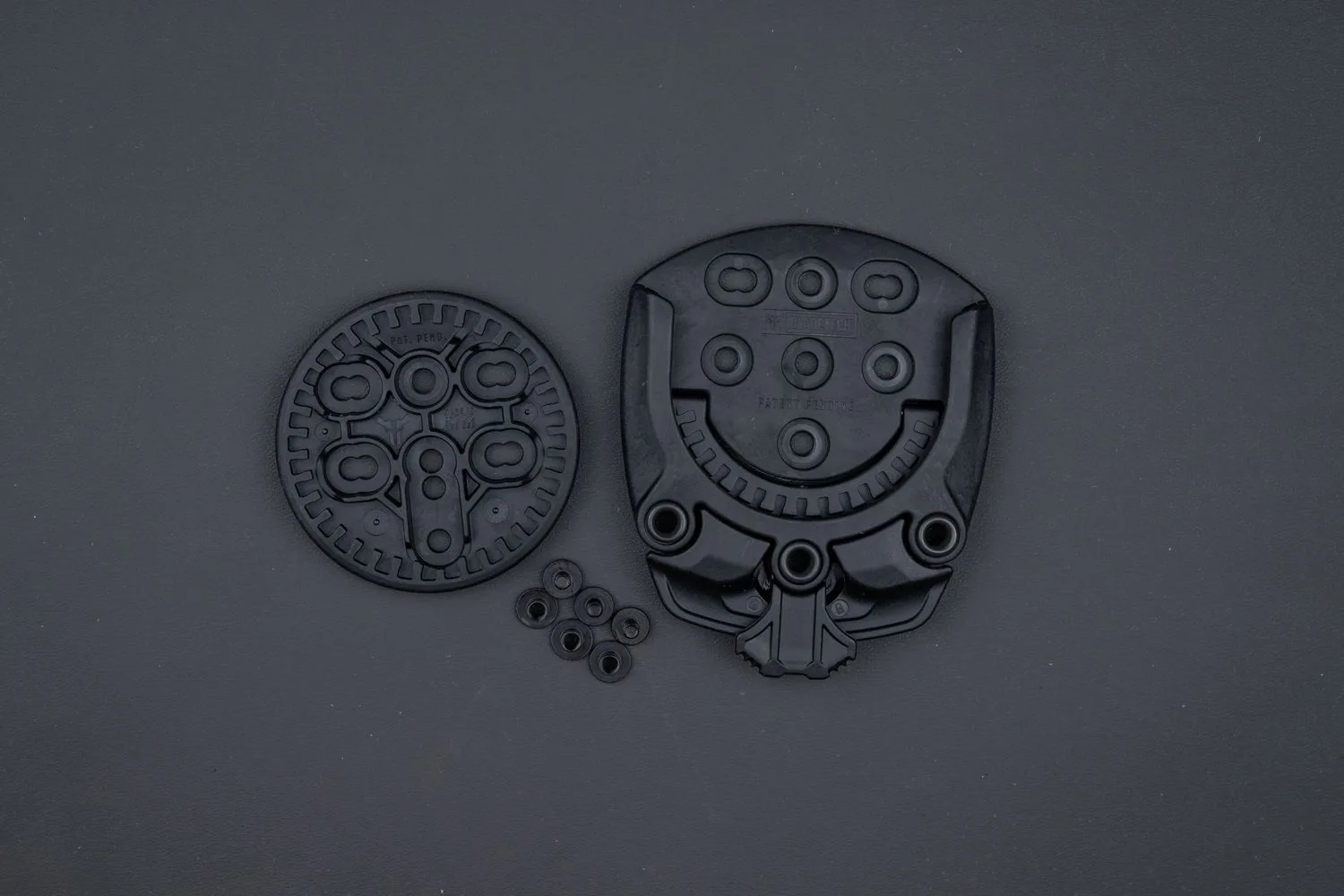
Blade Tech Tek-Mount
-
Blade Tech Tek-Mount: It allows for 360° gear rotation in 10-degree increments. The 10-degree increments give you fine control over gear angle, which matters for comfort and access when the mount sits on a belt.
-
Blade Tech Tek-Mount: It is built in the USA from high-strength glass-filled polymer. The material is part of the product identity; the record does not provide load ratings, so treat it as a mounting system for typical gear, not a certified structural component.
-
Blade Tech Tek-Mount: It features an auto-locking design and a secondary retention lock. Two retention features are relevant to belt carry: the auto-lock engages on connection, and the secondary lock provides an additional safeguard.
-
Blade Tech Tek-Mount: It offers versatile mounting options for belts, bags, vests, vehicles, and more. Belt is one of several supported mounting surfaces, so you can plan a setup that moves between your belt and other gear.
Planning your belt placement
Placement is the first decision because it affects comfort, access, and how the rotation feature works for you. The Tek-Mount record does not specify belt width limits or exact mounting hole spacing, so check your belt and mount interface before committing.
- Choose the belt location: Decide whether the gear should sit forward, at the hip, or behind the hip based on how you reach for it. The Tek-Mount supports belts, but the record does not give a recommended belt position, so pick a spot you can test for comfort and access.
- Confirm the mount interface: The Tek-Mount is a quick-connect system, so the gear you want to carry must be compatible with the Tek-Mount interface. The supplied record does not list specific holster models or adapter plates, so verify compatibility with the gear you plan to use.
- Check belt fit: The record does not state a maximum belt width. Before mounting, confirm that your belt fits the mount's attachment points; if the belt is too wide or too narrow, the mount may not sit securely.
- Plan for rotation: Because the system rotates in 10-degree increments, think about the angle you want before you lock it down. A slight forward cant often helps with a draw, but the record does not prescribe an angle, so adjust to your own reach.
Setting the rotation and retention
Once the mount is on your belt, connect your gear and check the rotation. The Tek-Mount rotates in 10-degree increments, so you can step through angles until the gear sits where you want it. The auto-locking design should engage when the gear is connected; the secondary retention lock adds a second layer of security. The supplied record does not describe the exact steps to engage the secondary lock, so follow the markings or instructions that come with your unit.
Test the setup with the gear unloaded or inert before you carry it in earnest. Confirm that the mount holds the gear securely at your chosen angle and that the retention features are engaged. If anything feels loose, recheck the connection and the belt fit.
Adjustment tips for belt carry
These tips focus on decisions you can make with the Tek-Mount's confirmed features. They are not manufacturer instructions; use them as a checklist for your own testing.
- Use the 10-degree increments to fine-tune cant: Small angle changes can make a noticeable difference in how the gear sits against your body. Step through the increments and pick the angle that gives you the cleanest access.
- Verify the auto-lock after every connection: The auto-locking design is a key retention feature. After snapping gear in, give it a gentle tug to confirm the lock has engaged before you rely on it.
- Engage the secondary retention lock for peace of mind: The secondary lock is there as a backup. The record does not specify when it must be used, but engaging it adds a second safeguard during movement.
- Keep the mount clean: The record does not provide a cleaning procedure. As a general practice, keep the interface free of debris so the quick-connect and rotation can function as intended.
- Recheck belt fit over time: Belts and gear can shift with use. Periodically confirm the mount still sits securely on your belt and that the connection points are not worn.
What the supplied record does not settle
The Tek-Mount record confirms tool-free quick-connect, 10-degree rotation, auto-locking, a secondary retention lock, and mounting options for belts, bags, vests, and vehicles. It does not provide belt width limits, load ratings, exact installation steps, or a list of compatible holsters or accessories. Those details matter for a final setup, so check them against your specific gear and the instructions included with your Tek-Mount before you carry.
If you need a mount that works across multiple platforms, the Tek-Mount's belt, bag, vest, and vehicle compatibility is a practical advantage. If you need a mount with published load specifications or a specific holster interface, the supplied information does not confirm those details, so verify before you buy.