Quick answer
The BodyGuard Compact CB Clear Back is a neoprene camera body cover that stays on while your lens is attached, shielding the body from knocks, dust, and weather while its clear rear panel and top windows keep controls and screens visible. It suits photographers who want everyday DSLR body protection without a full cage or hard case.
Where the Compact CB fits in a camera body care routine
A camera body protector cover is most useful when the camera is in and out of a bag, on a strap, or set down on rough surfaces. The Compact CB adds a soft shock-absorbing layer for those moments, but it does not replace sensible handling: keep the lens mount clean, avoid pressing on the clear windows, and remove the cover if the camera gets wet underneath it.
Because the cover is neoprene, it can trap fine grit against the body if you put it on over a dirty camera. Wipe the body down before fitting, and shake out the cover after dusty shoots. That small habit keeps the protection from becoming a source of abrasion.
What the clear back does and does not protect
The clear plastic back is there so you can see and use the rear screen and controls without removing the cover. It is a window, not a waterproof seal or a hard shield. Treat it as a way to keep the camera covered during normal handling, and avoid leaning or pressing on the clear panel when the camera is in a bag.
The two top windows serve the same purpose for upper controls. If your shooting style relies on frequent dial changes, check that the windows line up with the controls you use most before committing to the cover for a full day.
BodyGuard Compact CB questions answered
Does the Compact CB fit with the lens attached?
Yes. The cover is designed to protect the camera body while your lens is attached, so you fit it around the body rather than removing the lens. Check that the clear back and top windows sit where you need them before tightening anything down.
Will it block the rear screen or top controls?
The clear plastic back and two top windows are there to keep those areas usable. Line up the windows with your screen and the top dials or buttons you use most; if a control sits under opaque neoprene, plan to lift the cover for that adjustment.
How do I clean the clear back without scratching it?
Use a soft, damp cloth or a lens-safe wipe, and avoid paper towels or gritty cloths that can dull the plastic. Clean the neoprene separately with mild soap and water, rinse well, and let it air-dry fully before refitting so moisture does not sit against the camera. Never put the cover back on a damp camera body.
Does it really reduce shutter noise?
The neoprene layer is described as reducing shutter noise, which can help in quieter settings. It is a softening layer, not a soundproof enclosure, so treat it as one part of staying discreet rather than a guarantee of silence.
When should I take the cover off?
Remove it if the camera or cover gets wet, after a dusty or sandy shoot, and before storing the camera for long periods. Also take it off when you need unimpeded access to ports or a tripod plate that the cover covers.
Product facts
-
BodyGuard® Compact CB (Clear Back): Made from soft shock-absorbing neoprene and designed to stay on while your lens is attached. You can leave it fitted during normal shooting instead of removing it every time you change lenses or head out.
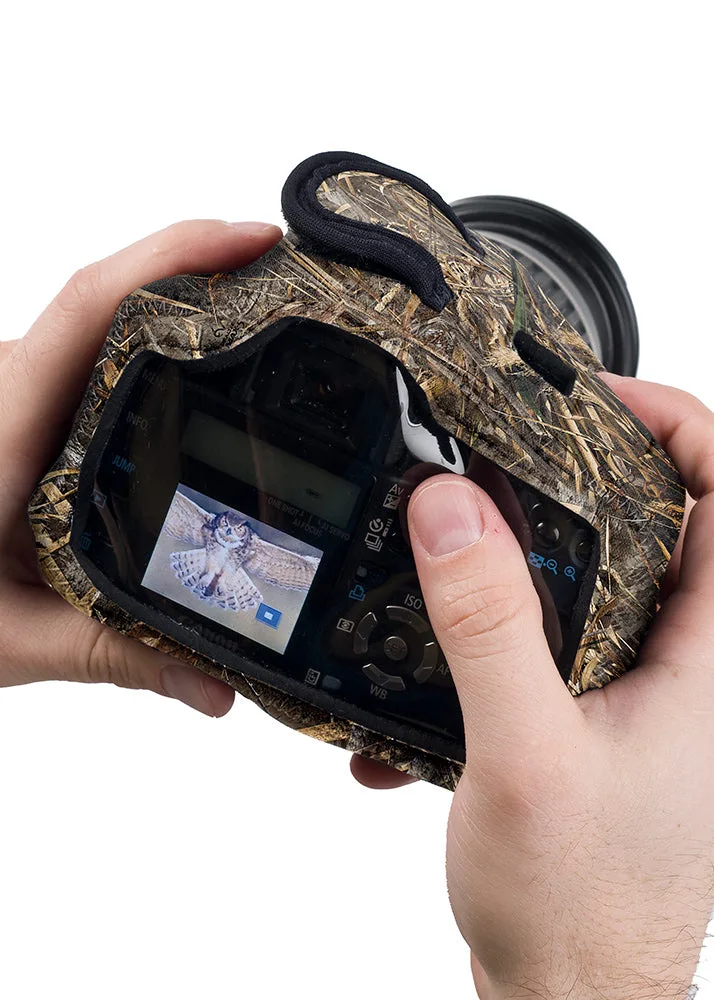
BodyGuard® Compact CB (Clear Back)
-
BodyGuard® Compact CB (Clear Back): Has a clear plastic back and two plastic windows on top. The clear panels let you check the rear screen and top controls without taking the cover off, which is the main reason to choose this version over a fully opaque body cover.
-
BodyGuard® Compact CB (Clear Back): Reduces shutter noise and keeps the body free from dust, dirt, and the elements. That makes it a practical choice for quieter settings and for days when the camera is exposed to dust or light weather.