Quick answer
A camera maintenance kit gives you the few tools that handle most routine cleaning: a blower brush for loose dust, tissues and fluid for lens glass, and buds, cloth, tweezers and a screwdriver for body seams and small fittings. Use the gentlest tool first and only add fluid or contact when dust alone won't shift.
Why the order of tools matters more than the tools themselves
Most cleaning damage comes from skipping straight to a cloth or fluid while grit is still on the surface. Loose dust is the bulk of what you remove, and a blower brush lifts it without contact. Once that's gone, a tissue or cloth has far less chance of dragging a hard particle across glass or paint.
The same logic applies to enlargers. Dust on a condenser or negative carrier sits close to the light path, so blowing it away before wiping prevents smears that show up in every print.
When a kit is not the right answer
A general maintenance kit handles exterior glass, body surfaces and enlarger hardware. It does not replace a sensor swab system for digital sensors, nor does it include the sealed fluids some manufacturers specify for coated optics. If your camera manual names a particular cleaner, follow that instead of a generic fluid.
Camera and enlarger cleaning questions answered
What should I clean first on a film camera?
Start with the blower brush on the lens glass, then the body seams and film chamber. Hold the camera with the opening facing down so loosened dust falls away rather than settling inside. Work from the lens outward, and keep openings pointed down.
How do I clean a lens without scratching the coating?
Blow off loose dust, then use a lens tissue with a drop or two of fluid, wiping in one direction from the centre outward. Use a fresh tissue for each pass and stop once the smudge is gone. Never press hard or scrub back and forth on coated glass.
Where do cotton buds and tweezers actually help?
Buds reach into the film chamber corners, around the lens mount and inside an enlarger's negative carrier. Tweezers lift stray hairs or debris from the carrier and around the bellows without adding finger grease. Use buds dry first; add fluid only if a corner stays tacky.
How do I remove dust from a darkroom enlarger?
Switch the enlarger off and let it cool. Blow dust from the condenser and carrier with the blower brush, then wipe metal surfaces with the cloth. Check the carrier again under a light before loading a negative. Cool and unplugged is the rule before any enlarger cleaning.
What is the screwdriver in the kit for?
It suits small fittings such as a loose lens mount screw or an enlarger carrier stop. Tighten only until the screw seats; do not force it, and never use it to open a sealed lens or camera body. If a screw needs real force, stop and have the item serviced.
How often should I clean my gear?
Blow dust off lenses after every outdoor session, and wipe the body when you see marks. Deep-clean an enlarger before a printing run rather than after, so dust does not end up on a negative. Little and often beats one heavy clean.
Product facts
-
Firstcall Camera/Enlarger Maintenance Kit: The Firstcall Camera/Enlarger Maintenance Kit packs a blower brush, lens cleaning tissues, lens cleaning fluid, cotton buds, cleaning cloth, tweezers and a screwdriver into a reusable carry case. One case covers both camera and enlarger cleaning, so you are not hunting for a bud or driver when dust appears mid-session.
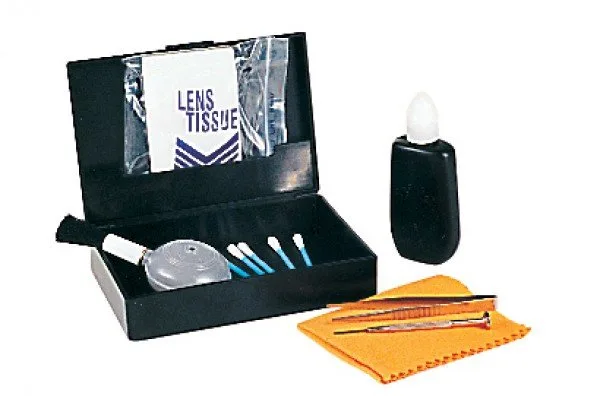
Firstcall Camera/Enlarger Maintenance Kit