Two Canon photo printers, two different maximum print sizes
The Canon Pixma PRO-200S and the Canon Image PROGRAF PRO-1000 are both photo-oriented printers, but they differ in maximum media width, ink type, and print speed. The PRO-200S is an A3+ printer, while the PRO-1000 handles media up to 17 inches wide—closer to A2. That single difference shapes the rest of the comparison, including which papers you can use and how large your final prints can be.
This comparison sticks to what the supplied catalog records confirm. Where a detail is not stated—such as ink cartridge yields, setup procedures, or operating system compatibility—I note it as a limitation rather than guessing.
Maximum print size and media handling
-
Canon Pixma PRO-200S Printer: The Pixma PRO-200S is an A3+ photo printer that supports a diverse range of photo paper surfaces and finishes up to 0.6mm thickness. A3+ is smaller than A2, so choose this if your largest typical print is A3+ or panorama-sized within that width. The 0.6mm thickness limit covers many fine art and thick photo papers, but check your specific paper against that figure.
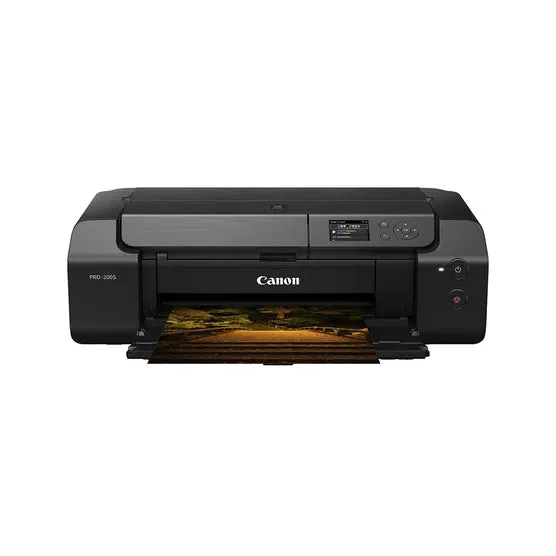
Canon Pixma PRO-200S Printer
-
Canon Image PROGRAF PRO-1000 A2 Printer: The Image PROGRAF PRO-1000 can handle media up to 17 inches wide, including thick 27.6 mil fine art media. 17 inches is wider than A3+, allowing larger prints and borderless output up to 17 inches wide. The 27.6 mil figure gives you a concrete thickness reference for fine art papers.
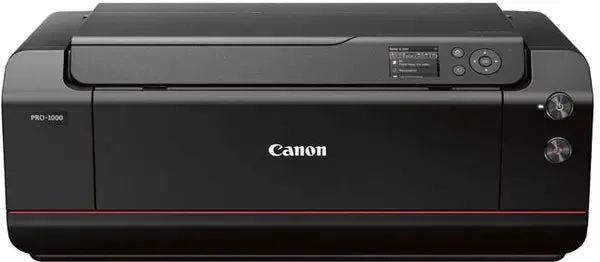
Canon Image PROGRAF PRO-1000 A2 Printer
Ink setup: 8-colour dye vs 11-colour pigment plus Chroma Optimizer
The PRO-200S uses an 8-colour dye ink set. The PRO-1000 uses an 11-colour LUCIA PRO pigment-based ink set with Chroma Optimizer. Pigment inks are typically chosen for longevity on fine art papers, while dye inks can produce vivid colours on glossy media—but the supplied records do not state lightfastness ratings or archival claims for either printer, so treat those as unconfirmed.
The PRO-1000's Chroma Optimizer is described as enhancing colour consistency on coated papers and ensuring smooth ink layering, reducing metamerism. That matters if you print on coated papers and want more predictable colour under different lighting. The PRO-200S record does not mention a comparable optimizer, so don't assume one is present.
Print speed and resolution
- Canon Pixma PRO-200S Printer: An A3+ bordered colour print in standard mode takes approximately 1 minute and 30 seconds. Useful for estimating throughput if you print batches of A3+ photos. The record does not give speeds for other sizes or modes.
- Canon Image PROGRAF PRO-1000 A2 Printer: The PRO-1000 can print a bordered 17 x 22" photo in just 4 minutes and 10 seconds or a bordered 13 x 19" photo in only 2 minutes and 30 seconds, with a maximum resolution of 2400 x 1200 dpi. These times give you a realistic sense of large-format output speed. The 2400 x 1200 dpi figure is the stated maximum resolution; the PRO-200S record does not list a resolution, so a direct resolution comparison is not possible from the supplied evidence.
Connectivity and workflow features
The PRO-200S offers three connection methods: Ethernet, Wi-Fi, and USB. It also supports printing from leading image editing software such as Digital Photo Professional and Adobe Photoshop, and it enhances connectivity with Canon EOS cameras. A skew correction function helps ensure precise alignment on various paper types, including thick media.
The PRO-1000 record mentions a two-way vacuum feeder that keeps media flat and stable, and an L-COA PRO image processing engine for determining printing paths. It does not list connection methods in the supplied evidence, so if Ethernet or Wi-Fi is essential, verify that detail with the retailer before buying. Both printers are described as supporting professional printing workflows, but specific software compatibility beyond what is listed is not confirmed.
Which printer fits your printing?
- Choose the Pixma PRO-200S if...: Your largest regular prints are A3+ or panorama-sized within that width, you want Ethernet, Wi-Fi, and USB connectivity, and you prefer a dye ink system. It is also the lower-priced option in the catalog.
- Choose the Image PROGRAF PRO-1000 if...: You need prints up to 17 inches wide, you want an 11-colour pigment ink set with Chroma Optimizer for coated papers and fine art media, and you value the vacuum feeder for thick media. It costs more and is physically larger.
What the records do not settle
Neither record provides ink cartridge yields, cost per print, or detailed setup instructions. The PRO-1000 record does not list connectivity options, and the PRO-200S record does not state a maximum resolution. If you need those specifics—especially for network setup or archival longevity—check the manufacturer's documentation or ask the retailer before you buy. The comparison above is limited to the confirmed catalog facts.