Quick Answer
To set up your Celestron Advanced VX 9.25 Schmidt-Cassegrain, start with a level tripod, balance the mount in both axes, then perform a two-star or three-star alignment using the hand controller. Follow the steps below to avoid common setup mistakes and get accurate GoTo pointing.
Why a level tripod matters more than you think
The Advanced VX mount's alignment routine assumes the tripod is level. If it's off by even a few degrees, the GoTo pointing accuracy drops noticeably, especially when slewing to objects near the horizon. Use the bubble level built into the tripod, but also check it after you attach the mount head and telescope, since the added weight can shift things slightly.
A common mistake is skipping the level check after the mount is fully loaded. Re-check the bubble once the optical tube is attached and the counterweight is in place. This small step saves you from frustrating alignment failures later.
Balancing your mount: the step most people rush
Balancing the mount in both right ascension and declination is critical for smooth tracking and accurate GoTo slews. An unbalanced mount makes the motors work harder, which can lead to tracking errors and premature wear. It also causes the clutches to slip during slews, which ruins alignment.
Take your time with this step. When you move the optical tube by hand, it should stay in place without drifting. If it moves on its own, adjust the counterweight or the tube position until it stays put. This is a few extra minutes that pays off every observing session.
Choosing the right alignment stars
The hand controller will suggest alignment stars, but you can pick your own. For the best accuracy, choose stars that are far apart in the sky, ideally one in the east and one in the west, and both at least 30 degrees above the horizon. Avoid stars near the zenith or very close to the horizon, as atmospheric refraction and the mount's geometry can introduce errors.
If you're doing a three-star alignment, the third star should be in a different part of the sky, not in a straight line with the first two. This gives the mount a better model of the sky and improves pointing across the entire celestial sphere.
Step-by-Step Setup and Alignment
- Set up the tripod and mount head: Extend the tripod legs to a comfortable height and spread them fully. Attach the mount head to the tripod and tighten the locking knobs. Use the bubble level to make sure the tripod is level, then re-check after the weight is added. Check the bubble level again after the mount is fully loaded.
- Attach the optical tube and accessories: Mount the dovetail plate of the Celestron 9.25” SCT into the mount's saddle and tighten the clamp. Attach the finderscope, diagonal, and eyepiece. Make sure the finderscope is aligned with the main tube during daylight or with a distant object. Align the finderscope before you start the alignment routine.
- Balance the mount in right ascension: Release the RA clutch and slide the counterweight along the shaft until the telescope stays put when you rotate it. Tighten the counterweight locking screw. This prevents motor strain and clutch slip. If the tube drifts, the counterweight position is wrong.
- Balance the mount in declination: Release the Dec clutch and move the optical tube to one side. Slide the tube in the saddle until it stays in place. Tighten the clamp. This ensures smooth tracking in both axes. If the tube moves on its own, adjust the tube position in the saddle.
- Power up and enter observing site information: Connect the power supply and hand controller. Turn on the mount and enter the current date, time, time zone, and your latitude and longitude. Use daylight saving time correctly if applicable. A wrong time zone or longitude is a common cause of poor GoTo accuracy.
- Perform the alignment routine: Choose a two-star or three-star alignment from the hand controller menu. Select the first alignment star and center it in the eyepiece using the arrow keys. Press Enter, then repeat for the second (and third) star. Always use the arrow keys to center the star, not the manual slow-motion knobs.
- Verify and refine alignment: After alignment, slew to a bright object like the Moon or a bright star. If it's not centered, use the hand controller to center it and press 'Align' to update the model. This improves pointing for the rest of the session. Re-aligning on a known object after the initial alignment boosts accuracy.
About the Celestron Advanced VX 9.25 SCT
-
Celestron Advanced VX 9.25 Inch Schmidt-Cassegrain Telescope - 12046: The Celestron Advanced VX 9.25” Schmidt-Cassegrain Telescope gathers 33% more light than an 8” telescope, and no single piece of the kit weighs more than 20 lbs. This means you get noticeably brighter views and better detail on planets and deep-sky objects, while still being able to carry and assemble the whole setup by yourself.
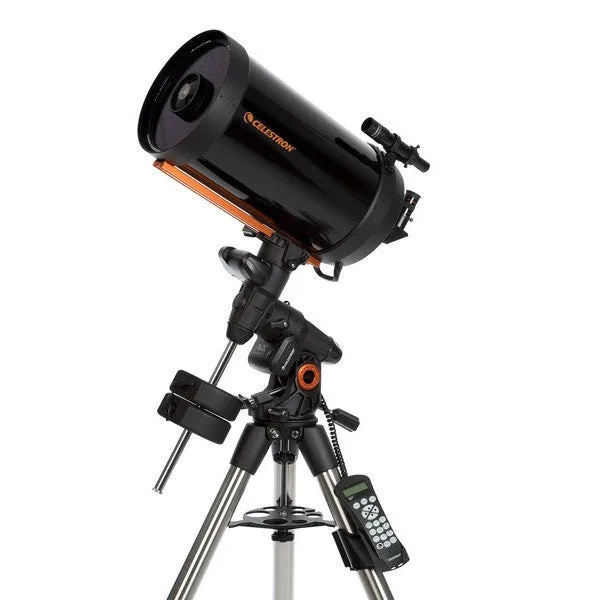
Celestron Advanced VX 9.25 Inch Schmidt-Cassegrain Telescope - 12046