A cluttered desk with tangled cables isn't just an eyesore—it can hinder productivity and even damage your equipment. Whether you're working from home or in a shared office, a reliable cable management system is essential for maintaining a clean, organized workspace. With so many options on the market, from simple wire wraps to full desk cable trays, choosing the right solution can feel overwhelming.
In this guide, we compare the most popular types of desk cable management systems, including cable trays, wraps, organizers, and smart accessories. We'll break down the pros and cons of each, help you decide which fits your setup, and highlight a few standout products from Omnidesk that can transform your desk from chaotic to streamlined.
Why You Need a Cable Management System
Beyond aesthetics, a proper cable management system protects your cables from wear and tear, reduces tripping hazards, and makes it easier to adjust your standing desk height without snagging wires. Tangled cables can also interfere with monitor arms and other peripherals, leading to frustrating downtime. Investing in a structured wire management solution pays off in both convenience and longevity of your gear.
For standing desk users, cable management is even more critical. As you transition between sitting and standing, loose cables can pull on ports or get caught in the desk frame. A well-designed cable organizer keeps everything secure and allows smooth height adjustments. Whether you use a simple wrap or a full desk cable tray, the goal is the same: a tidy, functional workspace.
- Reduces cable strain and extends the life of your cords
- Eliminates visual clutter for a more focused work environment
- Prevents cables from interfering with desk movement mechanisms
Cable Trays: The Heavy-Duty Solution
Cable trays are metal or plastic troughs mounted under the desk that collect and hide all your cables. They are ideal for setups with multiple devices—monitors, computers, speakers, and chargers—where a simple wrap won't suffice. Trays keep cables off the floor and out of sight, and many models include slots or clips to route wires neatly.
The main downside of cable trays is installation: they require drilling or strong adhesive, and you need to plan where to place them relative to your power strip and devices. However, once installed, they offer the most comprehensive wire management. For standing desks, choose a tray that moves with the desk or is fixed to the frame to avoid cable tension.
Cable Wraps and Sleeves: Simple and Affordable
Cable wraps and sleeves are flexible tubes or velcro straps that bundle multiple cables together. They are the easiest and most affordable cable management system to implement—just wrap or slide them around your wires and adjust as needed. These are perfect for single-cable runs (like a monitor or laptop charger) or for grouping cables behind a desk.
The trade-off is that wraps don't hide cables completely; they just organize them into a single bundle. For a cleaner look, you may need to combine wraps with other solutions like clips or a tray. The Omnidesk Cable Wrap, for example, is a simple yet effective tool for taming loose wires on your desktop or under the desk, and it works well with most cable diameters.
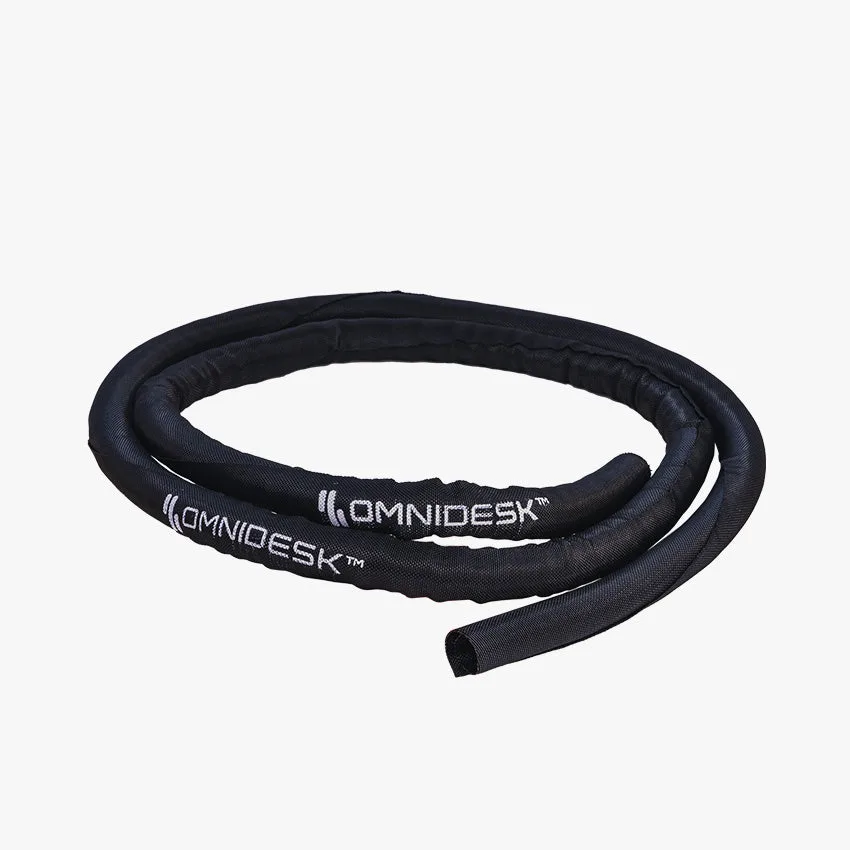
Omnidesk Cable Wrap
- Ideal for quick fixes and small setups
- Available in various lengths and colors to match your decor
- Can be reused and repositioned easily
Cable Organizers and Clips: Targeted Management
Cable organizers and clips are small adhesive or screw-mounted holders that keep individual cables in place along the edge of your desk or wall. They are perfect for routing a charging cable to your phone or keeping your mouse and keyboard wires tidy. Many organizers also include channels or raceways that can be painted to blend with your wall.
While not a full-system solution, clips are excellent for specific problem areas—like keeping your headset cable off the keyboard or preventing your monitor cable from dangling. They are low-cost and easy to install, but they won't address large bundles of cables. For a comprehensive setup, use clips in conjunction with a tray or wrap.
Smart Cable Management with GaN Chargers
Modern cable management isn't just about hiding wires—it's about reducing the number of cables you need. GaN (gallium nitride) chargers and desktop monitors with built-in charging hubs can dramatically simplify your setup. For instance, the Edifier QR65 Desktop Active Monitor with GaN Charger combines high-quality audio with a 65W GaN charging port, letting you power your laptop or phone directly from the speaker, eliminating one more cable from your desk.

Edifier QR65 Desktop Active Monitor with GaN Charger
Similarly, smart LED light strips like the Nanoleaf Essentials Smart LED Colour & White Ambiance Light Strip Starter Kit (2m) can be controlled via app or voice, reducing the need for physical switches and extra wiring. By choosing multi-functional devices, you can reduce cable clutter at the source—a strategy that pairs perfectly with any cable management system.
- GaN chargers are smaller and more efficient than traditional power bricks
- Desktop monitors with USB-C hubs can charge devices and transmit data through one cable
- Smart lighting eliminates separate controllers and dimmer switches
How to Choose the Right Cable Management System for Your Desk
Start by assessing the number of cables you have and how often you adjust your desk height. If you have a standing desk with multiple monitors, a cable tray is likely your best bet. For a simpler setup with just a laptop and phone charger, wraps and clips may suffice. Consider the layout of your desk: if your power strip is mounted under the desk, a tray that accommodates the strip is ideal.
Also think about future-proofing. As you add more devices, your cable management system should be expandable. Modular solutions like the Omnidesk Cable Wrap can be combined with other accessories to grow with your needs. Finally, don't overlook aesthetics—choose a system that matches your desk finish and personal style for a cohesive look.
- Count your cables and measure the length needed
- Decide between under-desk or on-desk management
- Look for systems that allow easy access for cable swaps
No matter which cable management system you choose, the key is to start simple and build up as needed. A tidy desk not only looks professional but also helps you stay focused and efficient. For a quick and effective upgrade, check out the Omnidesk Cable Wrap—it's a versatile, affordable solution that works with almost any setup. Explore our full range of desk accessories to find the perfect match for your workspace.