Start with what the Corepad record confirms
Before you replace anything, check that the skate you are considering is listed for your mouse. The Corepad Skatez - Razer Deathadder V4 Pro is sold as a fit for that model, so it is the right starting point for a Deathadder V4 Pro mouse feet replacement. The record confirms 100% pure PTFE, high-quality 3M adhesive, and a 0.85mm thickness. Those three facts explain most of what you will feel after installation: PTFE glides, 3M adhesive holds, and 0.85mm is the height your mouse will sit at once the new feet are on.
If your current glide problem started after a previous swap, the first suspect is installation rather than the skate itself. If it started gradually on factory feet, wear is the more likely cause. Either way, the checks below keep you from buying a second set to solve a problem the first set did not cause.
Corepad Skatez specs that affect fit and glide
-
Corepad Skatez - Razer Deathadder V4 Pro: 1 pack contains 2 sets of Skatez. You get a spare set, so a damaged install does not immediately mean another purchase.
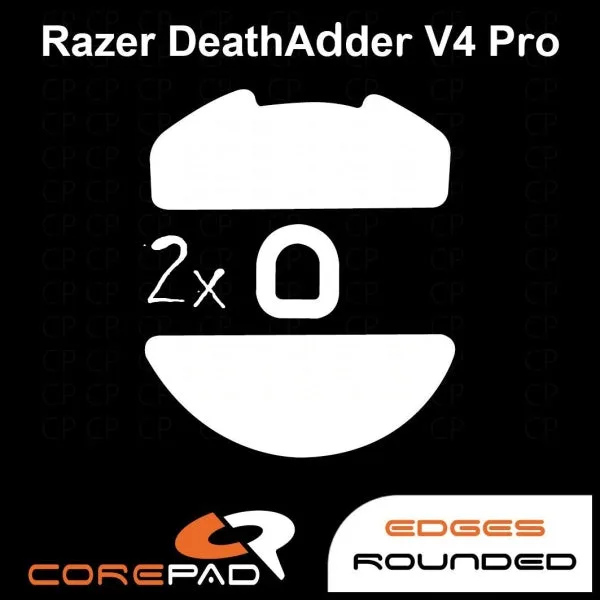
Corepad Skatez - Razer Deathadder V4 Pro
-
Corepad Skatez - Razer Deathadder V4 Pro: Corepad Skatez consists of 100% pure quality PTFE. PTFE is the glide surface; if the feel is inconsistent, check the pad and install before blaming the material.
-
Corepad Skatez - Razer Deathadder V4 Pro: Corepad Skatez use high-quality 3M adhesive. Adhesive quality matters most at the edges, where lifting causes drag and scratching.
-
Corepad Skatez - Razer Deathadder V4 Pro: Thickness: 0.85mm. This is the ride height your mouse will have after installation; it should match the clearance your mouse expects.
Install Corepad Skatez on the Deathadder V4 Pro without creating drag
The product record does not supply a step-by-step installation procedure, so the steps below are general handling advice for adhesive-backed PTFE feet, not a manufacturer instruction. Keep them conservative and stop if anything feels forced.
- Work on a clean, hard surface: Dust and skin oil under a new foot are a common cause of a rough first glide. Clean the mouse base and let it dry before removing any backing.
- Dry-fit before you peel: Set the skate in place without removing the adhesive backing. Confirm it sits inside the foot recess and does not overhang the edge.
- Peel only the backing you need: Expose the adhesive, place the skate with even pressure, and avoid stretching the PTFE. Stretched feet sit unevenly and feel slow in one direction.
- Press from the center outward: This pushes air toward the edges instead of trapping it under the middle. Pay attention to the leading and trailing edges, which take the most lateral load.
- Let the adhesive settle before judging glide: The record confirms 3M adhesive but gives no cure time. Give the feet a short settling period and re-check after your first session rather than judging in the first minute.
Diagnose Corepad Skatez glide issues on the Deathadder V4 Pro
Glide problems usually come from one of four places. Work through them in this order so you do not replace good skates for the wrong reason.
- The skate is not fully seated: A lifted edge or a bubble under the PTFE creates a catch point. Press the foot down again and check the perimeter with a fingernail.
- The mouse pad is the variable: Dust, humidity, and pad wear change glide more than most people expect. Test the mouse on a clean section of the same pad before changing skates.
- The old adhesive was not removed: Residue from factory feet raises the new skate unevenly. If the new foot sits proud on one side, stop and clean the base rather than pressing harder.
- The skate is installed but the feel is simply different: 0.85mm PTFE has its own feel. A slower or faster glide than factory feet is not automatically a defect, especially in the first session.
When the problem is fit, not glide
The Deathadder V4 Pro skates fit question is easier to settle than glide feel. The Corepad set is listed for this mouse, and the record confirms one pack contains two sets at 0.85mm thickness. If a foot visibly overhangs the recess or will not sit flat, remove it and check that you have the correct set and that the base is clean. Do not trim or sand a PTFE foot to force a fit; an uneven edge will drag and the adhesive will be compromised.
The supplied record does not include a sensor-height or lift-off-distance specification for this skate, so do not assume a particular change in either. If the mouse feels different after installation, treat that as something to observe on your own setup rather than a documented effect.
A spare set changes the replacement decision
Because one pack includes two sets, you can replace a damaged foot without buying another pack. That makes the first install lower-risk, but it does not make a bad install harmless: a poorly seated foot can still scratch your pad. Use the spare only after you have identified why the first set felt wrong. If the cause was pad contamination or old adhesive residue, the spare will behave the same way until those are addressed.