Quick Answer
Use the Creative Grids Alaska Ruler to cut all the shapes for the Alaska quilt block accurately and quickly, thanks to its non-slip surface and multiple-size cutting lines.
Why Use a Specialty Ruler for the Alaska Pattern
The Alaska quilt pattern involves unique angled shapes that are tricky to cut with standard rulers. A specialty ruler like the Creative Grids Alaska Ruler is designed specifically for this pattern, so you can cut multiple sizes from one tool and avoid the guesswork of measuring angles manually.
One trade-off: a specialty ruler is a single-purpose tool. If you only plan to make one Alaska quilt, you might prefer to use templates or a standard ruler with a rotary cutter. But for repeat projects or if you love the pattern, the time savings and accuracy are worth it.
Understanding the Ruler's Features
The Creative Grids Alaska Ruler features a non-slip surface that keeps fabric firmly in place while cutting. This is especially important when cutting angled pieces, as any shift can ruin the accuracy of your block.
The ruler is designed to cut accurate shapes in multiple sizes, so you can make different-sized blocks without needing additional rulers. Always check the size markings before cutting to ensure you're using the correct line for your desired block size.
Step-by-Step Cutting Guide
- Prepare Your Fabric: Press your fabric flat and fold it as needed for the size of pieces you're cutting. Place it on your cutting mat with the selvage edge aligned to your cutting grid. Check that the fabric is completely wrinkle-free before cutting to avoid distorted shapes.
- Position the Ruler Correctly: Place the Creative Grids Alaska Ruler on the fabric, aligning the size markings with the edge of your fabric. Ensure the non-slip side is facing down so it grips the fabric. Double-check that the ruler is aligned with the grainline if your pattern requires it.
- Cut with a Rotary Cutter: Hold the ruler firmly with one hand, keeping your fingers away from the cutting edge. Use a sharp rotary cutter to cut along the ruler's edge, applying even pressure. Replace your rotary blade if it snags or skips; a dull blade can cause fabric to shift.
- Rotate the Ruler for Angled Cuts: For angled pieces, rotate the ruler as indicated by the pattern instructions, aligning the correct angle line with your cut edge. Cut carefully along the edge. Take your time on angles—rushing is a common cause of inaccurate cuts.
- Check Your Pieces: After cutting, measure a few pieces with a regular ruler to verify they match the pattern's dimensions. This helps catch mistakes early. If pieces are off, recut rather than trying to force them to fit.
Product Facts
-
Creative Grids Alaska Ruler – CGRLBQ1: Designed specifically for the Alaska quilt block pattern, this ruler cuts accurate shapes in multiple sizes from a single ruler. You can make different-sized Alaska blocks without buying multiple rulers, saving money and storage space.
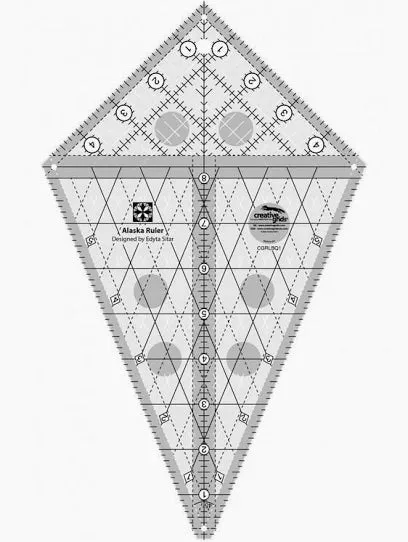
Creative Grids Alaska Ruler – CGRLBQ1
-
Creative Grids Alaska Ruler – CGRLBQ1: The non-slip surface keeps fabric firmly in place while cutting. This reduces fabric shifting, which is critical for precise angled cuts in the Alaska pattern.