What the D110 A320 MCDU Panel Does for Your Sim
The D110 A320 MCDU panel brings a functional control display unit to your home cockpit, designed specifically for A320 aircraft in Microsoft Flight Simulator 2020 and 2024. This compact module (21.5 × 14.2 × 3.8 cm) replicates the real aircraft's MCDU, allowing you to enter flight plans, manage performance data, and interact with the FMS more naturally than with a mouse and keyboard.
Because the panel is optimized for FenixA320 and FBWA320 models, it is best suited for simmers who fly those specific add-ons. Limited support for other aircraft means you should confirm compatibility before purchasing.
Panel Specifications You Need for Setup
-
D110 A320 MCDU Home Cockpit Panel for Windows MSFS2020/2024, Compatible with Fenix, FBW, Toliss (Backlit Edition) Pre-sale: 1 month: Dimensions: 21.5 × 14.2 × 3.8 cm; weight: 1200 g The panel fits on most desks or cockpit mounts, but its weight requires a stable surface or secure mounting. Follow the supplied product instructions for proper installation.
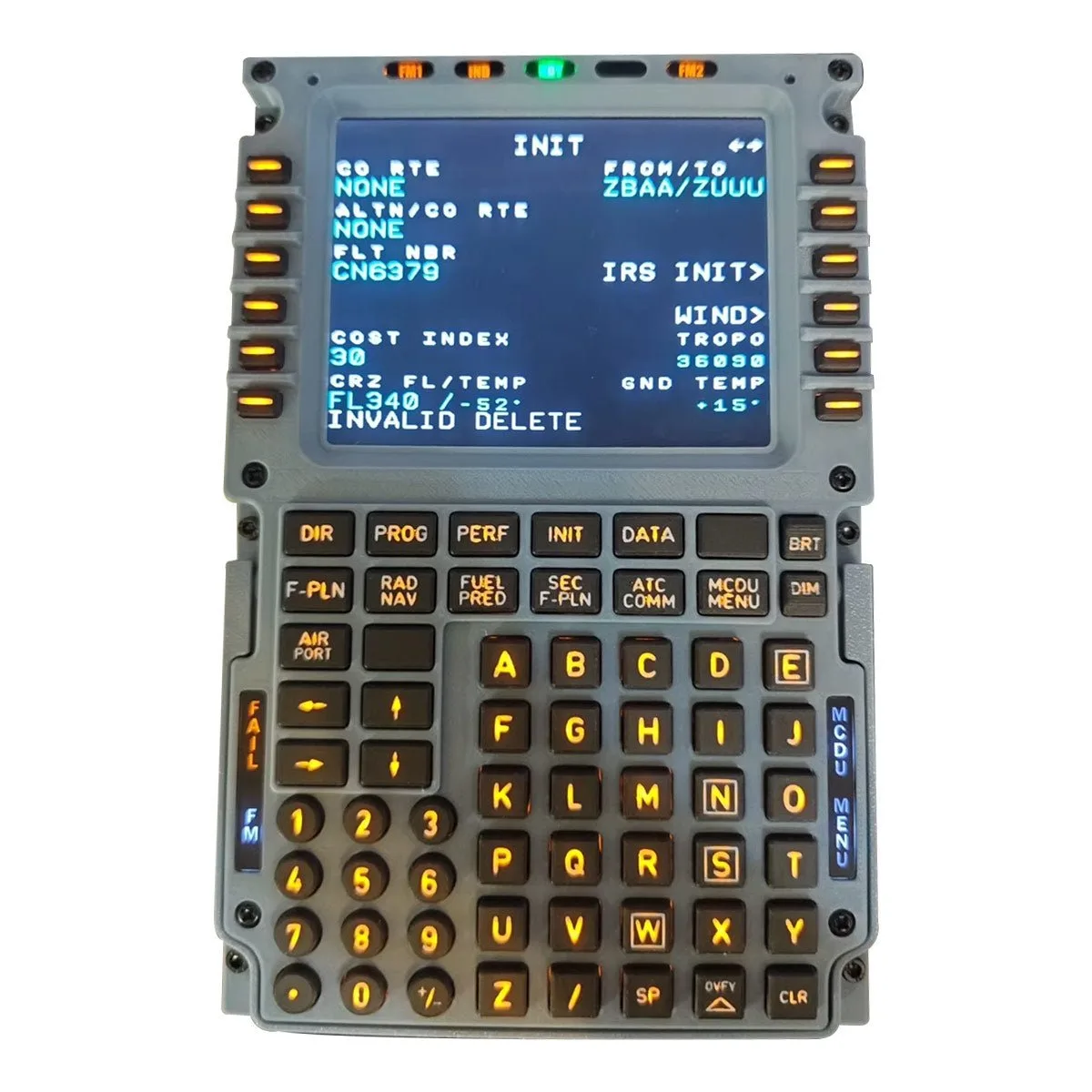
D110 A320 MCDU Home Cockpit Panel for Windows MSFS2020/2024, Compatible with Fenix, FBW, Toliss (Backlit Edition) Pre-sale: 1 month
-
D110 A320 MCDU Home Cockpit Panel for Windows MSFS2020/2024, Compatible with Fenix, FBW, Toliss (Backlit Edition) Pre-sale: 1 month: Connectivity: HDMI, 3 m Type-C data/power cable, DC 12 V universal power adapter with US plug, plus extra unused ports You need one free HDMI port and a power outlet. The included cables cover typical setups without extra purchases.
-
D110 A320 MCDU Home Cockpit Panel for Windows MSFS2020/2024, Compatible with Fenix, FBW, Toliss (Backlit Edition) Pre-sale: 1 month: Open-Source Integration: Uses Mobiflight software for button mapping and simulator communication; dedicated configuration file actively maintained Mobiflight is the key to making the panel work with MSFS. You'll need to install it and load the provided config file.
Installing the D110 MCDU Panel: Step by Step
Follow these steps to get the panel connected and working with MSFS2020 or 2024. The process assumes you already have the simulator and your chosen A320 add-on (Fenix or FBW) installed.
- 1. Connect the hardware: Plug the Type-C cable into the panel and your PC, then connect the DC 12 V power adapter. Use the HDMI cable to connect the panel's display to your GPU. The panel should power on and show a default screen.
- 2. Install Mobiflight software: Download and install the latest Mobiflight version from the official website. This open-source program handles button mapping and communication between the panel and MSFS.
- 3. Load the dedicated configuration file: The panel comes with a configuration file that maps buttons and displays for the A320. Import this file into Mobiflight to avoid manual mapping. The file is actively maintained, so check for updates periodically.
- 4. Configure Mobiflight for MSFS: In Mobiflight, select your simulator (MSFS2020 or 2024) and ensure the panel is recognized. Test button presses and screen output. If the panel does not respond, verify the USB and HDMI connections.
- 5. Launch MSFS and test with your A320: Start MSFS, load the FenixA320 or FBWA320, and check that the MCDU panel mirrors the in-game unit. Enter a simple flight plan to confirm full functionality.
What to Check Before You Start
The D110 panel is a pre-sale item with a 1-month lead time, so plan your build accordingly. Its 3D-printed construction (PLA front, PETG frame) is sturdy but may have minor surface variations—this is normal and does not affect performance.
Ensure your PC has a free HDMI port and a USB port (or enough power via the Type-C cable). The panel is rated for ages 16+ and requires basic familiarity with flight sim hardware.
Compatibility Notes for Fenix and FBW
The panel is fully compatible with FenixA320 and FBWA320 in both MSFS 2020 and 2024. If you fly other A320 variants or different aircraft, support is limited. Check the Mobiflight community forums for user-reported compatibility with other add-ons before purchasing.