What the Day Clock Setup Involves
The Day Clock is designed to be set up in seconds. You do not need to pair it with an app, configure Wi-Fi, or set the time manually. The clock uses a built-in radio signal to set itself automatically after you plug it in and choose your time zone.
Step-by-Step Day Clock Setup
Follow these steps to get your Day Clock running.
- Plug the clock into a wall outlet: Use the included power cord. The clock requires a standard AC outlet. Do not use a power strip unless necessary.
- Select your time zone: Press the time zone button on the back or bottom of the clock (depending on model) until the correct zone is displayed. The clock will then sync to the atomic time signal.
- Wait for the time to set automatically: The clock will search for the signal and set the correct time within a few minutes. During this time, the display may flash or show dashes. This is normal.
- Adjust the display brightness (optional): The clock has an automatic dimmer that reduces brightness from 7:00 PM to 7:00 AM for undisturbed sleep. You can also manually adjust brightness using the button on the back if available.
- Choose whether to show Time Periods: The clock can display time periods such as Morning, Afternoon, Evening, Night, and Before Dawn. If you prefer a simpler display, you can turn off this feature using the button on the clock.
What the Day Clock Provides for Easy Reading
-
Day Clock: Large, illuminated display readable from all angles and up to 20 feet away. This makes the clock ideal for seniors or anyone with visual impairments, as the time can be seen from across the room without squinting.
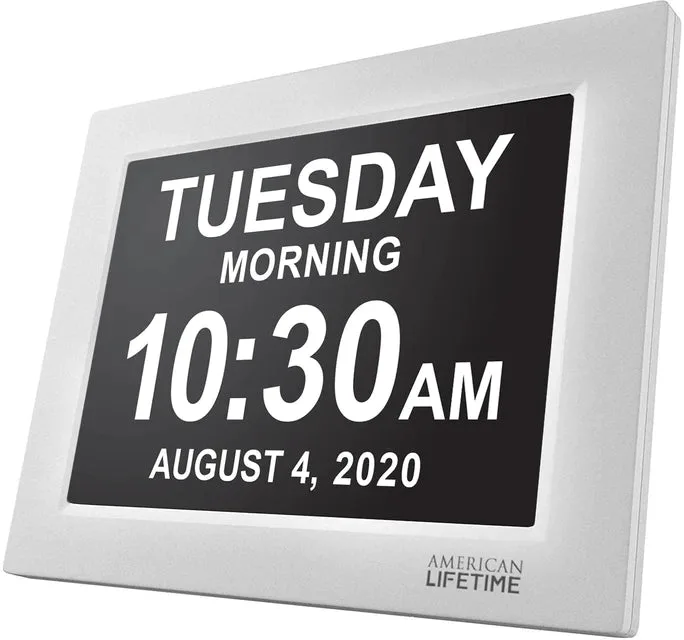
Day Clock
-
Day Clock: Time Periods: Before Dawn (12am-4am), Morning (4am-12pm), Afternoon (12pm-6pm), Evening (6pm-8pm), Night (8pm-12am). Option to not show the Time Period. Time periods help orient people who may lose track of day and night, such as those with dementia or memory loss. The option to hide them keeps the display simple for users who prefer it.
-
Day Clock: Instantaneous set-up: Simply plug it in, select your time zone, and you’re ready to go. No complicated menus or manual time setting means the clock is ready for use immediately, reducing confusion for the user or caregiver.
-
Day Clock: Automatic dimmer from 7:00 PM to 7:00 AM for undisturbed sleep. The dimmer prevents the bright display from disrupting sleep, while still being readable at night.
Placement Tips for Best Readability
Place the clock on a tabletop using the built-in kickstand, or hang it on the wall using the keyhole on the back. For best readability, position it at eye level or slightly above, and avoid direct sunlight on the display, which can wash out the numbers. The clock is designed to be read from up to 20 feet away, so it works well in a living room, bedroom, or hallway.
What the Supplied Information Does Not Cover
The product record does not specify battery backup, alarm volume adjustment, or how to change the time manually if the atomic signal is unavailable. If these features are important to you, check the manufacturer's full documentation or contact support before purchasing.