Quick Answer
If you need a full Windows laptop for multitasking and local software, choose the Dell Inspiron 15. If you want a lightweight, budget-friendly Chromebook for web-based tasks and long battery life, the HP Chromebook 11 is the better pick.
Performance and Storage: Windows Power vs Chrome OS Efficiency
The Dell Inspiron 15 is powered by an Intel Core i5-1334U with 10 cores and a boost speed up to 4.6 GHz, paired with 8GB RAM and a 512GB SSD. This combination handles demanding tasks like photo editing, running multiple apps, and heavy browser tabs without slowdown.
The HP Chromebook 11 uses a MediaTek MT8183 processor with 4GB RAM and 32GB eMMC storage. It is designed for Chrome OS, which is lightweight and cloud-centric, so it runs smoothly for everyday tasks like browsing, streaming, and schoolwork—but it won't handle heavy local software or large file storage.
Operating System: Full Windows vs Simple Chrome OS
Windows 11 S on the Dell Inspiron 15 offers full desktop software compatibility, including Microsoft Office, Adobe apps, and traditional Windows programs. It also includes Copilot, Microsoft's AI assistant, for integrated help.
Chrome OS on the HP Chromebook 11 is fast, secure, and simple. It supports Google Chrome and Android apps, making it perfect for users who live in the cloud. However, it cannot run traditional Windows software, which is a key limitation if you rely on specific programs.
Portability and Battery Life
The HP Chromebook 11 is slim and light, designed for easy carrying. Its long battery life makes it ideal for all-day classes or travel, and its 11.6-inch HD display is compact for small backpacks.
The Dell Inspiron 15 is a larger 15.6-inch laptop, which offers a bigger Full HD touchscreen but is heavier and likely has shorter battery life due to the more powerful hardware. This trade-off matters if you prioritize screen size over portability.
How to Choose: Trade-Offs Explained
- Performance vs Portability: The Dell Inspiron 15 offers powerful multitasking with an Intel Core i5 and 8GB RAM, but it's larger and heavier. The HP Chromebook 11 is slim and light, but its MediaTek processor and 4GB RAM are best for light tasks. If you carry your laptop daily, weigh the extra weight of the Dell against the need for speed.
- Storage Capacity: The Dell Inspiron 15 has a 512GB SSD, giving you ample space for files and software. The HP Chromebook 11 has only 32GB eMMC, which is fine for cloud storage but limited for offline files. If you work offline or store large files, the Dell's SSD is a clear advantage.
- Operating System: Windows 11 S on the Dell runs full desktop apps and includes Copilot. Chrome OS on the HP is simple, secure, and runs Android apps but cannot run traditional Windows software. Check if your required software is available on Chrome OS before choosing the HP.
Product Facts
-
Dell Inspiron 15.6 FHD Touch Screen Laptop| Intel Core i5-1334U | Intel UHD Graphics | Copilot |Wi-Fi 6 | Black | 8GB RAM | 512GB SSD |Windows 11 S | (Factory Renewed): This 15.6-inch laptop offers smooth multitasking with 8GB of high-bandwidth RAM, ideal for gaming, photo/video editing, and running multiple apps or browser tabs. It features a fast, flash-based SSD that ensures quick startup, silent operation, and reduced heat. If you need to run heavy software or keep many tabs open, the Dell Inspiron 15 will keep up without lag, and the SSD makes booting and loading fast.
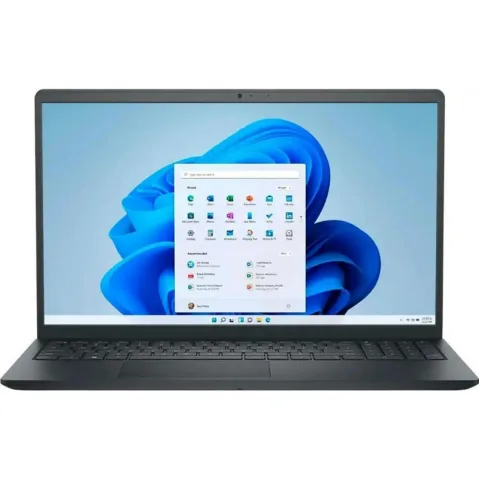
Dell Inspiron 15.6 FHD Touch Screen Laptop| Intel Core i5-1334U | Intel UHD Graphics | Copilot |Wi-Fi 6 | Black | 8GB RAM | 512GB SSD |Windows 11 S | (Factory Renewed)
-
HP Chromebook 11-inch Laptop - MediaTek - MT8183 - 4 GB RAM - 32 GB eMMC Storage - 11.6-inch HD Display - with Chrome OS: Light, Durable, and Always Ready—take this slim HP Chromebook anywhere with its long battery life. Enjoy fast, easy access to Google Chrome and Android apps, all in one place. If you prioritize portability and all-day battery for web-based work, the HP Chromebook 11 is a reliable, lightweight companion.
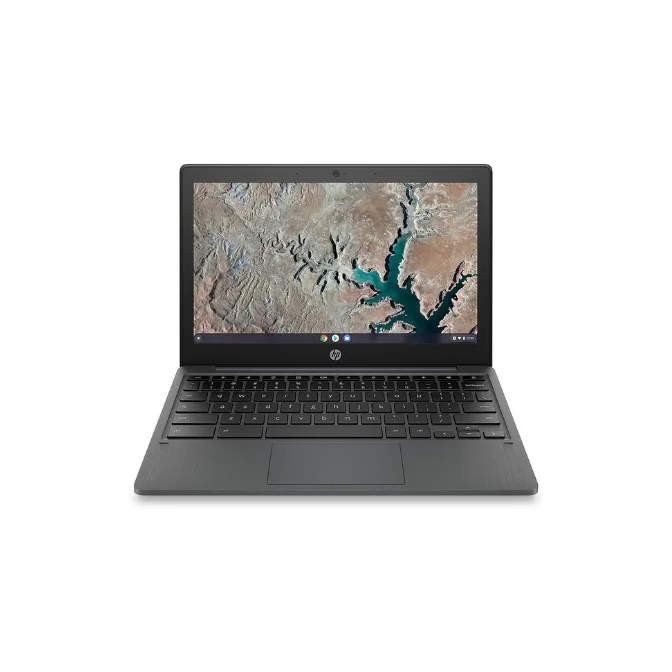
HP Chromebook 11-inch Laptop - MediaTek - MT8183 - 4 GB RAM - 32 GB eMMC Storage - 11.6-inch HD Display - with Chrome OS
Which Laptop Fits You?
Best for
- Students who need to run Windows-only software like Microsoft Office or coding tools
- Users who want a touchscreen and larger display for media consumption or creative work
Not for
- Users who need extreme portability and all-day battery on a tight budget—consider the HP Chromebook 11 instead
- Those who rely on Android apps and cloud-based workflows and want a simpler, lower-cost option