Quick Answer
A desk pedestal is a compact storage unit that fits under or beside your desk, providing drawers and shelves for office supplies, documents, and personal items. To use it efficiently, categorize your items, assign a specific drawer for each category, and regularly declutter to maintain an organized workspace. For a complete solution, pair your pedestal with cable management accessories like the Omnidesk Cable Strap to keep your desk tidy.
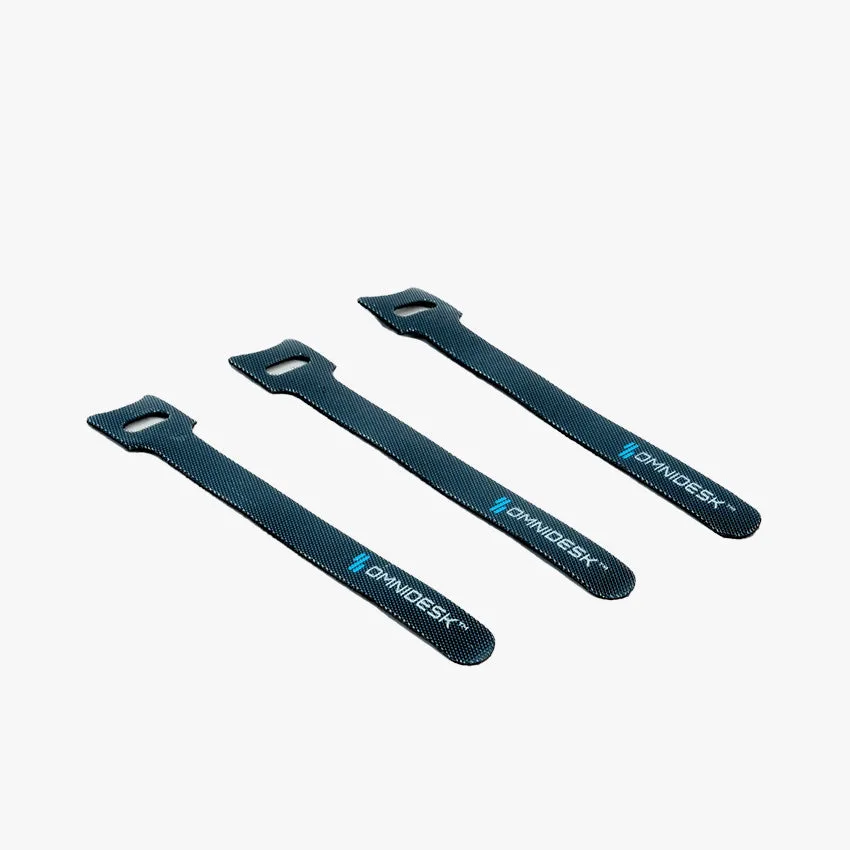
Omnidesk Cable Strap
A cluttered desk can hinder productivity and increase stress. A desk pedestal offers a practical solution by providing dedicated storage right at your workstation. Whether you're working from home or in an office, understanding how to use a pedestal efficiently can transform your workspace into an organized haven.
In this article, we'll explore the role of a pedestal in desk organization, common problems you might encounter, and step-by-step solutions to maximize its potential. We'll also highlight how products like the Omnidesk Cable Strap can complement your pedestal for a clutter-free setup.
Why a Desk Pedestal is Essential for Office Storage
A desk pedestal is more than just a storage box; it's a strategic tool for maintaining an efficient workflow. By keeping essential items within arm's reach, you minimize disruptions and maintain focus. Pedestals come in various sizes and configurations, from single-drawer units to multi-tier cabinets, allowing you to choose based on your needs.
For home offices, a pedestal can replace bulky filing cabinets, saving valuable floor space. It also keeps sensitive documents secure if it includes a lock. The key is to choose a pedestal that complements your desk height and aesthetic, ensuring it doesn't disrupt your ergonomic setup.
- Categorize items: group similar items (e.g., stationery, cables, documents) to streamline retrieval.
- Use drawer dividers: keep small items like paper clips and USB drives from becoming a jumble.
- Label drawers: clear labels help you and others find items quickly without rummaging.
Common Problems with Desk Pedestals and How to Solve Them
Even with a pedestal, you might face issues like wasted space, difficulty finding items, or drawers that won't close due to overstuffing. These problems often stem from poor organization habits. The solution is to implement a systematic approach to what goes into each drawer.
Start by emptying your pedestal and sorting items into categories. Discard or relocate anything you haven't used in the past six months. Assign each drawer a specific purpose: top drawer for frequently used items, middle for documents, bottom for bulky supplies. This not only improves accessibility but also reduces clutter on your desk surface.
- If drawers are jamming, remove excess items and use vertical dividers to maximize space.
- For a paperless approach, scan documents and store them digitally, freeing up drawer space.
- Regularly schedule a 10-minute tidy-up at the end of each week to maintain order.
Integrating a Pedestal with Your Standing Desk Setup
If you use a standing desk, a pedestal can be a game-changer. It provides a stable surface for your feet when standing and keeps your essentials within reach whether you're sitting or standing. However, ensure the pedestal doesn't obstruct the desk's height adjustment mechanism. Measure the clearance under your desk to choose a pedestal that fits comfortably.
For cable management, combine your pedestal with the Omnidesk Cable Strap. These velcro straps help you bundle and label cables, keeping them out of sight and preventing tangles. This is especially useful if your pedestal is positioned near power outlets or computer towers.
- Place frequently used items in the top drawer to minimize bending or stretching.
- Use a cable tray or straps to route cables from your desk to the pedestal without creating a tripping hazard.
Diagnosing Your Desk Pedestal Organization
- Symptom: Drawers are overflowing and hard to close: You have too many items in a single drawer, or you're storing items that don't belong there. Empty the drawer, sort items into categories, and relocate anything you don't use weekly.
- Symptom: You frequently lose small items like pens or sticky notes: Lack of dividers or designated spots for small items. Add drawer dividers or small containers to keep similar items together.
- Symptom: Cables are tangled around your pedestal: You haven't implemented a cable management system. Use the Omnidesk Cable Strap to bundle and label cables, keeping them organized and out of the way.
Product Facts: Enhance Your Pedestal Organization
- Omnidesk Cable Strap: A versatile velcro backed cable strap with a handy loop that allows you to neatly categorise and organise your cables. Package Contains 15 x Omnidesk Cable Strap (Black): 15cm Use these straps to bundle cables from your pedestal's power strip or connected devices, keeping your workspace tidy and reducing clutter.
- zero-ergo-curve-157733">Zero Ergo Curve: The Zero is perfect for users who prioritize stability and a clutter-free workspace. Its reinforced steel frame offers support for heavier setups up to 130kg. It comes with integrated cable management options to help users keep wires neatly hidden, creating a clean, distraction-free workspace. If you're looking for a new desk to pair with your pedestal, the Zero Ergo Curve offers built-in cable management and stability, ensuring your pedestal and cables stay organized.
A desk pedestal can significantly improve your workspace organization when used correctly. By categorizing items, maintaining regular decluttering, and integrating cable management solutions, you'll create a functional and stress-free environment. Start implementing these tips today to enjoy a more productive and organized desk.