Quick answer
Replace DJI Mavic Mini propellers every 20-30 flight hours or after any visible damage. Always use genuine DJI propellers and install them in matched pairs with the correct rotation direction.
When to replace Mavic Mini propellers
Even with careful flying, propellers wear down over time. Nicks, cracks, or warping reduce lift and efficiency, making your drone harder to control. Replace them immediately if you notice unusual vibration, increased noise, or reduced flight time.
A common trade-off: aftermarket propellers may cost less but often lack the precise balance and material quality of genuine DJI parts. The 4 Pairs DJI Mavic Mini Drone Propellers are designed for quieter flight and foldable storage, maintaining the original performance your drone was built for.
Tools and workspace
You only need the new propellers and your hands—no screwdrivers or extra tools. Work on a clean, flat surface with good lighting so you don't drop tiny screws or mix up propeller pairs.
How to replace DJI Mavic Mini propellers
- 1. Power off and remove the battery: Turn off the drone and take out the battery to prevent accidental motor startup during the swap. Never work on a drone with the battery installed.
- 2. Identify propeller pairs and rotation: Each propeller is marked CW (clockwise) or CCW (counter-clockwise). The CW propeller has a raised ridge on the mounting hole; the CCW propeller is flat. Match them to the correct motor arm—CW on the front-right and rear-left, CCW on the front-left and rear-right. Mixing up rotation directions will prevent the drone from lifting off.
- 3. Remove the old propeller: Hold the motor bell firmly with one hand. Use your other hand to twist the propeller screw counter-clockwise (lefty-loosey) until it comes off. Keep the screw safe—it's small and easy to lose. If the screw is tight, use a small Phillips-head screwdriver, but avoid over-torquing.
- 4. Install the new propeller: Align the new propeller with the correct rotation marking. Press it down onto the motor shaft and hand-tighten the screw clockwise until snug. Do not overtighten—the motor should spin freely without binding. A common mistake is cross-threading the screw; start turning slowly to ensure it catches properly.
- 5. Repeat for all four propellers: Replace all four propellers at once, even if only one is damaged. Uneven wear can cause imbalance and vibration. Always replace in complete sets to maintain balanced flight performance.
- 6. Test spin and check balance: Reinstall the battery, power on the drone, and gently spin each motor by hand to confirm the propellers move freely. Then perform a low-altitude hover test (about 1-2 feet) to listen for unusual noise or vibration. If you hear a high-pitched whine or see wobbling, land immediately and re-check the installation.
Propeller options
-
4 Pairs DJI Mavic Mini Drone Propellers: 4 Pairs 4726F Mavic Mini Propellers for DJI Mavic Mini Drone Quieter Flight and Powerful Foldable Low Noise Propellers These genuine DJI propellers are engineered for the Mavic Mini's specific motor and frame, so you get consistent lift and reduced noise compared to generic alternatives.
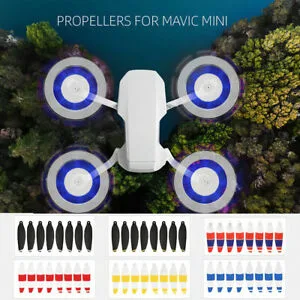
4 Pairs DJI Mavic Mini Drone Propellers