What the Integrated Tablet Holder Offers
The Echelon Meridian Pilates Reformer includes a built-in tablet holder that lets you stream Echelon Fit® classes, instructor-led workouts, scenic sessions, and wellness content directly from your personal device. This keeps your phone or tablet secure and within easy reach while you train.
Tablet Holder at a Glance
-
Echelon Meridian Pilates Reformer with Tablet Holder: The integrated tablet holder securely supports most iPads and tablets, creating a clean, modern setup that blends seamlessly into your home environment. You can use your own tablet without needing a separate mount or stand, keeping your workout area tidy.
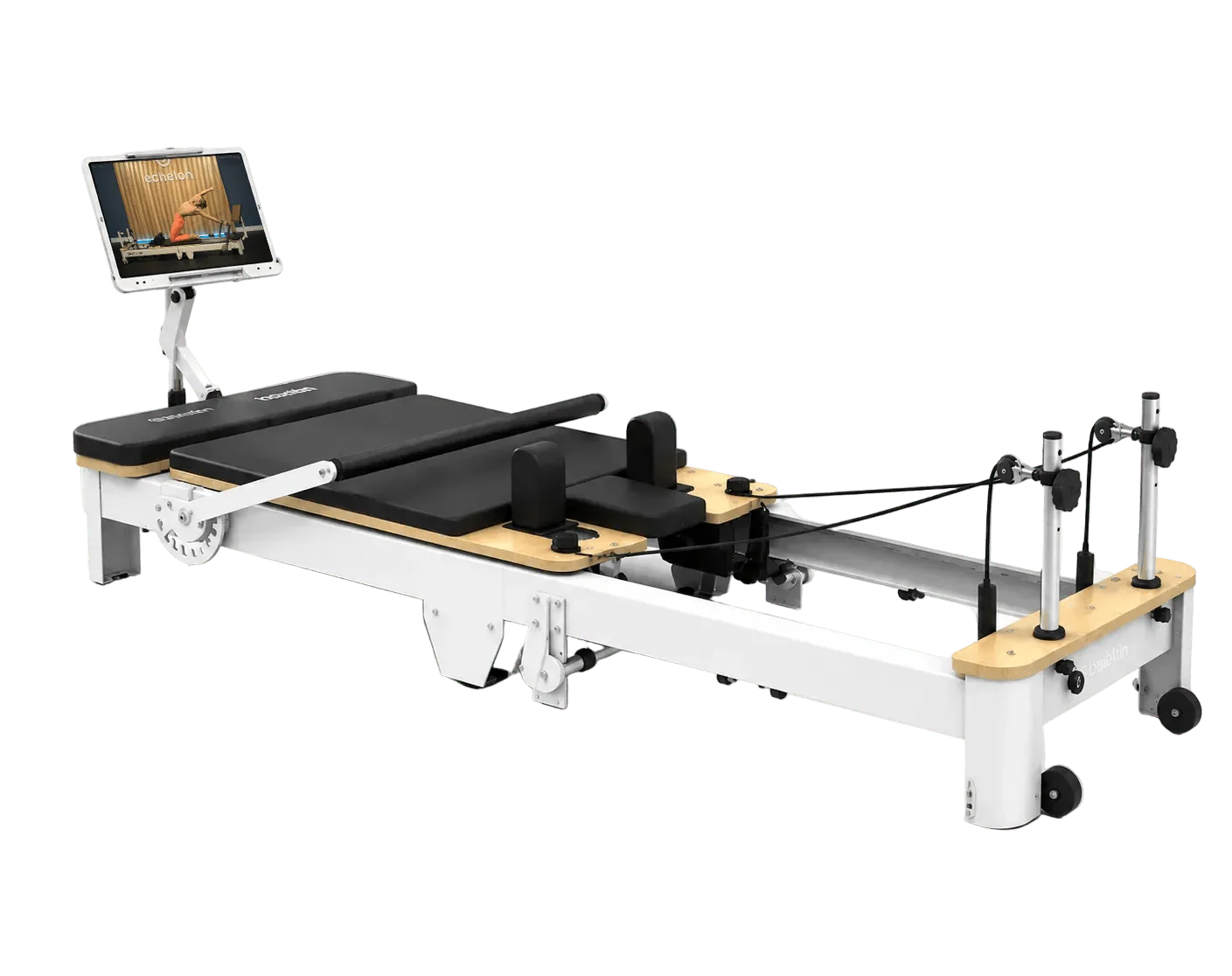
Echelon Meridian Pilates Reformer with Tablet Holder
-
Echelon Meridian Pilates Reformer with Tablet Holder: Compatible with most tablets and iPads. No need to buy a specific device — your existing tablet or iPad will likely work.
-
Echelon Meridian Pilates Reformer with Tablet Holder: WiFi-enabled streaming through your device. Your tablet handles the connection, so you just need a stable WiFi network and the Echelon Fit® app.
-
Echelon Meridian Pilates Reformer with Tablet Holder: Access to the Echelon Fit® App with live and on-demand Pilates classes, strength training, stretching, recovery, mobility, meditation, and scenic experiences. The holder lets you follow along with a wide range of content without needing a built-in screen.
Setting Up the Tablet Holder
The tablet holder is integrated into the reformer frame. No tools are required to prepare it for use.
- Position the reformer: Place the Echelon Meridian Pilates Reformer on a level surface in your chosen workout space. The compact footprint allows placement in a home gym, bedroom, or living area.
- Locate the tablet holder: The holder is built into the front of the reformer frame. It is designed to hold most iPads and tablets securely.
- Insert your tablet: Gently place your tablet or iPad into the holder. Ensure it is centered and fully seated. No additional straps or clips are needed.
- Open the Echelon Fit® app: On your tablet, launch the Echelon Fit® app. Connect to your WiFi network if prompted. Browse live and on-demand classes, scenic sessions, or wellness content.
- Adjust the angle if needed: Tilt the holder slightly to reduce glare or improve your viewing angle during different exercises. The holder stays in position once adjusted.
Using the Holder During Workouts
Once your tablet is in place, you can stream live or recorded classes, follow along with instructor cues, and track your progress — all from the same device. The Echelon Meridian reformer also supports Bluetooth® accessory compatibility, so you can pair heart rate monitors or other Bluetooth® accessories to enhance your session.
What to Keep in Mind
The tablet holder is designed for most iPads and tablets, but very large or unusually shaped devices may not fit securely. Always check that your tablet case does not interfere with the holder's grip. For the best experience, keep your tablet charged and your WiFi connection stable before starting a class.