Start with the two modes, not the buttons
The Evenflo Elara 2-in-1 Smart Motion Swing & Soothing Nest gives you two ways to comfort your baby in one piece of gear: an upright Smart Motion Swing and a reclined Soothing Nest. The mode you choose changes how your baby sits and how the motion feels, so decide on the mode first, then set up the app and motion settings around it.
Both modes are intended for babies up to 9 months (25 lb / 11.3 kg). The supplied information does not include separate weight or age limits for each mode, so treat that single range as your guide for either setup.
What the Elara gives you in either mode
-
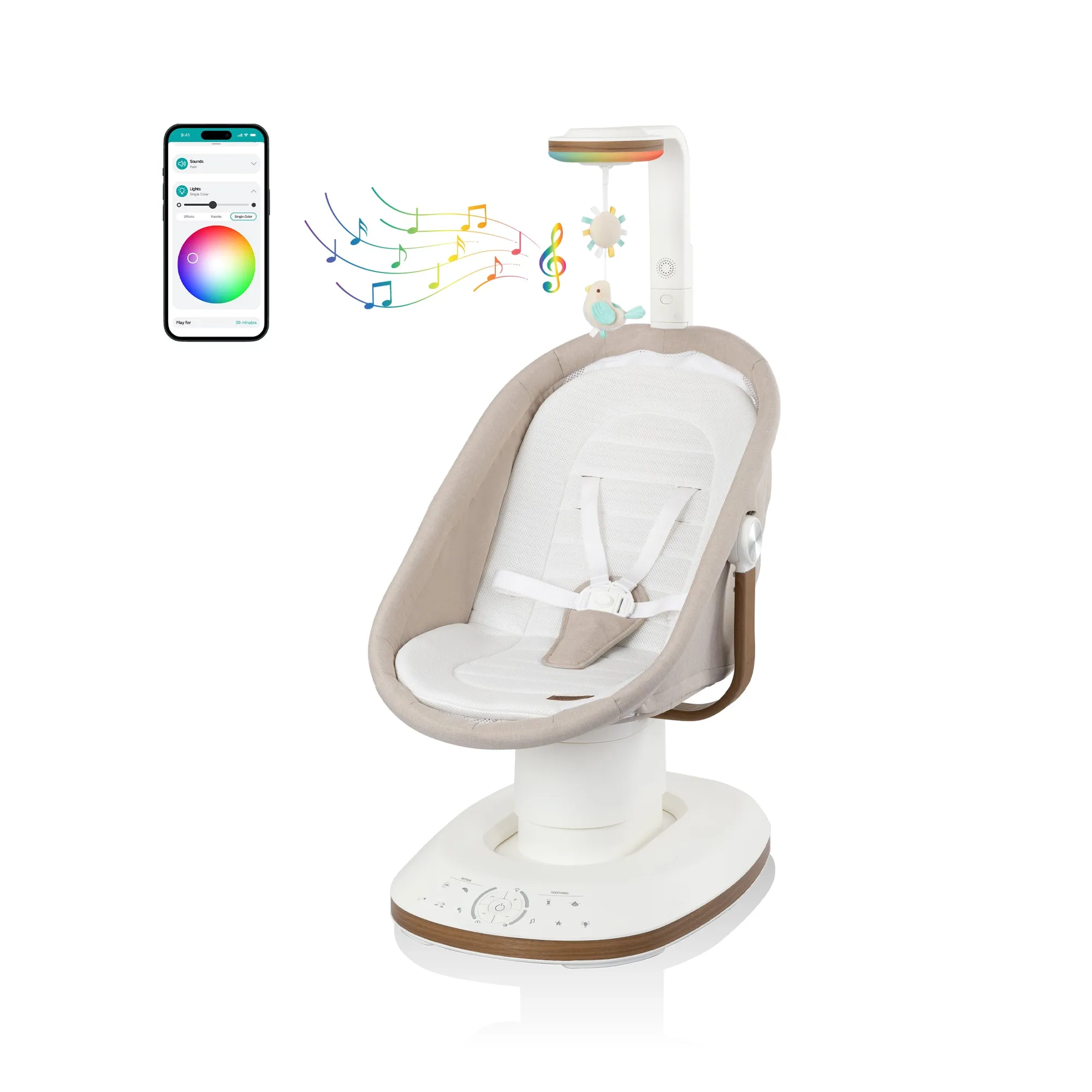
Elara 2-in-1 Smart Motion Swing & Soothing Nest: Two distinct modes: an upright Smart Motion Swing and a reclined Soothing Nest, accommodating babies up to 9 months (25 lb / 11.3 kg). This is the core decision: the same seat converts between an upright swing and a reclined nest, so you are not choosing between two products.
-
Elara 2-in-1 Smart Motion Swing & Soothing Nest: SensorySoothe Technology integrates lights, music, sounds, and a toy built into the technology bar, all managed through the Evenflo mobile app. These features are shared across the system, so you can use them in either mode once you have the app connected.
Swing mode vs. Soothing Nest: how to choose
The supplied information describes the physical difference clearly: the swing is upright and the nest is reclined. It does not specify which mode suits which mood or age beyond the shared 9-month, 25 lb limit. Use the descriptions below as a practical starting point, and watch your baby's response.
- Smart Motion Swing (upright): Choose this when you want your baby more upright and engaged with the motion and the technology bar. The swing offers 10 different motions, 5 adjustable speeds, and 90° rotation to fine-tune seating position and swing movement.
- Soothing Nest (reclined): Choose this when a more reclined position fits the moment better. The nest uses the same SensorySoothe lights, music, sounds, and toy, and the same app controls, but the supplied information does not give a separate recline angle or a different motion range for this mode.
Setting up the Elara: a practical sequence
The supplied information does not include a step-by-step assembly manual, so the sequence below focuses on what the product record does confirm: the two modes, the technology bar, the app, and the motion controls. Follow the printed instructions in the box for physical assembly.
- 1. Build the frame and seat: Assemble the swing according to the included instructions. The Elara is part of The Home Collection and features breathable air mesh, machine-washable fabrics, and wood-like accents; keep those fabrics in place as you assemble.
- 2. Attach the SensorySoothe Technology Bar: The technology bar holds the integrated lights, music, sounds, and toy. The product weight note says it includes the SensorySoothe Technology Bar, so fit it as directed before you use the app.
- 3. Connect the Evenflo mobile app: All SensorySoothe features are managed through the Evenflo mobile app. Pair the swing as directed in the app so you can control lights, music, sounds, and motion from your phone.
- 4. Set the mode and motion: Choose the upright Smart Motion Swing or the reclined Soothing Nest. In swing mode, use the app to select from 10 motions and 5 speeds, and adjust the 90° rotation to change seating position and swing movement.
- 5. Turn on cry detection if you want it: Advanced cry detection automatically responds within seconds when your baby cries, activating SensorySoothe lights and sounds alongside gentle rocking motion. The supplied information does not say whether cry detection works in both modes, so test it in the mode you plan to use.
Using the app without overdoing it
The app is the control center for SensorySoothe, which means it is easy to keep adding lights, sound, and motion. A calmer approach is to change one thing at a time: start with the mode, then add motion, then add sound or lights if your baby needs more. The Elara is designed to adapt to your baby's preferences, but the supplied information does not include recommended settings, volumes, or session lengths.
Cry detection is the one feature that acts on its own. It responds within seconds by combining lights, sounds, and gentle rocking. If you prefer to respond yourself first, check the app settings so you know what will happen when your baby cries.
Practical checkpoints for either mode
The supplied product record does not include care, safety, or compatibility instructions beyond the 9-month, 25 lb limit. The checkpoints below stick to what is confirmed and to general, non-manufacturer guidance.
- Check the weight and age limit: The Elara accommodates babies up to 9 months (25 lb / 11.3 kg). The supplied information does not give a minimum age or weight, so confirm suitability for your baby with Evenflo before first use.
- Keep fabrics clean: The fabrics are machine washable. Follow the care label on each piece rather than guessing at water temperature or drying method.
- Watch the technology bar: The toy and lights are built into the technology bar. The supplied information does not describe how the toy attaches or whether it is removable, so check the bar as assembled before each use.
- Use the app deliberately: Because all SensorySoothe features run through the app, keep your phone charged and nearby, and decide ahead of time which lights, sounds, and motions you want active.
What the supplied information leaves open
The product record does not include a recline angle for the Soothing Nest, a separate motion range for each mode, or instructions for cleaning the technology bar. It also does not state whether cry detection is mode-specific. These are fair questions to ask Evenflo support before you buy or before you rely on a particular setup.
What the record does confirm is the overall package: two modes in one unit, a 9-month and 25 lb limit, app-controlled SensorySoothe lights, music, sounds, and toy, cry detection, 10 motions, 5 speeds, 90° rotation, breathable air mesh, machine-washable fabrics, and a choice of Coastal Coffee or Truffle Taupe. That is enough to plan your setup around the mode you expect to use most.