Quick answer
For long hours, an ergonomic executive chair with a headrest generally offers better neck and upper back support, reducing strain during extended sitting. However, a standard executive chair without a headrest can be a better fit if you prefer unrestricted movement or have a workspace that requires frequent turning. Choose based on your specific comfort needs and work style.
When you spend eight or more hours a day at a desk, the difference between an ergonomic executive chair with a headrest and a standard executive chair becomes more than a matter of style. It affects your posture, your energy levels, and how your neck and back feel by Friday afternoon.
This comparison breaks down the real trade-offs between these two chair types, using specific models from Humanscale to illustrate what to look for. We'll help you decide which one aligns with your body, your work habits, and your space.
Humanscale
What Sets an Ergonomic Executive Chair with Headrest Apart

Ergonomic Executive Chair with Headrest
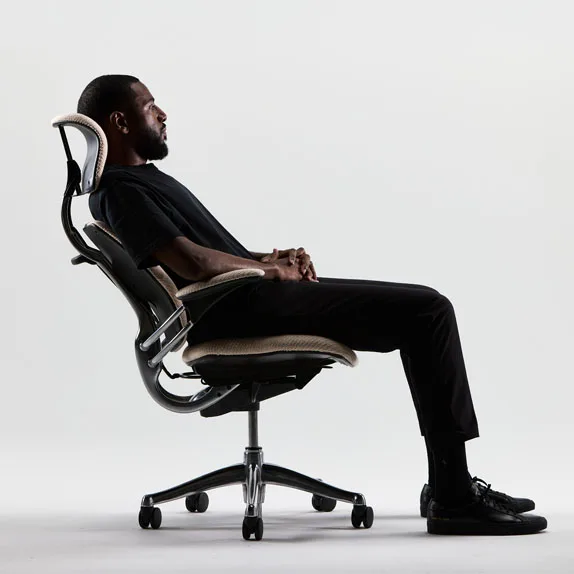
An ergonomic executive chair with a headrest adds an extra point of support that a standard executive chair typically lacks. That headrest cradles your neck and upper spine, which matters when you lean back to read, think, or take a call. Without it, your neck muscles work overtime to hold your head up, leading to fatigue and tension over long periods.
The trade-off is that a headrest can feel restrictive if you prefer to move freely or if your tasks require you to twist frequently. It also adds bulk, which may not suit a compact workspace. The key is to test whether the headrest aligns with your natural sitting posture and supports, rather than forces, your neck position.
- Look for a headrest that adjusts in height and angle to match your neck curve.
- Consider how often you lean back; if it's rare, a headrest may be unnecessary.
Standard Executive Chair: Simplicity and Freedom
A standard executive chair without a headrest offers a cleaner silhouette and encourages an upright working posture. It's often lighter and easier to move around, which is a plus in a dynamic office where you swivel frequently or reach for files. Without a headrest, you're less likely to slump into a passive reclined position, which can be a benefit for maintaining active sitting.
However, the lack of head support becomes noticeable during breaks or when you want to rest your neck. If you have a history of neck pain or spend long stretches in a reclined position, a standard chair may leave you unsupported. As with the headrest version, the overall ergonomic design—seat depth, lumbar support, armrests—matters just as much.
- If you choose a standard chair, prioritize adjustable lumbar support to protect your lower back.
- Ensure the seat pan allows your feet to rest flat and your knees at a 90-degree angle.
Comparing Specific Models: Path Task Chair vs. Liberty Ocean
To illustrate the difference, consider two Humanscale chairs. The Path Task Office Chair is an eco-friendly task chair that adapts to every body type, with a versatile aesthetic and personalization options. It promotes healthy work habits and is a solid choice for those who want an ergonomic chair that adjusts to them, though it does not include a headrest.
On the other end, the https://snuglivingcoai.shop/products/recycled-plastic-chair-275651Recycled Plastic Chair (Liberty Ocean) is made from reclaimed fishing nets and is ideal for a functional workspace. It's sustainable and comfortable, but like the Path, it lacks a headrest. Neither of these specific models offers a headrest, which highlights that a headrest is a feature you may need to seek out in other models or consider as an add-on.
- When a chair lacks a headrest, you can add a separate headrest attachment if your chair supports it.
- Focus on the chair's adjustability to compensate for missing head support.
The trade-off at a glance
- Neck support: A headrest provides crucial support for your neck during reclined moments, reducing strain. Standard chairs require you to maintain an upright posture, which can be tiring over time. If you suffer from neck pain, prioritize a headrest.
- Freedom of movement: Standard chairs allow unrestricted twisting and reaching, which is beneficial in active tasks. Headrests can impede quick movements. If you move a lot, a standard chair may feel less restrictive.
- Workspace fit: A headrest adds height and bulk, which might not suit low-back desks or small spaces. Standard chairs have a lower profile. Measure your space and chair clearance before choosing.
Products that support your ergonomic setup
- Path Task Office Chair: Discover Path - the eco-friendly task chair that adapts to every body type. With a versatile aesthetic and personalization options, it enhances any workspace while promoting healthy work habits. If you choose a standard executive chair, the Path's adaptability helps you fine-tune support for your body, reducing the risk of discomfort during long hours.
- Recycled Plastic Chair: Sustainable and comfortable, Liberty Ocean is an eco-friendly office chair made from reclaimed fishing nets. Ideal for a functional workspace. For those prioritizing sustainability without sacrificing comfort, this chair offers a supportive seat, though it doesn't include a headrest, so plan for neck support separately.
Which chair fits you?
Best for
- People who lean back frequently and need neck support during long hours.
- Those with existing neck or upper back pain who want to reduce strain.
Not for
- Individuals who prefer an upright, active sitting posture and rarely recline.
- Workspaces with limited vertical clearance or where frequent twisting is required.
Choosing between an ergonomic executive chair with a headrest and a standard executive chair ultimately depends on your posture habits and the type of support your body craves during long hours. Test both styles if possible, and remember that even without a headrest, a well-adjusted chair like the Path or Liberty Ocean can keep you comfortable and productive.