Quick Answer
To set up the ESP-01 with Arduino, connect it to a 3.3V power source, use a voltage divider on the TX line, and communicate via serial AT commands.
Why the ESP-01 Needs Special Attention to Voltage
The ESP-01 module runs on 3.3V logic, but most Arduino boards output 5V on their serial pins. Connecting them directly can damage the ESP-01. A simple voltage divider on the TX line from Arduino to ESP-01 solves this.
Power is also critical: the ESP-01 can draw up to 300 mA during WiFi transmission. A 3.3V regulator on an Arduino board may not supply enough current, so use a separate 3.3V supply.
What You Can Do with AT Commands
Once connected, the ESP-01 accepts AT commands over serial at 115200 baud. You can join a WiFi network, make HTTP requests, and fetch data from servers anywhere in the world. This turns any Arduino project into a connected device.
Step-by-Step ESP-01 Setup
- Step 1: Wire the Power and Ground: Connect the ESP-01 VCC and CH_PD (or EN) pins to a 3.3V supply capable of 300 mA. Connect GND to common ground. Do not use the Arduino's 3.3V pin if it draws more than 150 mA. A separate 3.3V regulator or module is safer than relying on the Arduino's onboard regulator.
- Step 2: Connect Serial Lines with Voltage Level Shifting: Connect Arduino TX to ESP-01 RX through a voltage divider (e.g., 1kΩ series + 2.2kΩ to ground). Connect Arduino RX directly to ESP-01 TX (3.3V is safe for Arduino input). Skipping the voltage divider can permanently damage the ESP-01's RX pin.
- Step 3: Set the Correct Baud Rate and Test: Open the Arduino Serial Monitor at 115200 baud (both NL & CR). Type AT and press Enter. The module should reply OK. If you see garbage, check baud rate or wiring. The default baud rate is 115200; some modules may use 9600 after firmware changes.
- Step 4: Connect to a WiFi Network: Send AT+CWJAP="SSID","password" (replace SSID and password with your network credentials). Wait for WIFI CONNECTED and WIFI GOT IP. Use AT+CIFSR to see the assigned IP. The module only supports 2.4 GHz networks. It will not connect to 5 GHz-only networks.
- Step 5: Fetch Data from a Server: Send AT+CIPSTART="TCP","example.com",80 then AT+CIPSEND= and type a GET request. The module will return the server response. Keep the request short; the module has limited memory (about 50 KB free).
Product Facts
-
ESP-01 (ESP8266) wireless WIFI transceiver: This module allows any microcontroller to connect to a 802.11b/g/n wireless network. It enables your Arduino project to request data from a server anywhere via WiFi, making it ideal for IoT applications.
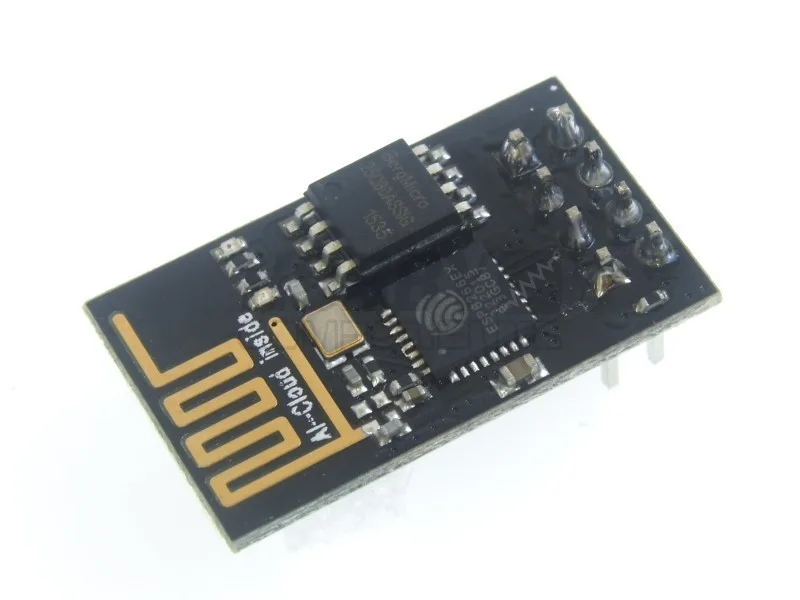
ESP-01 (ESP8266) wireless WIFI transceiver