
Quick answer
Choose the Polka Dot EVA cable with the 340g stainless counterweight bar if your desk is hard, smooth and your board slides during fast-trigger play; choose the Blue & White EVA cable with 3m flex if you route the cable around a monitor arm, under a shelf or across a wide desk and want the lightest possible drag.
What the counterweight bar actually changes
A counterweight bar is not a performance upgrade for the keyboard signal. It is a desk-behavior choice: the 340g stainless bar anchors the cable run so the cable stays put when you sweep the mouse or shift the board. On a hard mat or bare desk it keeps the cable from skating; on a thick soft mat it can press a dent into the surface over time, and on a glass desk it needs a pad underneath to avoid scratching.
The trade-off is portability. If you carry your board to meets or between rooms, a weighted cable is one more heavy item in the bag. The Blue & White EVA build skips the bar and keeps the run lighter, which matters more when the cable is moved often.
Why 3m of flex matters more than color on wide desks
Both cables are built for responsive 8KHz setups and HE magnetic keyboards, including fast-trigger and rapid-trigger builds. The practical difference is reach: the Blue & White EVA cable offers a flexible 3m stretched reach, so you can route it behind a monitor, along the back edge of a desk or through a cable channel without pulling the connector taut.
Color comes after routing. Pick the colorway that matches your keycaps only once you know the cable will reach your preferred path. A shorter run that forces the aviator connector to dangle mid-air looks worse than a color that is one shade off.
Color choice: match the case, not the keycaps
Blue & White reads as a cooler accent and pairs naturally with white, silver, blue and gray cases. Black-and-White Polka Dot is a higher-contrast pattern that stands out against plain black or white desks and busy keycap sets. If your keycaps already carry a strong pattern, a solid two-tone cable keeps the desk calmer; if the board is plain, the polka dot adds visual interest without changing the keyboard.
Neither colorway is more durable by specification. Treat color as a visual decision and let the counterweight and reach decide the model.
The USB-C detail worth checking before you buy
The Polka Dot cable uses a USB-A/USB-C interchangeable connection, which helps if you move between a desktop with USB-A ports and a laptop with USB-C. The Blue & White listing does not state an interchangeable connector, so do not assume it. If your only free port is USB-C and you need that flexibility, the Polka Dot model is the safer pick.
Decision rules for color and counterweight
- Hard, smooth desk and a board that slides: Choose the Polka Dot cable with the 340g stainless counterweight bar. The weight anchors the run so fast-trigger play does not drag the cable out of place. Put a thin pad under the bar on glass or polished surfaces.
- Wide desk, monitor arm or under-shelf routing: Choose the Blue & White EVA cable with 3m flex. Measure your intended path first; if it exceeds roughly 2.5m, the longer run is the deciding factor over color.
- You switch between USB-A and USB-C hosts: Choose the Polka Dot model, which lists a USB-A/USB-C interchangeable connection. Do not assume the Blue & White cable offers the same.
- You carry the board to meets or between rooms: Skip the counterweight bar and take the lighter Blue & White build. A 340g bar is one more heavy item in the bag.
- Color match: Match the cable to the case finish first, then to the keycaps. Blue & White suits white, silver, blue and gray cases; Polka Dot suits plain black or white desks and plain keycap sets.
Product facts
-
8KHz EVA Braided Aviator Keyboard Cable — Blue & White, 3m Flex: EVA two-piece braided aviator construction with a flexible 3m stretched reach, built for 8KHz HE magnetic keyboard setups. The longer flexible run suits wide desks and routed paths where a short cable would pull tight.
8KHz EVA Braided Aviator Keyboard Cable — Blue & White, 3m Flex
8KHz EVA Braided Aviator Keyboard Cable — Blue & White, 3m Flex
-
8KHz USB-C Braided Aviator Keyboard Cable — Polka Dot, 340g Stainless Counterweight Bar: Black-and-White Polka Dot two-piece braided aviator cable with a 340g stainless steel counterweight bar and USB-A/USB-C interchangeable connection. The weighted bar holds the run steady on hard desks, and the interchangeable connector covers both USB-A and USB-C ports.
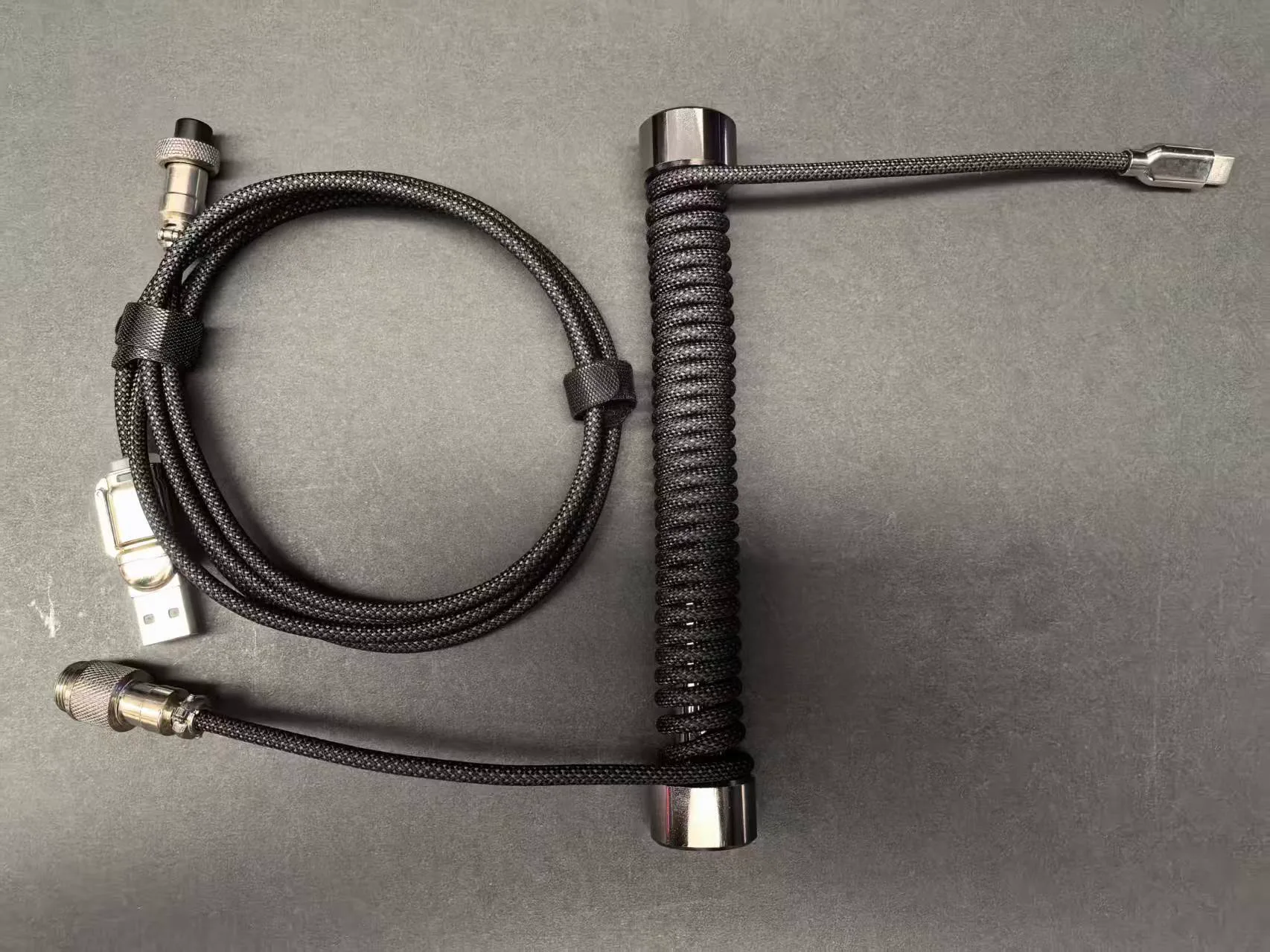
8KHz USB-C Braided Aviator Keyboard Cable — Polka Dot, 340g Stainless Counterweight Bar
Who should choose which
Best for
- Players on hard or smooth desks who want a cable that stays put during fast-trigger play
- Users who need both USB-A and USB-C host options from one cable
Not for
- Owners of thick soft mats who do not want a weighted bar pressing into the surface
- Buyers who route cables beyond 3m or who need a stated connector type the listing does not confirm