What the 1.85m layout means for your desk
The EVA USB-C Braided Aviator Keyboard Cable measures 1.85 meters in total, split into a 1.5m straight section and a 0.35m coil. That layout gives you a long run from a USB port to the keyboard, with the coiled section keeping the last stretch tidy near your desk edge. Before you buy, measure the path from your PC or hub to where the keyboard sits, then check that the coil has room to relax without pulling the connector sideways. If your tower sits far away, the straight section does most of the work; if your port is close, the coil becomes the visible feature.
How to connect the EVA cable to an 8KHz keyboard
The supplied details confirm USB-A/USB-C interchangeability at the host end and a Type-C connector for the keyboard end. They do not list a required power adapter, driver, or firmware step, so treat the points below as a physical setup sequence rather than a software procedure.
- Check the keyboard-side connector: The cable uses a Type C connector for the keyboard. Confirm your keyboard's port matches before routing the cable.
- Choose the host connector: The cable supports USB-A and USB-C at the host end. Pick the port that matches your PC, laptop, or hub.
- Route the 1.85m run: Lay the 1.5m straight section from the host to the coil, then let the 0.35m coil sit near the keyboard without tight bends.
- Seat both ends firmly: Push each connector fully into its port. The gold-plated or silver-plated terminal depends on the edition, but both are supplied as the cable's terminal finish.
Why the aviator connector is a setup checkpoint, not a speed switch
The EVA cable is described as built for responsive 8KHz keyboard setups and for high-speed signal delivery to support HE magnetic keyboards, including fast-trigger and rapid-trigger builds. The aviator connector itself is a two-piece braided construction with USB-A/USB-C interchangeability; the supplied record does not claim that the connector changes polling rate on its own. Use the connector as a convenient break point for routing and swapping host ends, and rely on your keyboard's own 8KHz capability for the polling rate. If your keyboard is not an 8KHz or HE model, the cable still works as a compatible mechanical keyboard cable, but the high-polling-rate benefit is not confirmed for your setup.
EVA cable specifications that affect fit
-
8KHz EVA USB-C Braided Aviator Keyboard Cable — Iridescent, 1.85m: Length: 1.85 meters (1.5m straight section + 0.35m coil) Plan your desk route around the straight run and leave slack at the coil so the keyboard connector is not pulled.
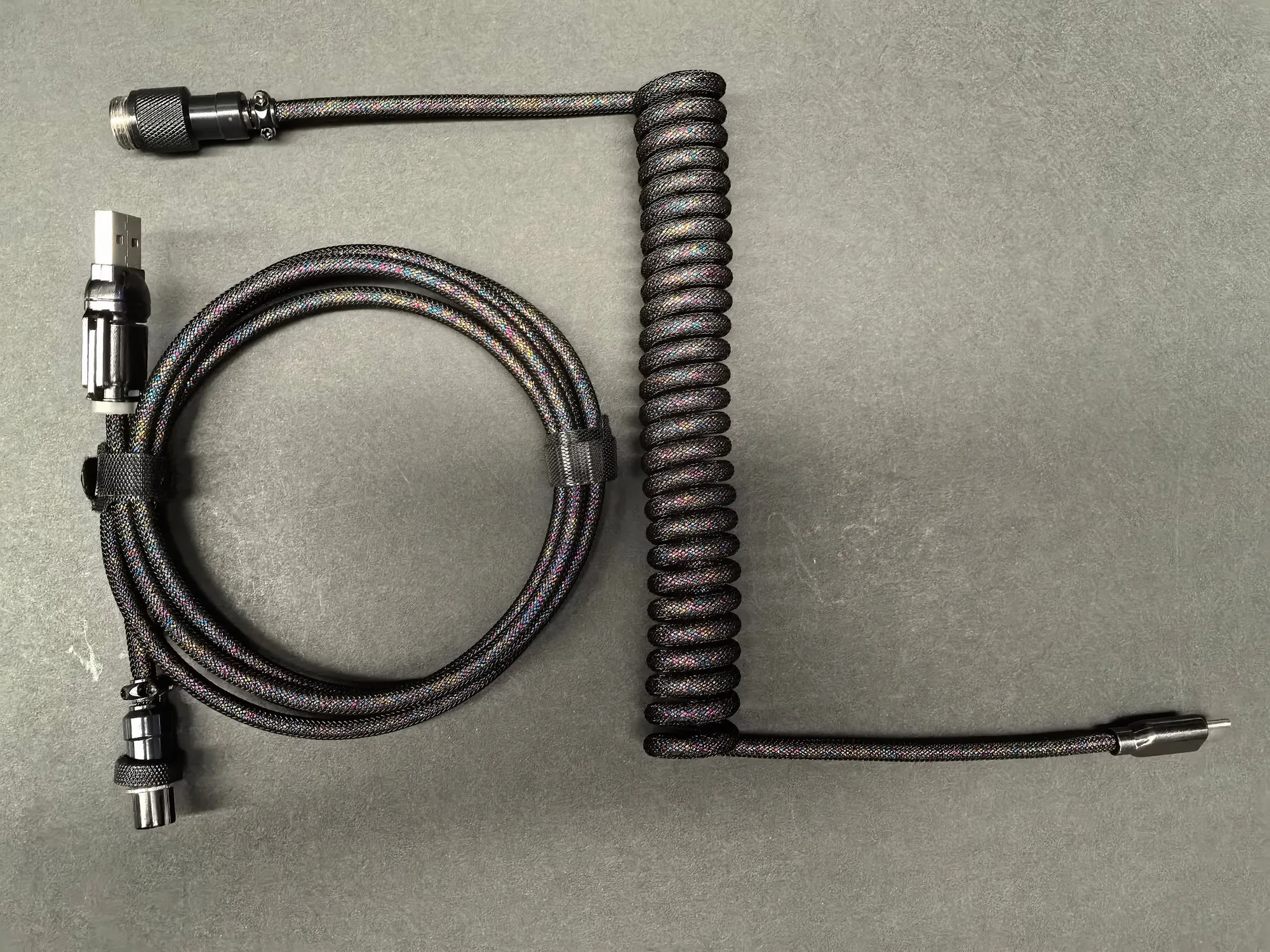
8KHz EVA USB-C Braided Aviator Keyboard Cable — Iridescent, 1.85m
-
8KHz EVA USB-C Braided Aviator Keyboard Cable — Iridescent, 1.85m: Connector: Type C (Mini/Micro) to USB-A and USB-C Confirm both your keyboard port and host port before ordering; the cable covers USB-A and USB-C hosts.
-
8KHz EVA USB-C Braided Aviator Keyboard Cable — Iridescent, 1.85m: Cable Diameter: 5mm A 5mm braided cable needs a little more clearance in cable channels and under desk trays than a thin rubber cable.
-
8KHz EVA USB-C Braided Aviator Keyboard Cable — Iridescent, 1.85m: Cable Material: Superconductive silver-plated oxygen-free copper This is the supplied conductor material; it is part of the cable's build, not a separate accessory you add.
Iridescent finish: what to expect and what to avoid
The iridescent EVA sleeve is cosmetic, and the supplied record does not describe a protective coating or a cleaning procedure. Keep the braid away from sharp desk edges and avoid dragging the aviator connector across rough surfaces, since the finish is the visible part of the cable. For everyday care, a dry or barely damp cloth is the conservative choice when no manufacturer cleaning instructions are supplied; do not soak the braid or use solvent-based cleaners. The Atwood nylon and PET cover materials are listed as the sleeve construction, so treat the surface as a textile rather than a hard plastic shell.
What the catalog does not confirm before you install
The supplied information does not include a driver, firmware update, or power-adapter requirement for the EVA cable. It also does not confirm compatibility with every keyboard model beyond the stated Type-C keyboard connection and USB-A/USB-C host options. If your keyboard uses a different connector or a proprietary port, check that before ordering. The pictured keyboard, mouse, and mouse receiver are not included, so plan the cable as a standalone accessory. Finally, the catalog lists one Standard variant; the record does not confirm other lengths or color editions for this exact model.