Quick answer
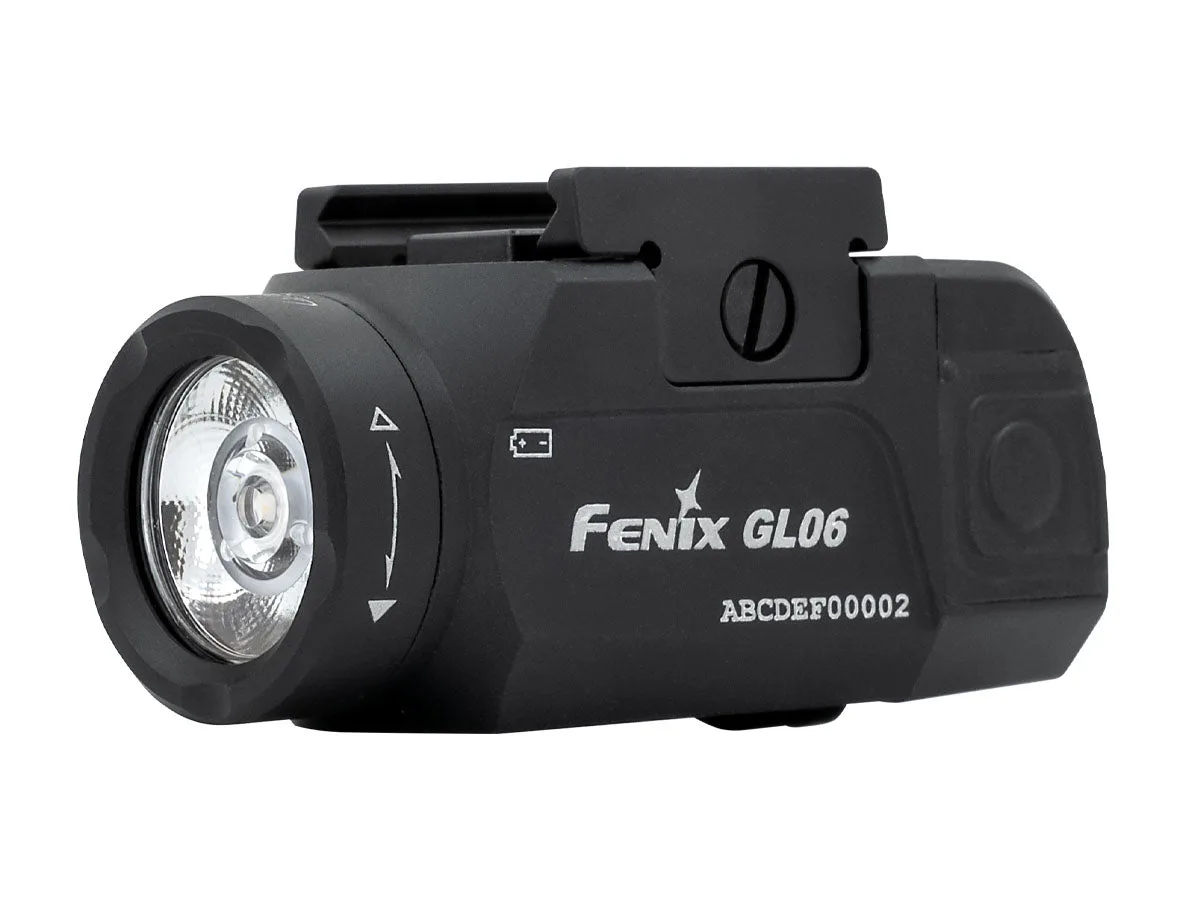
Mount the Fenix GL06 by confirming your pistol has a barrel length of 4 inches or longer, sliding the light onto the rail, and tightening the mount until it holds firmly without crushing the rail. The GL06 is built for compact pistols, not 3-inch sub-compacts, so checking fit first prevents a wasted install.
Check compatibility before you touch the rail
The GL06 is specifically designed for compact pistols and fits select models with barrel lengths of 4 inches or longer. It will not fit 3-inch sub-compact models. Also confirm your pistol uses a GLOCK-style or the matching mounting interface for the GL06 variant you own, because the available Weapon Fit option determines which pistols the light will attach to.
Prepare the pistol and the light
Unload the pistol and remove the magazine before any work on the rail. Wipe the rail and the GL06 mounting surface with a dry cloth to remove oil or debris, since a clean interface lets the mount sit flush. If your pistol uses an adapter plate, install it per the pistol manufacturer's instructions before sliding on the light.
Slide and seat the light on the rail
With the pistol pointed in a safe direction, align the GL06 mount with the rail slot and slide it rearward until it stops. You want the light body positioned so the bezel clears the muzzle and the switch remains reachable with your support hand. Do not force it; if it binds, remove it and recheck the rail interface.
Tighten the mount and verify retention
Tighten the mounting screw or clamp until the light no longer shifts when you apply light hand pressure. Over-tightening can damage the rail or strip the mount, so stop as soon as movement is gone. Then press the activation switch to confirm the light powers on and the beam points where you expect.
Confirm beam alignment and switch access
The GL06 produces up to 600 lumens with a 459-foot beam distance, which is enough to identify a target in low light. Check that the beam is centered and that your fingers can reach the switch without shifting your grip. If the light sits too far forward or back, loosen the mount, reposition, and retighten.
Mounting steps at a glance
- Verify barrel length and rail interface: Measure or look up your pistol's barrel length and confirm it is 4 inches or longer. Check that your pistol matches the GLOCK-style or other interface listed for the GL06 variant you have. If your pistol is a 3-inch sub-compact, the GL06 will not fit.
- Clear and clean the pistol: Unload the pistol, remove the magazine, and wipe the rail and light mount with a dry cloth to remove oil or grit. A clean rail prevents the light from shifting after tightening.
- Slide the GL06 onto the rail: Align the mount with the rail and push it rearward until it stops. Position it so the bezel clears the muzzle and the switch is reachable. If it binds, stop and recheck the interface rather than forcing it.
- Tighten until movement stops: Turn the mounting screw or clamp until the light no longer shifts under light hand pressure. Do not over-tighten. Over-tightening can damage the rail or strip the mount.
- Test the light and beam alignment: Activate the GL06 and confirm it powers on. Check that the beam is centered and that you can reach the switch without adjusting your grip. Reposition and retighten if the beam is off-center or the switch is hard to reach.
Product facts
- Fenix GL06 Compact Weapon Light: The Fenix GL06 is a compact weapon light with a maximum output of 600 lumens and 459ft (140m) beam distance, designed for compact pistols with barrel lengths of 4 inches or longer. This output and beam distance give you enough light to spot a target in the dark, but the 4-inch minimum barrel length means you must verify your pistol before mounting.