Quick answer
Use the Fotodiox Pro Lens Hood for Hasselblad Bay 50 (B50) on the C 80mm f2.8 by seating it on the lens's B50 bayonet and twisting until it locks, then check the front element and corners before shooting. Use it outdoors or under strong light, and remove it when you need the smallest possible setup or are working in tight spaces.
Why the B50 mount matters more than the hood shape
Hasselblad C lenses use a bayonet filter/hood mount, and the 80mm f2.8 standard lens takes the Bay 50 size. A hood made for a different bay size, or a generic screw-in hood, will not seat correctly. The Fotodiox hood is listed as a dedicated B50 bayonet mount, so it is matched to that mount rather than clamped or screwed on.
That fit matters because a loose or mismatched hood can shift in the bag, sit off-center, or block part of the frame. Before you buy any Hasselblad C lens accessories, confirm the bay size on the lens barrel, not just the focal length.
When the hood helps and when to take it off
A lens hood helps most when strong light comes from the side or above and can strike the front element, causing flare or washed-out contrast. The Fotodiox hood's matte black interior is designed to reduce internal reflections, and its wide opening is intended to reduce vignetting with wide-angle lenses. On an 80mm standard lens, that wide opening gives you margin against corner shading.
The tradeoff is size. A hood adds bulk and can intrude in tight framing or when you are close to a subject. If you are working in a cramped space, packing light, or using on-camera flash close to the lens, remove the hood and rely on careful framing instead. The hood protects the front element from bumps and light, but it is not a substitute for a lens cap when the camera is stored.
Installing and using the B50 hood: step by step
- Confirm the lens is a Bay 50 C lens: Check the lens barrel or the manual for the bay size. The C 80mm f2.8 standard lens uses Bay 50. If your lens is a different bay size, this hood will not seat correctly. Do not force a hood onto a mount it was not made for; check the bay size first.
- Line up the hood's bayonet tabs with the lens mount: With the camera off and the lens supported, align the hood's bayonet tabs with the matching slots on the front of the lens. Keep the hood square to the lens rather than tilting it. A tilted start is the most common cause of a hood that will not turn.
- Twist until the hood seats and locks: Turn the hood in the direction the bayonet allows until it stops. It should sit flush and not wobble. Do not over-tighten; the hood is plastic and the mount is designed to seat, not to be forced. A hood that still wobbles after seating is not fully engaged; re-seat it before shooting.
- Check the front element and frame corners: Look through the viewfinder or at the ground glass and confirm the hood does not appear in the corners. The wide opening is intended to reduce vignetting, but a hood that is not fully seated can still intrude. If the hood is visible in the frame, remove and re-seat it before you shoot.
- Decide whether to keep it on for the shot: Keep the hood on when light is strong or coming from the side. Remove it in tight spaces, when packing small, or when a close flash setup makes the hood cast a shadow. Treat the hood as a light-control and protection tool, not a permanent fixture.
- Remove and store it without strain: Twist the hood off in the reverse direction and store it flat or on the lens with the cap on. Avoid leaving it mounted loosely in a bag where it can catch on other gear. Store the hood off the lens if the bag is crowded; a caught hood can stress the bayonet.
Product facts
-
Fotodiox Pro Lens Hood for Hasselblad Bay 50 (B50) C 80mm f2.8 Standard Lens: Dedicated B50 bayonet mount lens hood with a matte black interior, made of high-impact plastic. The bayonet fit matches the Hasselblad 80mm f2.8's Bay 50 mount, while the matte interior helps control reflections and the plastic keeps the hood light on the lens.
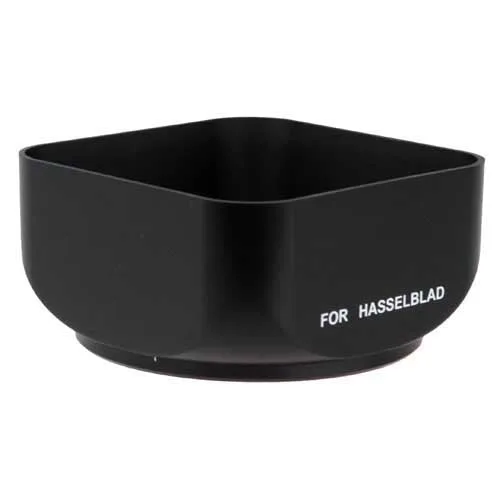
Fotodiox Pro Lens Hood for Hasselblad Bay 50 (B50) C 80mm f2.8 Standard Lens