Start with what the case is made of
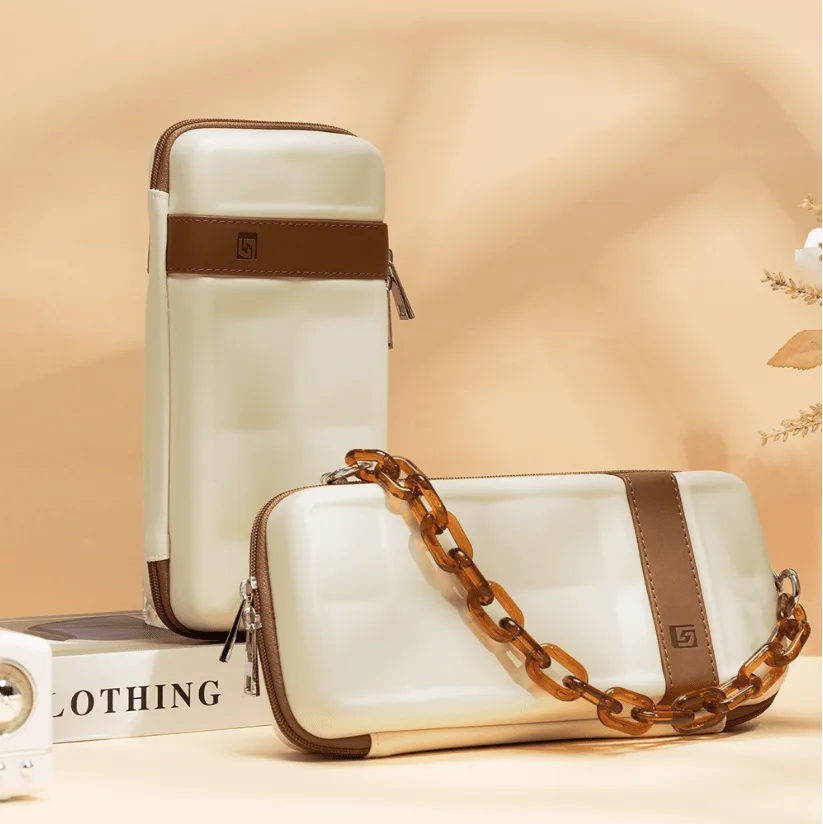
The GeekShare Bracelet Carrying Case combines a PU + EVA composite shell with a soft, non-slip silicone handle and a decorative chain. That mix matters for cleaning: the shell can handle a gentle wipe, but the chain and handle need a lighter touch. The case is listed for Nintendo Switch and Nintendo Switch OLED, and it holds the console, Joy-Con controllers, up to 10 game cards, and small accessories.
Before you clean, empty the case completely. Remove the console, controllers, game cards, and any loose items. Check the interior for crumbs or dust, and shake them out over a bin. This prevents grit from scratching the screen or shell when you wipe the inside.
A simple cleaning routine for the shell, handle, and chain
Use these steps in order. They rely on the materials listed in the catalog and avoid harsh treatments that could damage the finish.
- Wipe the PU + EVA shell: Dampen a soft cloth with water and wring it out well. Wipe the cream-and-brown exterior gently. Avoid soaking the case or using abrasive pads, since the composite is designed to absorb impacts, not to be scrubbed.
- Clean the silicone handle: The handle is soft and non-slip. Wipe it with the same damp cloth, then dry it with a towel. Do not pull or stretch the handle while cleaning, as that could loosen its attachment.
- Wipe the chain detail: The chain is a decorative element. Use a dry or barely damp cloth to remove fingerprints. Do not submerge the chain or use polish, which could remove its finish.
- Dry everything before reloading: Leave the case open in a well-ventilated area until the interior and exterior are completely dry. Put your console back only when the case is dry to the touch.
What to avoid when cleaning
The supplied information does not include manufacturer cleaning instructions, so treat the steps above as general care for the listed materials. Skip bleach, alcohol, and solvent-based cleaners, which can degrade PU and silicone. Do not put the case in a washing machine or dryer. Also avoid leaving the case in direct sunlight for long periods, as that can fade the cream-and-brown palette.
Materials that shape your care routine
-
GeekShare Bracelet Carrying Case: PU + EVA composite structure helps absorb external impacts. The shell is built for protection, so gentle wiping is enough; harsh scrubbing is unnecessary and may wear the surface.
GeekShare Bracelet Carrying Case
-
GeekShare Bracelet Carrying Case: Soft, non-slip silicone handle. Silicone can attract dust, so wipe the handle regularly and avoid stretching it.
-
GeekShare Bracelet Carrying Case: Customized metal badge and stylish chain detail. These decorative parts need dry or barely damp cleaning to keep their appearance.
Storage habits that protect the case and your console
When the case is not in use, keep it closed to stop dust settling inside. Store it in a cool, dry place away from direct heat. If you use the built-in playstand, fold it back into position before closing the case. The case holds up to 10 game cards, so keep cards in their slots rather than loose in the main compartment to avoid scratches.
For travel, the silicone handle makes the case comfortable to carry, but avoid hanging it by the chain. The chain is a design detail, not a load-bearing strap. Place the case in a larger bag or carry it by the handle.
Quick checks before you zip up
- Console is dry and free of grit: Wipe the console with a dry cloth if needed, and make sure no crumbs are in the case.
- Game cards are in their slots: Up to 10 cards fit in the dedicated storage; loose cards can rattle and scratch.
- Playstand is folded flat: The integrated stand should be closed before you zip the case.
- Chain is not snagged: Check that the chain detail is not caught in the zipper before closing.
Where the supplied information stops
The catalog does not provide specific drying times, stain-removal methods, or warranty care requirements. If you encounter a stain or damage that a gentle wipe cannot fix, contact GeekShare support for guidance rather than experimenting with stronger cleaners.