Quick Answer
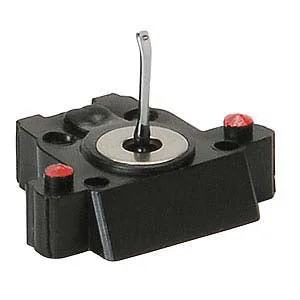
Most Grado replacement stylus questions come down to three checks: confirm the stylus model matches your cartridge body, inspect the diamond and cantilever for wear or damage, and install by aligning the stylus assembly and seating it fully. If sound is distorted, channel balance shifts, or the stylus looks worn, replace it rather than trying to repair it. The Stylus Red4 is a user-replaceable option for E-RED4, E-RED1PC4, and E-RED1PM.
Grado replacement stylus questions tend to cluster around fit, wear, and installation because those are the three moments where owners either solve the problem or create a new one. This FAQ answers the specific questions readers send most often, with the practical checks that separate a correct replacement from a guess.
Each answer stands on its own, so you can jump to the question that matches your situation. Where a catalog fact settles the issue, it is stated plainly; where a specification is not published, that limitation is noted instead of guessed.
Fit and Compatibility Questions
The stylus must match the cartridge body it is designed for. Grado publishes the compatible bodies for each replacement stylus, so start there rather than by visual comparison. The Stylus Red4 is listed as a user-replaceable stylus for E-RED4, E-RED1PC4, and E-RED1PM. If your cartridge body is not on that list, the Red4 is not the correct replacement for it.
A stylus that fits physically but is not listed for your body is still the wrong part. The cantilever geometry and suspension are matched to the body, so a near-fit can change tracking behavior and sound. When in doubt, match the model number on your existing stylus or the cartridge documentation before ordering.
- Check the model number on the stylus you are replacing, not just the cartridge family name.
- If your body is not listed for Stylus Red4, do not assume it will work correctly.
- Keep the old stylus as a reference until the new one is confirmed working.
Wear, Damage, and When to Replace
Wear is cumulative and not always visible without magnification. The practical signs are a loss of high-frequency detail, increased surface noise on records that used to play quietly, and a slow drift in channel balance. Distortion that appears only on inner grooves is another common wear indicator. If you need to raise tracking force beyond the recommended range to stop mistracking, the stylus is usually past its useful life.
Replacement stylus wear is best judged against a known-good record rather than memory. Play a clean, familiar LP and listen for changes in sibilance and tracking. If the same record now sounds harsh or skips where it did not before, and alignment and tracking force are correct, replace the stylus. Physical damage such as a bent cantilever or a missing diamond tip requires replacement regardless of hours logged.
- Use one familiar record as your wear reference, not a rotation of different pressings.
- A bent cantilever or chipped diamond is a replacement, not an adjustment.
- Do not compensate for wear by increasing tracking force beyond the recommended range.
Installation and Setup Questions
Grado stylus installation is a user-level task on models designed for it, but it still requires care. Power down the turntable, secure the tonearm, and remove the old stylus by gripping the assembly as instructed for your model. Align the new stylus with the body and seat it fully; a partially seated stylus can cause channel imbalance or mistracking that looks like a defect.
After installation, recheck tracking force and anti-skate before playing a record. Do not use a valuable LP for the first play. Use a clean, inexpensive record to confirm the stylus tracks correctly and both channels are present. If the sound is thin, distorted, or one-sided, stop and reseat the stylus before assuming the part is faulty.
- Seat the stylus fully; partial insertion is a common cause of imbalance.
- Reset tracking force after any stylus change.
- Test with a record you do not mind risking, not your best pressing.
Maintenance and Longevity Questions
A replacement stylus lasts longer when the records it plays are clean. Dust and grit at the tip accelerate wear and increase noise. Brush the stylus from back to front with a proper stylus brush, and clean records before play. Avoid touching the cantilever or diamond with fingers, and do not use solvents not intended for stylus cleaning.
Store spare styli in their protective packaging away from heat and moisture. If you remove a stylus for any reason, place it in its case rather than leaving it exposed on a shelf. These habits do not change the wear rate of the diamond itself, but they prevent the avoidable damage that shortens its life.
- Clean records reduce stylus wear more than any other habit.
- Brush the stylus back to front, never side to side.
- Keep spare styli in their cases, not loose in a drawer.
Stylus Replacement Checkpoints
Confirm the model match
Look up your cartridge body against the published compatibility list for the stylus you plan to buy. For Stylus Red4, that list is E-RED4, E-RED1PC4, and E-RED1PM. If your body is not listed, stop and identify the correct stylus before ordering.
Judge wear against a reference record
Play one clean, familiar LP and listen for new harshness, inner-groove distortion, or channel drift. Rule out alignment and tracking force first. If the same record now sounds worse and setup is correct, replace the stylus.
Install, reseat, and retest
Seat the stylus fully, reset tracking force, and test on a record you do not mind risking. If sound is still wrong, reseat before concluding the part is defective. A partial seat is the most common installation error; a full reseat often fixes it.
Grado Parts That Answer Common Stylus Questions
- Stylus Red4: User replaceable stylus for E-RED4, E-RED1PC4, and E-RED1PM. This is the compatibility list to check first. If your cartridge body is not one of these, the Red4 is not the right replacement stylus for you.
- Grado Headphone Replacement G-Cushions: Consumer replaceable genuine Grado ear cushions, standard on PS1000, PS2000, GS1000, GS2000, GS3000, and WHITE HEADPHONE, and they also fit all Prestige, Reference, Statement, Professional, and Limited Edition headphones. Useful when a listener is troubleshooting sound changes and has already ruled out the stylus; worn cushions can change headphone sound and comfort, and they are a user-replaceable part.
- Large Hard-Shell Case for Grado Headphones: Hard-shell zipper case with embossed Grado logo, fits PS1000e, PS2000e, GS1000e, GS2000e, GS3000e, and RS1e, and is the correct case for any headphone with G-cushions. If you store headphones between listening sessions, a hard case prevents the kind of physical damage that leads to repair or replacement questions later.
Most Grado replacement stylus problems are solved by matching the model, checking wear honestly, and seating the new stylus fully. If your body is listed for Stylus Red4, that is your direct replacement path; if it is not, confirm the correct stylus before you buy.