The compatibility check that decides it first
Before you look at the designs, confirm where you edit. The 22 Holiday Overlays for Lightroom & Photoshop are built for Photoshop 2022, Photoshop Elements 11–22, and Lightroom Classic. The supplied product information states plainly that these overlays will not work in Lightroom CC or the Lightroom mobile app.
That single line separates this pack from a lot of holiday overlay shopping. If your holiday photos live on your phone and you finish edits in Lightroom mobile, this set is not the right purchase for that workflow. If you work on a desktop in Lightroom Classic or one of the listed Photoshop versions, you are in the supported range.
What the pack actually contains
-
22 Holiday Overlays for Lightroom & Photoshop: 22 holiday overlays, each with one or more color variations. The color variants are the practical reason to choose a pack over a single overlay: you can match a warm card design or a cooler photo without hunting for a separate download.
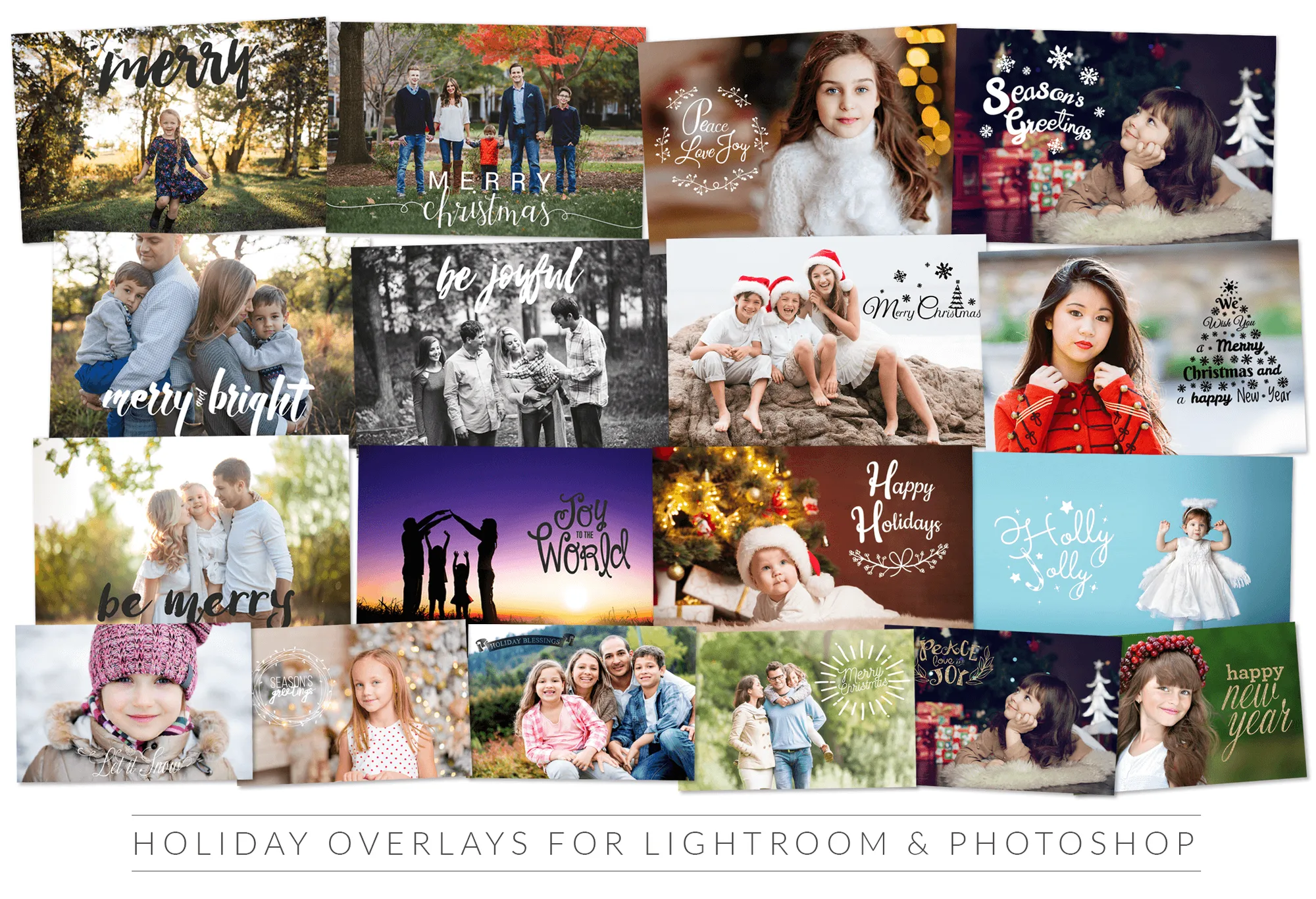
22 Holiday Overlays for Lightroom & Photoshop
-
22 Holiday Overlays for Lightroom & Photoshop: The set includes word-based designs such as Christmas Cheer, Happiest Holidays, Happy Hanukkah, Happy New Year, Holiday Blessings, Joy to the World, Be Merry, Let It Snow, Merry Christmas, Peace Love Joy, and Season's Greetings. The mix covers Christmas, Hanukkah, and New Year greetings, so one pack can serve several cards or portrait sessions rather than a single holiday.
-
22 Holiday Overlays for Lightroom & Photoshop: Instructions for use are included. You are not left guessing how to apply the files, which matters if overlays are new to your editing routine.
Where this overlay pack earns its place
The product record names Christmas cards, New Year's cards, holiday templates, and everyday photos as intended uses. Those are the jobs to judge it against.
- Greeting cards and templates: Word-based overlays like Merry Christmas or Happy New Year suit a card layout where the greeting is the point. The color variations let you keep the type readable against different backgrounds.
- Holiday portrait overlays: For portraits, the quieter phrases such as Be Merry or Peace Love Joy work as a light seasonal touch. The pack is not a full portrait retouching system, so plan to do your portrait work first and add the overlay as a finishing layer.
- Everyday photos with a seasonal caption: The record explicitly includes everyday photos, which is useful for family snapshots that need a caption rather than a full design treatment.
When a 22-overlay set is the right size, and when it is not
A larger seasonal overlay set is not automatically better. Match the size of the pack to how many holiday projects you actually finish.
- Choose this 22-overlay pack if: You make a handful of cards, a few portrait edits, or one holiday template project and want a spread of greetings with color options in a single download.
- Look elsewhere if: You need overlays for Lightroom CC or the mobile app, or you want a single signature design rather than a varied set of greetings. The supplied record does not describe a mobile-compatible version.
The trade-off to accept before checkout
The clearest trade-off is platform reach. This pack is deliberately tied to desktop editing in Lightroom Classic and the listed Photoshop versions. That focus is fine for a card-making or portrait-finishing workflow, but it means the pack cannot follow you onto a phone edit.
The second trade-off is scope. These are holiday greeting overlays, not a general-purpose texture or light-effect collection. If your holiday edit needs bokeh, atmospheric light, or full design templates, this set covers the wording layer only. The supplied record does not claim to include those other elements.
A sensible order for using the overlays in a holiday edit
The product record confirms instructions are included but does not detail a specific procedure. The order below is a general editing approach, not a manufacturer instruction.
- Finish the photo first: Complete exposure, color, and retouching before adding a greeting overlay, so the text sits on the image you actually intend to keep.
- Pick the greeting before the color: Choose the phrase that fits the occasion, then use the supplied color variations to keep it legible against your background.
- Keep the overlay as a separate layer: In Photoshop and Lightroom Classic, working non-destructively lets you reposition or swap the overlay without redoing the edit.
- Check the card at final size: A greeting that reads well on screen can crowd a printed card. Review the layout at the size you will deliver.
Price and format at a glance
- 22 Holiday Overlays for Lightroom & Photoshop: Catalog price is USD 26.13, shown against a catalog comparison price of USD 39.00. For a 22-overlay set with color variations, that is the number to weigh against how many holiday projects you will realistically complete this season.
- 22 Holiday Overlays for Lightroom & Photoshop: The pack is supplied as a Standard option with no additional option types listed. There is no size or license tier to choose between in the supplied record, which simplifies the buying decision.