Quick answer
To add line following to your mBot, attach the Me Line Follower Sensor to the front of the chassis, connect it to a digital port on the mCore, and upload a line-following program from mBlock.
Why the Me Line Follower Sensor works with mBot
The Me Line Follower Sensor is part of the Makeblock open-source platform, which means it is designed to integrate with mBot's mCore board. Its compact size and mounting holes line up with the standard mBot chassis, so you can attach it without extra brackets.
Because the sensor comes with an Arduino library, you can program it in both mBlock's block-based environment and the Arduino IDE. That flexibility makes it a practical upgrade for classrooms that want to teach line-following logic at different levels.
Trade-offs: sensor placement and lighting
The sensor detects contrast between the line and the floor, so it works best on a matte surface with a dark line on a light background (or vice versa). Shiny floors can reflect infrared light and confuse the sensor, so test on a matte surface first.
Placement matters: the sensor should sit about 1–2 cm above the floor. If it is too high, it may not detect the line reliably; if it is too low, it can scrape the surface. Adjust the mounting height before you start programming.
Step-by-step installation and programming
- Mount the sensor: Attach the Me Line Follower Sensor to the front of the mBot chassis using the included screws. Position it so the two sensor eyes face downward, about 1–2 cm above the floor. Check that the sensor is parallel to the ground; a tilted sensor will miss the line. Ensure the sensor is level and at the correct height before tightening the screws.
- Connect to the mCore: Plug the sensor's cable into a digital port on the mCore (commonly port 2 or 3). Use the port that matches your program. If you use the wrong port, the sensor will not respond, so double-check the port number in your code. Note the port number you use; you will need it in the program.
- Upload the line-following program: Open mBlock, select the mBot board, and write a simple program: read the sensor values, and if the left sensor detects the line, turn right; if the right sensor detects the line, turn left; if both detect the line, go straight. Upload the program to the mCore. A common mistake is forgetting to set the correct port in the 'read digital' block, so verify that the port matches the physical connection. Test on a matte surface with a high-contrast line. If the robot zigzags, reduce the turn speed or adjust the sensor height.
Product at a glance
-
Me Line Follower Sensor: The Me Line Follower Sensor is part of the Makeblock open-source construction platform and comes with an Arduino library for easy programming. This means the sensor plugs directly into your mBot's mCore and works with mBlock's block-based coding, so you can add line following without soldering or custom drivers.
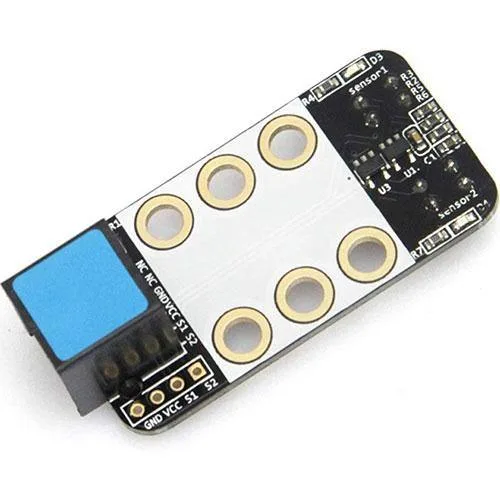
Me Line Follower Sensor