Quick answer
Align the Bruder 02222 Lemken VarioPack K's hitch with your Bruder tractor's rear coupling, push until it clicks, and secure the locking pin. For front mounting, attach the included bracket to the tractor's front linkage first.
Before you start: check tractor compatibility
The Bruder 02222 Lemken Front Furrow Press VarioPack K is designed to fit most Bruder tractors with a standard rear or front three-point hitch. It works especially well with larger farm tractor models like the John Deere 9620RX or Massey Ferguson 7624 series. If your tractor has a smaller hitch or a non-standard coupling, you may need an adapter (sold separately). Always test the fit loosely before tightening any parts.
Common mistake: forcing the hitch
A frequent error is trying to push the furrow press onto the tractor hitch without first aligning the locking mechanism. The VarioPack K uses a spring-loaded pin that must be pulled back before sliding the implement onto the hitch ball. Forcing it can bend the pin or scratch the plastic. Always pull the pin, slide the implement on, then release the pin to lock it in place.
Step-by-step attachment guide
- 1. Position the tractor and implement: Place your Bruder tractor on a flat surface. Set the VarioPack K behind (or in front of) the tractor so the hitch opening aligns with the tractor's coupling ball or hook. Make sure the tractor is stable; use a non-slip mat if needed.
- 2. Pull the locking pin: Locate the spring-loaded locking pin on the VarioPack K's hitch. Pull it outward and hold it in the open position. This clears the way for the coupling. If the pin feels stuck, check for debris or paint in the groove; do not force it.
- 3. Slide the implement onto the hitch: While holding the pin open, gently push the VarioPack K until the hitch opening fully covers the tractor's coupling ball or hook. The implement should sit flush against the tractor's hitch plate. If it doesn't slide easily, realign the tractor or adjust the implement's angle slightly.
- 4. Release the locking pin: Let go of the spring-loaded pin. It should snap back into place, locking the implement onto the hitch. Tug gently on the implement to confirm it's secure. If the pin doesn't click, it may not be fully aligned; repeat step 2 and 3.
- 5. (Optional) Attach the front bracket for front mounting: If you prefer a front-mounted setup, first attach the included bracket to your tractor's front linkage using the provided screws. Then repeat steps 2-4 to connect the VarioPack K to the bracket. Front mounting changes the weight distribution; use it only on tractors rated for front implements.
What you're attaching
-
Bruder 02222 Lemken Front Furrow Press VarioPack K 18.10.10: The Bruder 02222 Lemken VarioPack K has listed dimensions of 15 x 5.9 x 4.7 inches. Its compact size makes it easy to handle and store, but the hitch mechanism is the same as larger Bruder implements, so the attachment steps are consistent across the lineup.
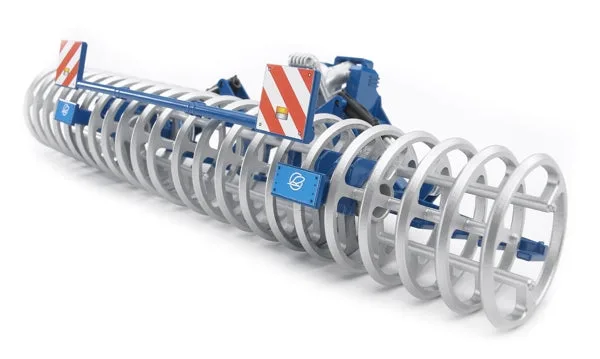
Bruder 02222 Lemken Front Furrow Press VarioPack K 18.10.10