Quick answer
Assemble the Meking Creator Set All-in-One Multi-Function Support Rig by first securing the rolling base, then attaching the vertical pole and extension arm, and finally mounting your laptop tray and accessories in the order that balances weight and reach.
Why a rolling stand rig beats a fixed desk mount
A rolling stand lets you reposition your entire workstation without unclamping or re-leveling gear. The Meking Creator Set includes a wheeled base that glides over carpet and hard floors, making it practical for creators who switch between desk work, overhead flat lays, and standing video setups.
Assembly steps for your Meking Creator Set
- 1. Lock the rolling base and attach the lower pole: Set the base on a flat surface and engage the wheel brakes. Thread the lower pole section into the base socket and tighten the collar by hand until snug. Common mistake: skipping the brake lock causes the rig to roll when you mount heavy gear.
- 2. Insert the upper pole and adjust height: Slide the upper pole into the lower section. Use the locking lever to set the total height to roughly 150cm for desk use or 200cm for overhead shots. Checkpoint: leave at least 10cm of overlap between pole sections for stability.
- 3. Mount the 40-inch extension arm: Attach the arm bracket to the top of the upper pole. Insert the arm and tighten the friction knob just enough to hold the arm level when unloaded. Common mistake: over-tightening the knob can strip the threads; hand-tighten only.
- 4. Install the laptop tray and balance the load: Slide the laptop tray onto the arm’s mounting plate and lock it. Place your laptop on the tray, then adjust the arm’s counterbalance spring so the tray stays put when you let go. Checkpoint: if the arm droops, increase spring tension; if it rises, reduce tension.
- 5. Add accessories (camera, mic, light) last: Attach each accessory to the remaining mounting points on the pole or arm. Start with the heaviest item (camera) closest to the pole, then add lights and mics outward. Common mistake: mounting a heavy light at the far end of the arm first can tip the rig; always load heaviest items nearest the center column.
Key product details
-
Meking Creator Set All-in-one Multi-Function Support Rig: Reaches 220cm with a 2-section vertical pole and a 40-inch extension arm. This range lets you shoot overhead flat lays or product demos while keeping your laptop at eye level, reducing neck strain during long editing sessions.
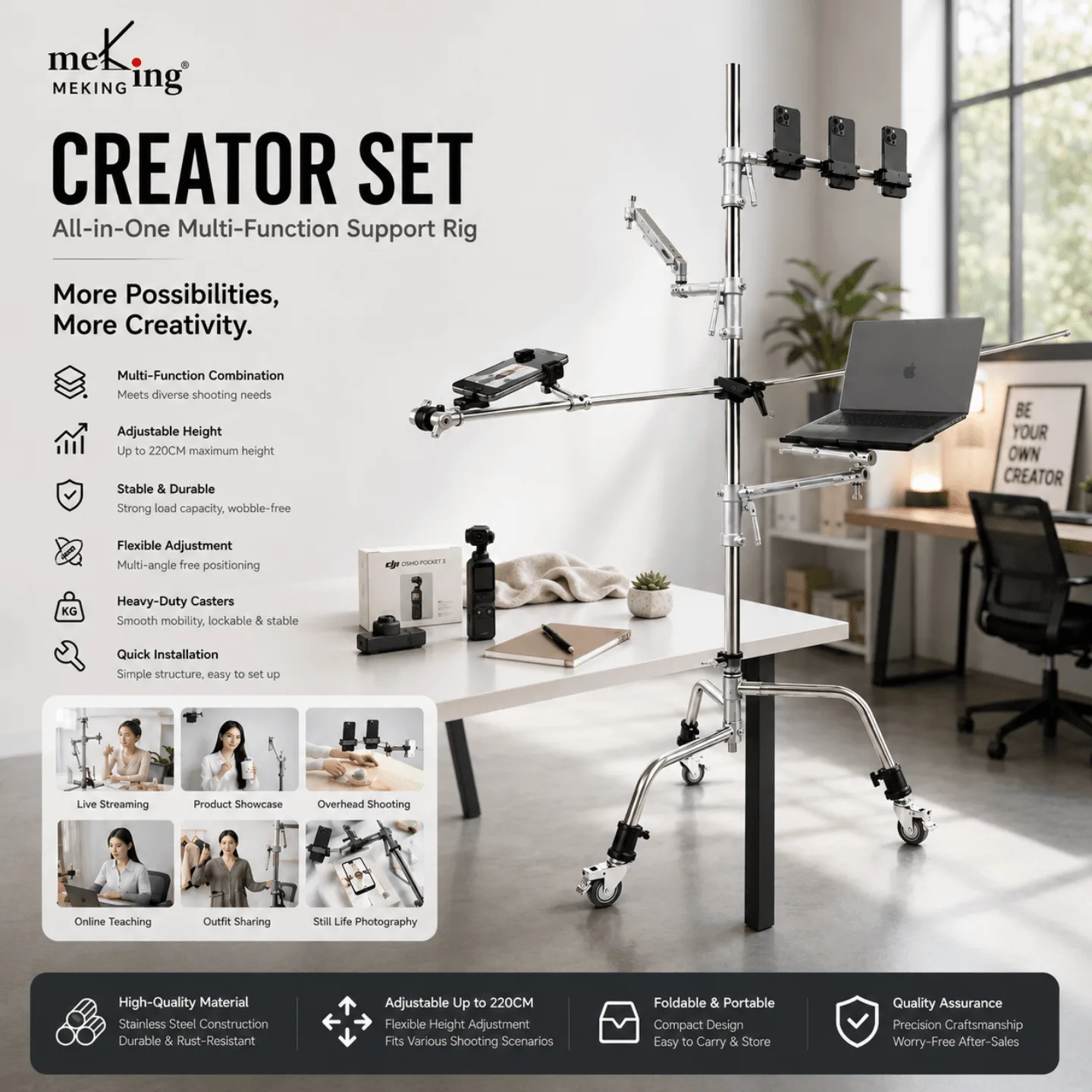
Meking Creator Set All-in-one Multi-Function Support Rig