What to Look for in an iPad Mini Case for A17 Pro
Choosing a case for the iPad mini (A17 Pro) means balancing protection, everyday usability, and any mounting needs you might have. The right case keeps your device safe without adding bulk or blocking features you use daily.
Start with the basics: fit, drop protection, and access to ports and buttons. Then consider extras like mounting compatibility, pencil storage, and screen protection. This guide walks through the real trade-offs so you can match a case to how you actually use your iPad mini.
Fit and Protection: The First Decision
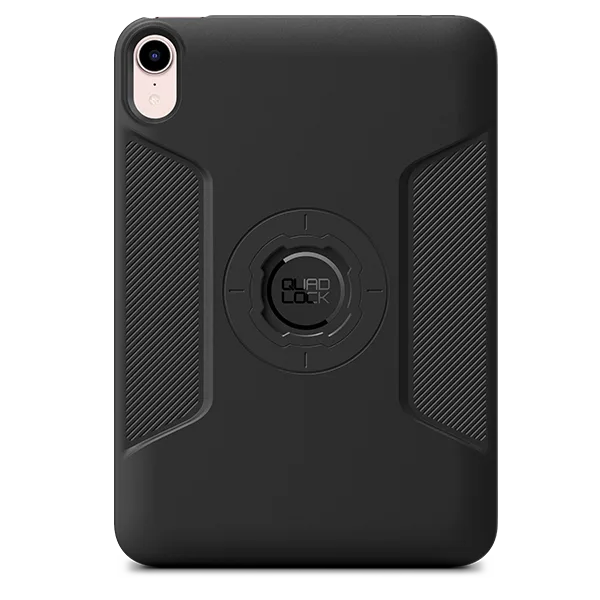
An iPad mini case must fit the exact model. The A17 Pro shares the same chassis as the 6th Gen, so cases designed for that generation will fit. The Quad Lock iPad Case is available in a variant specifically for the iPad mini (A17 Pro) MAG, ensuring a precise fit.
For protection, look for a dual-layer design. The Quad Lock case uses a tough polycarbonate core with an impact-absorbing TPU outer shell. That edge-to-edge TPU layer helps cushion drops while keeping the case slim. The soft-touch material also makes the case comfortable to hold for long reading or gaming sessions.
Protection and Design Details
-
Cases - iPad: PROTECTIVE / IMPACT RESISTANT: tough polycarbonate core and impact absorbing TPU edge-to-edge outer shell. Dual-layer construction provides reliable everyday drop protection without making the case bulky.
Cases - iPad
-
Cases - iPad: SLEEK DESIGN: slim profile and soft touch material. A slim, soft-touch case is easier to hold for extended periods and slips into bags without adding bulk.
Mounting and Accessory Compatibility
If you plan to mount your iPad mini in a car, on a bike, or at a desk, the case's mounting system matters. The Quad Lock iPad Case includes the brand's secure locking mechanism and an embedded MAG ring, making it compatible with both twist-and-lock mounts and Quad Lock MAG heads. This gives you flexibility in choosing a mount that fits your vehicle or workspace.
The case also features integrated tether points for a lanyard or safety strap, which is useful if you carry the iPad hands-free or want extra security when mounted. A discreet recess on the side supports Apple Pencil connection and charging, so you don't have to remove the case to use or charge the pencil.
Screen Protection and Pencil Storage
The Quad Lock case itself does not include a screen cover. For screen protection and a place to secure your Apple Pencil during travel, you can add the Quad Lock iPad Folio. The folio grips the case securely with or without the pencil attached, and it folds into a stand for hands-free viewing. This is a separate purchase, but it turns the case into a complete carry solution.
Accessory Support
- Cases - iPad: The iPad Case features integrated tether points, perfect for the Quad Lock Lanyard or other safety attachments. Tether points add security for mounting or hands-free carry, especially useful in active use like biking or working.
- Cases - iPad: A discreet recess in the side wall supports Apple Pencil connection and charging. You can keep the Apple Pencil attached and charged without removing the case, preserving convenience.
What to Know About Charging
The iPad mini does not support wireless charging, so a case's wireless charging compatibility is not a factor here. You'll charge via USB-C, and the case's design should leave the port fully accessible. The Quad Lock case is designed for everyday charging without obstruction.
Making Your Choice
The best case for your iPad mini A17 Pro depends on your priorities. If you want solid drop protection and the ability to mount the iPad in multiple locations, the Quad Lock iPad Case covers both in a slim package. If you also need screen protection and pencil storage, pair it with the folio. For those who don't need mounting, a simpler case might save weight and cost, but you'll lose the secure locking system and tether points that make the Quad Lock case versatile for active use.