USB-C has become the universal standard for charging and data transfer, but not all cables are created equal. With so many options on the market, choosing the right USB-C cable can be confusing. This guide will walk you through the key factors to consider—wattage, data transfer speeds, connector types, and build quality—so you can make an informed decision that keeps your devices safe and performing at their best.
Whether you're charging a smartphone, a laptop, or a pair of earbuds, the cable you choose matters. A low-quality cable can lead to slow charging, data corruption, or even damage to your devices. Let's break down what you need to know to pick the perfect USB-C cable for your needs.
Understanding USB-C Cable Types and Standards
USB-C is a connector standard, but cables can support different protocols and speeds. The most common types include USB 2.0, USB 3.0/3.1, and USB4/Thunderbolt. USB 2.0 cables are fine for basic charging and low-speed data transfer, but if you need to move large files or connect to an external monitor, you'll want a cable that supports higher data rates.
Another key distinction is the cable's power delivery (PD) capability. PD allows for higher wattage charging, which is essential for laptops and fast-charging smartphones. When you're choosing a USB-C cable, look for one that explicitly states its PD support and wattage rating to ensure it can handle your device's power requirements.
- Check the cable's data transfer speed: USB 2.0 (480 Mbps), USB 3.2 (20 Gbps), or Thunderbolt 4 (40 Gbps).
- For charging, look for 'Power Delivery' support and the wattage rating (e.g., 60W, 100W).
Wattage and Power Delivery: Matching Your Device's Needs
The wattage a cable can handle is crucial. A cable rated for 60W can charge a smartphone or tablet, but it won't be enough for a 16-inch MacBook Pro that needs 96W. Using a cable with insufficient wattage can result in slow charging or even damage to the cable and device. Always check the power requirements of your device and choose a cable that can deliver at least that amount.
For most users, a 60W cable is sufficient for phones and tablets, but if you own a laptop or plan to future-proof your setup, consider a 100W or 240W cable. The PowerKnit FLEX USB-C to USB-C Cable is a great example of a high-wattage option that supports fast charging for a range of devices. Similarly, the PowerKnit Travel Kit USB-C to USB-C Cable 2-Pack offers two cables with decent wattage for travel convenience.
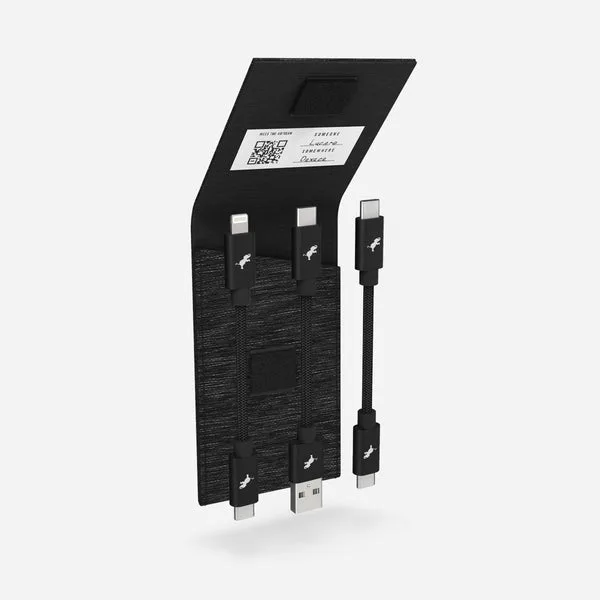
PowerKnit Travel Kit USB-C to USB-C Cable 2-Pack
- For smartphones: 60W cables are usually enough for fast charging.
- For laptops: look for 100W or higher to ensure you can charge at full speed.
Data Transfer Speeds: More Than Just Charging
USB-C cables also differ in data transfer speeds. If you frequently back up your phone or transfer large video files, you'll want a cable that supports USB 3.1 or higher, offering speeds up to 10 Gbps or more. Cheaper cables often only support USB 2.0, which is fine for syncing contacts but painfully slow for big files.
When choosing a cable, consider both your current and future data needs. A high-speed cable like the PowerKnit FLEX USB-C to USB-C Cable not only supports fast charging but also high-speed data transfer, making it a versatile choice for both charging and syncing.
Cable Length and Build Quality: Durability Matters
Cable length affects convenience and charging efficiency. Longer cables are great for reaching outlets across the room, but they can experience voltage drops if they're too long or poorly made. For most users, a 3-foot (1 meter) cable is a good balance for everyday use, while a 6-foot (2 meter) cable is better for travel or using your phone in bed.
Build quality is equally important. Look for cables with reinforced connectors, braided nylon or similar durable materials, and certifications like MFi (Made for iPhone) or USB-IF. The PowerKnit FLEX cables are known for their durability, with a flexible braided design that resists tangling and fraying.
- Choose a length that fits your typical usage—shorter for portability, longer for convenience.
- Invest in a cable with a good warranty and strong connectors to avoid frequent replacements.
Compatibility: Not All USB-C Cables Are Equal for Every Device
While USB-C is universal, some devices have specific requirements. For example, the Nintendo Switch requires a cable that supports DisplayPort Alternate Mode for video output. Similarly, some Android phones support proprietary fast charging standards like Qualcomm Quick Charge or OnePlus Warp Charge, which may require a cable that supports those protocols.
When in doubt, check your device's manual or manufacturer's website for recommended cable specs. The PowerKnit FLEX USB-A to USB-C Cable is a good option if you need to connect older USB-A devices to a USB-C port, offering compatibility and reliability.
Choosing the right USB-C cable doesn't have to be overwhelming. Focus on wattage, data speed, length, and build quality, and you'll find a cable that meets your needs and lasts. For a reliable, high-performance option, consider the PowerKnit FLEX USB-C to USB-C Cable—it offers fast charging, high-speed data transfer, and a durable design that will serve you well for years.