Why QD-OLED Screens Need Special Care
QD-OLED monitors deliver stunning contrast and color, but their delicate surface requires a gentler cleaning routine than standard LCDs. The MSI MAG 321UPX and MAG 271QP QD-OLED monitors use an advanced panel that can be scratched or damaged by harsh chemicals, rough cloths, or excessive pressure.
This guide covers safe, effective methods to remove dust, smudges, and fingerprints without harming your QD-OLED display. The focus is on practical steps you can take at home using common supplies.
What You Should Know Before Cleaning
Always power off the monitor and let it cool before cleaning. Unplug the power cable to avoid any electrical risk. Use a soft, lint-free microfiber cloth—never paper towels, tissues, or abrasive sponges. Avoid any cleaning solutions that contain alcohol, ammonia, or acetone, as these can strip the anti-reflective coating or damage the OLED layer.
For the MSI MAG 321UPX, the supplied information confirms it includes OLED Care 2.0 to reduce burn-in risks, but this feature does not change cleaning precautions. Both monitors share similar panel technology, so the same gentle approach applies to the MAG 271QP and the MAG 321UPX.
Step-by-Step Cleaning Process
Follow these steps to clean your QD-OLED monitor safely.
- Dust the screen first: Use a dry microfiber cloth to gently wipe away loose dust. Start from the top and work downward in straight strokes. Avoid circular motions that can trap grit against the surface.
- Dampen the cloth (do not spray the screen): If smudges remain, lightly dampen a corner of the cloth with distilled water. Never spray liquid directly onto the monitor—moisture can seep into edges and damage internal components.
- Wipe gently with the damp cloth: Using minimal pressure, wipe the affected area in one direction. For stubborn spots, let the moisture sit for a few seconds before wiping again. Do not press hard or scrub.
- Dry the screen immediately: Use the dry part of the cloth to remove any moisture streaks. Ensure the screen is completely dry before turning the monitor back on.
Key Facts About Your QD-OLED Monitor
-
32" MSI MAG 321UPX QD-OLED Monitor: The MAG 321UPX features a QD-OLED panel with 3840x2160 resolution, 240Hz refresh rate, and 0.03ms response time. Its high pixel density and fast response make it ideal for competitive gaming, but the delicate panel requires careful cleaning to avoid dead pixels or scratches.
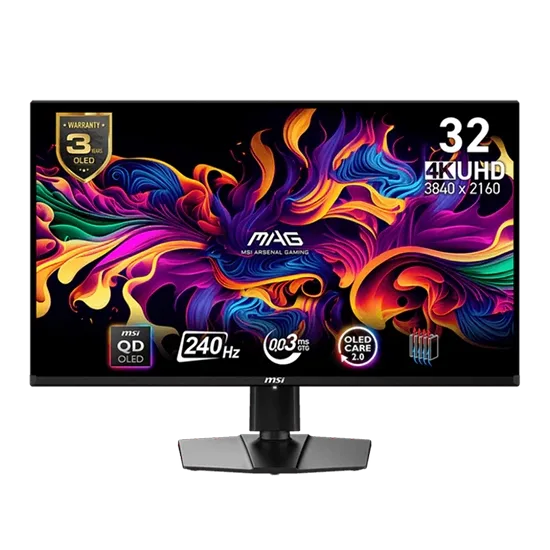
32" MSI MAG 321UPX QD-OLED Monitor
-
27" MSI MAG 271QP QD-OLED X28 Monitor: The MAG 271QP QD-OLED X28 offers a 2560x1440 panel with 280Hz refresh rate and 0.03ms response time. The smaller, high-refresh display is popular for esports, and its QD-OLED surface demands the same gentle cleaning approach as larger models.
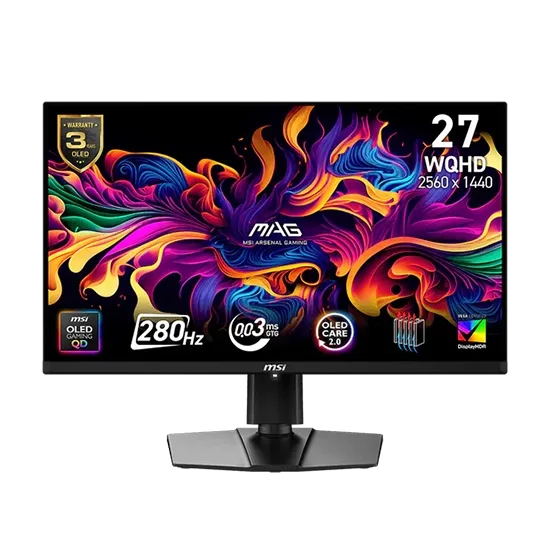
27" MSI MAG 271QP QD-OLED X28 Monitor
What to Avoid
Do not use any commercial screen cleaners unless they are specifically labeled safe for OLED or QD-OLED panels. Even products marketed as 'safe for LCDs' may contain ingredients that harm the coating. Stick to distilled water or a very mild solution of water and a tiny drop of gentle dish soap, but test on a small area first.
Never use compressed air cans—they can spray propellant onto the screen or push dust into edges. Also avoid using any rough cloths, including those with added fibers or textures. Always store your microfiber cloth in a clean bag to prevent picking up dirt that could scratch the screen later.
When to Clean Your Monitor
Clean only when dust or smudges are visible. Frequent unnecessary wiping can increase the risk of micro-scratches over time. A good practice is to dust the screen once a week with a dry microfiber cloth and do a deeper clean only when needed. If you notice persistent marks that do not come off with gentle damp wiping, consult the manufacturer's guidelines rather than using stronger solvents.