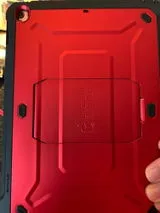
Your Steam Deck is a powerful handheld that goes wherever you do, and its rugged case is the first line of defense against drops, bumps, and daily wear. The Steam Deck Unicorn Beetle PRO Rugged Kickstand Case is built to take abuse, but even the toughest armor needs regular cleaning to stay in top shape. Dust, sweat, and grime can accumulate in crevices, dull the finish, and even affect the kickstand's function.
In this guide, we'll walk you through the best methods to clean and maintain your Unicorn Beetle PRO case, ensuring it continues to protect your device and look great for years. Whether you're a casual gamer or a hardcore enthusiast, these tips will keep your case in pristine condition.
Why Regular Cleaning Matters
A rugged case like the Unicorn Beetle PRO is designed to absorb shocks and shield your Steam Deck from impact. However, when dirt and debris build up in the corners or around the kickstand, they can create friction points that wear down the case over time. Moreover, oils from your hands can make the surface slippery, reducing your grip during intense gaming sessions.
Cleaning your case regularly also prevents the buildup of bacteria and allergens, which is especially important if you share your device or play in public spaces. A clean case not only looks better but also functions better, maintaining the snug fit and the smooth operation of the kickstand.
- Prevents abrasive particles from scratching the case surface
- Maintains the kickstand's hinge and locking mechanism
- Keeps the case looking new and preserves its resale value
What You'll Need
Before you start, gather a few simple supplies. Most of these you likely already have at home. Avoid harsh chemicals that can damage the polycarbonate shell or the rubberized coating.
You'll need: lukewarm water, mild dish soap or a gentle multi-surface cleaner, a soft microfiber cloth, a soft-bristled brush (like an old toothbrush), cotton swabs, and a toothpick or plastic spudger for stubborn debris. For a deeper clean, you can use a small amount of isopropyl alcohol (70% or less) on a cloth, but test it on an inconspicuous area first.
- Microfiber cloth for streak-free drying
- Soft-bristled brush to reach tight crevices
- Toothpicks for dislodging dried-on grime
Step-by-Step Cleaning Process
First, remove the case from your Steam Deck. This is crucial to avoid getting moisture into the device's ports. To remove the case, gently flex the corners and slide the device out. If your case has a built-in screen protector, be careful not to scratch it during removal.
Next, rinse the case under lukewarm running water to remove loose dust and debris. Do not use hot water, as it can warp the plastic. Then, mix a few drops of dish soap with water in a bowl. Dip the microfiber cloth into the soapy water, wring it out well, and wipe down the entire case, paying extra attention to textured areas and the kickstand.
For crevices and seams, use the soft-bristled brush dipped in the soapy water to gently scrub away grime. For the kickstand hinge, use a cotton swab to clean around the pivot point. If there are stubborn spots, let the soapy water sit for a minute before scrubbing. Avoid submerging the case in water for long periods, as it may compromise the adhesive pads inside.
Once clean, rinse the case thoroughly under running water to remove any soap residue. Shake off excess water and pat dry with a dry microfiber cloth. Allow the case to air dry completely before reattaching it to your Steam Deck. This prevents moisture from getting trapped between the case and your device.
- Always remove the case before cleaning to avoid moisture damage
- Use gentle pressure when scrubbing to avoid scratching the surface
- Air dry completely to prevent mold or mildew
Caring for the Kickstand
The kickstand is a key feature of the Unicorn Beetle PRO case, allowing you to prop up your Steam Deck for tabletop play. Over time, dust and grit can get into the hinge, making it stiff or loose. To keep it functioning smoothly, clean the hinge area regularly with a cotton swab and a bit of isopropyl alcohol.
After cleaning, apply a tiny drop of silicone-based lubricant or a dry lubricant like PTFE to the hinge. Avoid oil-based lubricants, as they can attract dust and become sticky. Wipe away any excess. This simple step will ensure your kickstand remains sturdy and reliable.
Also, check the kickstand's locking mechanism for wear. If it feels loose or fails to stay in place, it may be time to consider a replacement. Regular maintenance can extend the life of your kickstand significantly.
- Clean the hinge with alcohol and a cotton swab
- Use a dry lubricant to keep the kickstand smooth
- Inspect the kickstand for signs of wear regularly
Dealing with Stains and Tough Grime
Sometimes, a simple soapy wash isn't enough. For stubborn stains like ink or sticky residue, apply a small amount of isopropyl alcohol to a cloth and gently rub the affected area. The alcohol evaporates quickly and won't leave a residue. For grease or oil, a degreaser or a paste of baking soda and water can work wonders.
To make a baking soda paste, mix three parts baking soda with one part water. Apply the paste to the stain with a soft cloth, let it sit for five minutes, then scrub gently with a toothbrush. Rinse thoroughly and dry. This method is effective yet gentle on the case's materials.
Avoid using bleach, ammonia, or abrasive cleaners, as they can discolor or damage the case. Always test any cleaner on a small, hidden area first to ensure compatibility.
- Use isopropyl alcohol for ink and sticky residues
- Baking soda paste works well for grease and oil
- Never use bleach or abrasive cleaners
Maintaining the Case's Appearance
To keep your case looking new, consider applying a UV protectant spray designed for plastics. This can help prevent yellowing and fading from sun exposure. However, be sure to test it on a small area first, as some sprays can leave a glossy finish that may not be desired.
Store your Steam Deck and case in a cool, dry place when not in use. Extreme heat or cold can warp the case or make it brittle. If you use a carrying bag, ensure it's clean and free of debris that could scratch the case.
Regularly inspect the case for cracks or loose parts. The Unicorn Beetle PRO is durable, but no case is indestructible. If you notice damage, consider replacing the case to ensure your Steam Deck remains fully protected. For example, the Steam Deck Unicorn Beetle PRO Rugged Kickstand Case-Metallic Red is a popular choice for those who want both style and durability.

Steam Deck Unicorn Beetle PRO Rugged Kickstand Case-Metallic Red
- Apply UV protectant to prevent fading
- Avoid extreme temperatures
- Inspect for damage periodically
How Often Should You Clean?
The frequency of cleaning depends on how often you use your Steam Deck and in what environments. If you game daily and take your device on the go, a quick wipe-down weekly is recommended, with a deep clean monthly. For occasional use, a deep clean every few months should suffice.
Pay attention to signs that your case needs cleaning: visible dirt, a slippery feel, or a musty odor. These are indicators that grime has built up. By staying on top of maintenance, you'll ensure that your case continues to provide maximum protection and looks great.
- Weekly wipe-down for daily users
- Monthly deep clean for heavy use
- Adjust based on usage and environment
A clean case is a happy case. By following these simple steps, you can keep your Steam Deck Unicorn Beetle PRO Rugged Kickstand Case in excellent condition, ensuring it continues to protect your device and look sharp. Remember to clean regularly, care for the kickstand, and address stains promptly. For those in need of a new case, check out the Steam Deck Unicorn Beetle PRO Rugged Kickstand Case-Metallic Red for a fresh start.