A cluttered desk often leads to a cluttered mind. In today’s fast-paced work environment, many professionals are turning to minimalist desk setups to reclaim focus, reduce visual noise, and create a calm, productive sanctuary. Minimalism isn’t about having nothing—it’s about keeping only what serves a purpose and brings you joy.
Whether you work from home full-time or just need a cleaner desk for your daily tasks, this guide will walk you through every step of creating a minimalist desk setup. From choosing the right furniture to taming cables and selecting only the essential accessories, you’ll learn how to transform your workspace into a haven of simplicity and efficiency.
Why a Minimalist Desk Setup Matters
A minimalist desk setup is more than just a trend—it’s a proven way to enhance productivity and mental well-being. Studies show that visual clutter competes for your attention, making it harder to concentrate on important tasks. By reducing the number of items on your desk, you free up cognitive resources for deep work.
Beyond productivity, a clean workspace also lowers stress levels. When your desk is tidy, you feel more in control and less overwhelmed. Plus, a minimalist setup is easier to clean and maintain, saving you time every week. It’s a simple investment that pays dividends in focus and peace of mind.
- Reduces distractions and improves concentration
- Lowers stress and creates a sense of calm
- Easier to clean and maintain daily
- Makes your workspace feel larger and more open
Start with the Right Desk: Choose a Clean, Adjustable Foundation
The foundation of any minimalist desk setup is the desk itself. A clean, uncluttered surface starts with a desk that has a simple design and, ideally, height-adjustable capabilities. A standing desk allows you to alternate between sitting and standing, which promotes better posture and energy levels throughout the day.
For a truly minimalist look, consider a desk with a smooth, uninterrupted surface and integrated cable management features. The Omnidesk Essential is a great example—it offers a sleek, minimalist design with a sturdy frame and a clean aesthetic that fits any modern workspace. Its spacious surface gives you room to spread out while keeping only what you need.
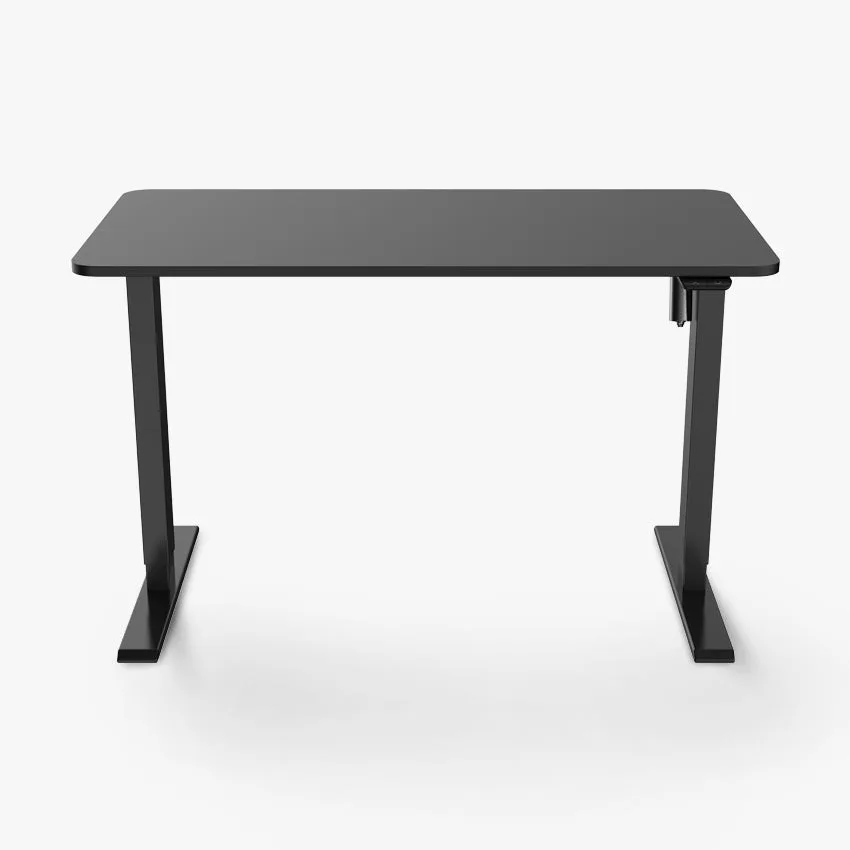
Omnidesk Essential
- Choose a desk with a simple, uncluttered design
- Opt for a height-adjustable model for ergonomic flexibility
- Look for built-in cable management to keep wires hidden
Master Cable Management: The Secret to a Truly Clean Desk
Cables are one of the biggest culprits of desk clutter. Even if you have only a few devices, loose wires can quickly ruin the minimalist aesthetic. The key is to route cables out of sight and keep them organized under or behind the desk.
Start by using cable clips, ties, and raceways to bundle and guide cables along the desk frame. A product like the Advanced Cable Management Bar can be mounted under your desk to keep power strips and excess cable lengths neatly tucked away. For smaller bundles, the Omnidesk Cable Bind offers a simple, reusable solution to keep cords from tangling. Combine these with the Omnidesk Cable Wrap for a complete, invisible cable management system.
- Use a cable management bar to hide power strips and excess cables
- Bundle cables with reusable ties or wraps
- Route cables along the underside of the desk for a clean look
- Label cables for easy identification when you need to move devices
Choose Only Essential Desk Accessories
Minimalism is about intentionality. Every item on your desk should serve a clear purpose. Start by removing everything that isn’t used daily—old papers, extra pens, decorative items that don’t spark joy. Then, choose a few high-quality accessories that combine function and form.
A simple desk organiser can keep your daily tools like pens, sticky notes, and a phone within reach without cluttering the surface. The Hestia Mini Desktop Organiser is a perfect example: it’s compact, elegant, and holds just enough to keep your essentials tidy. Pair it with a single monitor, a wireless keyboard, and a mouse for a truly minimalist setup.
- Keep only daily-use items on your desk
- Use a compact desktop organiser for pens and small tools
- Opt for wireless peripherals to reduce cable clutter
- Store everything else in drawers or shelves
Add a Touch of Calm: Greenery and Personal Touches
A minimalist desk doesn’t have to feel sterile. Adding one or two carefully chosen elements can bring warmth and personality to your workspace without causing clutter. A small plant, for example, improves air quality and adds a natural, calming element.
If you prefer a personal touch, choose a single framed photo or a small piece of art that inspires you. The key is restraint—one or two items maximum. This way, your desk remains clean and focused, but still feels like your own space.
- Add one small plant for a natural, calming effect
- Limit personal items to one or two meaningful pieces
- Avoid decorative items that serve no functional purpose
Creating a minimalist desk setup is one of the most effective ways to improve your focus, reduce stress, and enjoy your workspace more. Start by choosing a clean, adjustable desk like the Omnidesk Essential, then tame your cables with the Advanced Cable Management Bar and Omnidesk Cable Bind. Finally, keep only the essentials and add a single personal touch. Your mind—and your productivity—will thank you.