Quick answer
Set up your All-Star Stadium Nano Player with a stable, glare-free viewing angle, charge it fully before long sessions, and rotate through its seven built-in titles instead of grinding one. Keep your thumbs relaxed on the compact controls, take short breaks, and store the device safely when not in use. These habits make a bigger difference than any accessory.
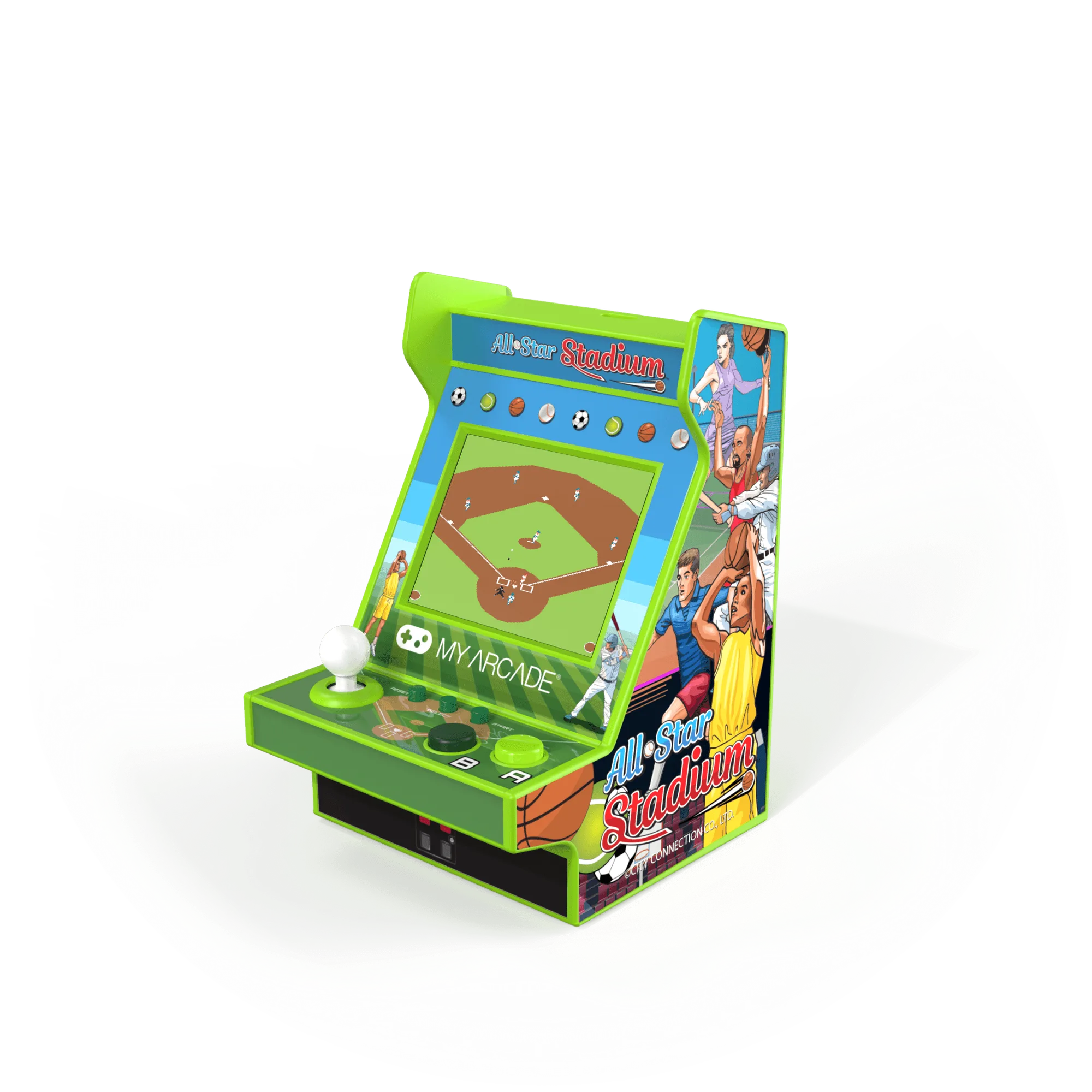
All-Star Stadium Nano Player
The All-Star Stadium Nano Player packs seven fully playable titles into a handheld small enough to carry anywhere. That compact design is a strength, but it also means small adjustments to how you hold, charge, and store the device can noticeably improve how long you enjoy it. This guide walks through the setup and play habits that make the most of the hardware you already own.
You do not need extra gear to get better sessions out of this handheld. The steps below focus on posture, screen placement, battery care, and game rotation. Each step includes a common mistake to avoid, so you can fix small problems before they turn into frustration or a dead battery mid-game.
Why the All-Star Stadium Nano Player rewards good setup habits
The All-Star Stadium Nano Player includes fully playable versions of BASES LOADED 1, 2, 3 & 4, GOAL!, RACKET ATTACK, and HOOPS. That is a mix of baseball, soccer, tennis-style action, and basketball, all on one device. The 2.4-inch full-color screen is bright enough for indoor play, and the compact ergonomic body is designed for hours of use. Because the screen is small, your viewing distance and angle matter more than they would on a TV.
The device is fine-tuned for ergonomics and compact design, which means it fits smaller hands well and travels easily. The tradeoff is that long sessions can still cause thumb fatigue if you grip too tightly. The steps below help you avoid that without buying anything extra.
- Keep the screen about 10 to 14 inches from your eyes for the sharpest view.
- Avoid playing in direct sunlight, which washes out small color displays.
Step 1: Pick a stable, glare-free play position
Before you start a game, sit somewhere with steady light and a surface you can rest your elbows on. A desk, tray table, or firm cushion works better than holding the device in midair. Tilt the Nano Player slightly toward you so the 2.4-inch screen faces your eyes directly rather than catching overhead light.
The most common mistake is playing while lying flat on your back with the device held above your face. That angle creates glare and forces your wrists into an awkward position, which shortens sessions fast. If you like playing in bed, prop yourself up and rest the device on a pillow instead.
Checkpoint: if you have to squint or tilt the screen more than a little to see the action, change your position before starting a game.
- Use a book or small stand to angle the device if your hands get tired.
- Turn off nearby lamps that reflect directly off the screen.
Step 2: Charge fully before a long session
The Nano Player runs on a rechargeable battery, and starting a long tournament on a partial charge is one of the easiest ways to cut a session short. Plug it in until it is fully charged, then unplug it before you play. If you are planning a road trip or a tournament with friends, charge it the night before rather than the morning of.
The common mistake here is leaving the device plugged in while playing for hours. That habit adds heat and can shorten battery life over time. Charge between sessions, not during them, whenever you can. If you must play while charging, keep the device on a hard surface so heat can escape.
Checkpoint: a full charge should get you through a normal evening of play. If it does not, your charging routine is the first thing to review.
- Charge in a cool room, not on a radiator or in direct sun.
- Unplug once the battery is full to avoid unnecessary heat.
Step 3: Learn the controls before you chase a high score
Each of the seven titles has its own control feel, even though they share the same compact button layout. Spend five minutes in each game just moving, passing, or swinging before you try to win. In BASES LOADED, for example, practice timing a pitch before you worry about hitting home runs. In GOAL! and HOOPS, get comfortable with direction changes before you attempt long shots.
The common mistake is jumping straight into a full game and blaming the controls when you lose. The Nano Player is designed for ergonomics, but every sports title has its own timing. A short practice round teaches your thumbs the rhythm.
Checkpoint: if you can complete one full play or possession without looking down at the buttons, you are ready to play for real.
- Rotate through all seven titles once so no game feels unfamiliar.
- Use the first minute of any session as a warm-up, not a scored game.
Step 4: Rotate games to avoid thumb fatigue
The Nano Player's compact body is built for portability, which means your thumbs do more work per button press than on a full-size controller. Playing the same sports title for two hours straight is the fastest route to sore hands. Switch between a fast-action game like RACKET ATTACK and a slower, timing-based game like BASES LOADED to give your hands a break without stopping play.
The common mistake is treating rotation as a break in focus. It is not. Changing games changes your grip and rhythm, which keeps your hands fresher and your attention sharper. If you are chasing a personal best, rotate after every few attempts rather than grinding one mode.
Checkpoint: if your thumbs feel stiff, switch titles or take a five-minute break before continuing.
- Alternate between a reflex-heavy title and a strategy-heavy one.
- Stretch your hands and wrists between games, not just between sessions.
Step 5: Store and transport the device with care
The All-Star Stadium Nano Player is compact, but compact devices are easy to lose or damage in a bag. Keep it in a dedicated pocket or small case rather than loose with keys and cables. If you travel often, pack it near the top of your bag so you are not digging for it and risking a drop.
The common mistake is tossing the device into a backpack with no protection and then wondering why the screen has a scratch. A soft pouch or even a clean microfiber cloth wrapped around the device adds cheap protection. Avoid leaving it in a hot car, which is hard on both the battery and the screen.
Checkpoint: if you can shake your bag and not hear the device rattling against something hard, it is stored well enough.
- Keep a microfiber cloth with the device to wipe the screen.
- Do not store it under heavy items where the screen could take pressure.
Step 6: Build a simple routine around your sessions
The best way to get more from the Nano Player is to make play a small, regular habit rather than an occasional marathon. A 20-minute session after work or a few games during a lunch break keeps your skills sharp and your battery healthy. If you play with friends or family, set a simple rule like winner stays on, which keeps everyone involved and the device from sitting idle.
The common mistake is saving the device for rare, long sessions. That pattern leads to forgotten controls and a battery that sits drained for weeks. Short, frequent play is easier on the hardware and more fun overall.
Checkpoint: if you have not picked up the device in a week, schedule a short session rather than waiting for a free afternoon.
- Keep the device somewhere visible so it is easy to grab.
- Top up the charge after every few sessions instead of waiting for empty.
Seven-step checklist for better All-Star Sports sessions
- Set your viewing angle: Sit with elbows supported and tilt the 2.4-inch screen toward your eyes. Avoid playing flat on your back, which causes glare and wrist strain. If you have to squint, reposition before you start.
- Charge fully, then unplug: Start long sessions on a full battery and charge between sessions rather than during them. Heat from charging while playing shortens battery life. A full charge should cover a normal evening of play.
- Practice each title first: Spend five minutes in each of the seven games learning the timing before you chase a score. Every sports title has its own control rhythm. If you can complete one play without looking at the buttons, you are ready.
- Rotate games to rest your thumbs: Switch between reflex-heavy and timing-based titles every few attempts. The compact body asks more of your thumbs than a full-size controller. Stiff thumbs mean it is time to switch titles or take a break.
- Store it protected: Keep the device in a dedicated pocket or soft pouch, away from keys and heavy items. Avoid hot cars, which stress the battery and screen. If it does not rattle in your bag, it is stored well enough.
- Play in short, regular sessions: Aim for 20-minute sessions a few times a week instead of rare marathons. Frequent play keeps your skills sharp and the battery healthy. If a week passes, schedule a short session rather than waiting.
- Wipe the screen and check the charge: Use a microfiber cloth on the 2.4-inch display and top up the battery after every few sessions. Small maintenance keeps the device ready to grab. A clean screen and a topped-up battery remove the two most common reasons the device sits unused.
What you are working with
- All-Star Stadium Nano Player: Includes fully playable versions of BASES LOADED 1, 2, 3 & 4, GOAL!, RACKET ATTACK, and HOOPS, with a full-color 2.4-inch screen and a compact, ergonomic design. Seven built-in titles mean you can rotate games to reduce thumb fatigue, and the small screen makes viewing angle and glare control more important than on a larger display.
- PAC-MAN Joystick Player: Features a high-resolution 3.5-inch full-color vertical display and artwork inspired by the original PAC-MAN arcade cabinet. If you enjoy the All-Star Stadium Nano Player but want a larger vertical screen and a joystick-style control for arcade classics, this is a natural next step for a desk or game room.
You do not need new gear to get more from the All-Star Stadium Nano Player. A stable viewing angle, a full charge, a few practice minutes per title, and a habit of rotating games will keep your hands fresh and your sessions fun. Treat the device well between plays, and it will be ready whenever you have twenty minutes to spare.