Quick Answer
Install your LensCoat on a clean, dry Canon 300 f/2.8 IS by aligning the control windows first, then smoothing the cover from front to back. Avoid stretching the material over the focus ring.
Why Alignment Matters
The LensCoat for the Canon 300 f/2.8 IS includes clear plastic windows over the autofocus, Image Stabilization controls, and distance scale. If these windows are not aligned precisely, you won't be able to read the settings or operate the switches without removing the cover.
The cover also has a small hole on the last section (likely for a tripod collar or strap lug). Matching this hole to your lens's corresponding feature is essential for a secure fit.
Installation Steps
- Prepare the lens: Ensure the lens is clean and dry. Remove any dust or debris that could scratch the surface or get trapped under the cover. A clean lens prevents scratches and ensures the cover adheres smoothly.
- Align the control windows: Position the cover so the clear plastic windows line up exactly with the autofocus, IS controls, and distance scale. Check both sides to confirm alignment. Misalignment here will block access to essential controls.
- Slide the cover into place: Starting from the front of the lens, gently slide the cover over the barrel. Work it back toward the mount, smoothing out any wrinkles as you go. Do not pull or stretch the material—this can cause it to tear or lose its shape.
- Align the tripod collar hole: If your lens has a tripod collar, match the small hole in the cover with the collar's position. Adjust the cover slightly to ensure the hole sits flush. A misaligned hole can interfere with mounting the lens on a tripod.
- Final check and adjustment: Once the cover is in place, verify that all windows are clear and the hole is aligned. Make small adjustments if needed, then press the cover firmly to remove any air bubbles. A final check ensures the cover is both protective and functional.
Product Facts
-
LensCoat® Canon 300 f/2.8 IS: The LensCoat for the Canon 300 f/2.8 IS features clear plastic windows over the autofocus and Image Stabilization controls, and also the distance scale. These windows let you see and use the lens controls without removing the cover, so precise alignment during installation is critical.
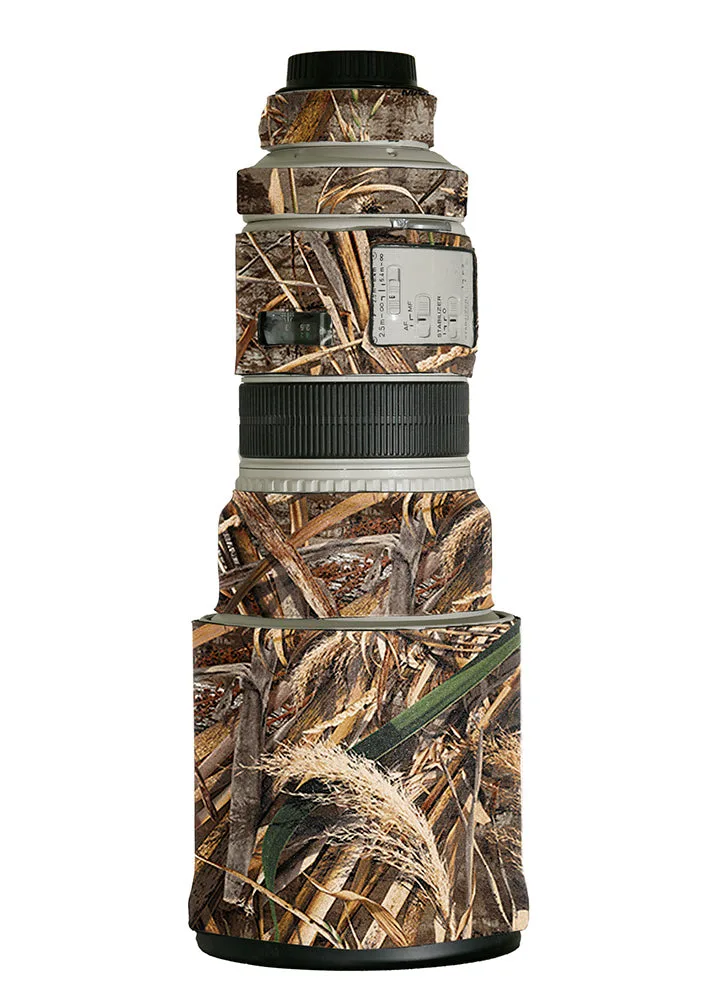
LensCoat® Canon 300 f/2.8 IS