What You Need to Know Before You Start
The Maxx Tech Blue Wave Camo face plates are designed exclusively for the PS5 Slim disc and digital consoles. They are not compatible with the original PS5 model, so check your console version before purchasing. The set includes five console face plates, one matching controller face plate, and two thumb grips to complete the look.
Installation is straightforward and requires no special skills. The console face plates snap into place with a simple push, and the controller face plate uses the included tool for removal and installation.
Installing the Console Face Plates
Follow these steps to replace your PS5 Slim console's face plates with the Blue Wave Camo design.
- Remove the old face plates: Gently lift the existing face plates from your PS5 Slim console. They are held in place by clips and should come off without excessive force.
- Align the new face plates: Line up the Maxx Tech Blue Wave Camo face plates with the corresponding slots on the console. The plates are designed to fit seamlessly.
- Snap them into place: Press each face plate firmly until you hear a click. The plates should sit flush against the console with no gaps.
Installing the Controller Face Plate
The controller face plate gives your DualSense controller a matching Blue Wave Camo look.
- Use the included tool to remove the original face plate: The kit comes with a controller tool. Insert it into the small notch on the controller's face plate and gently pry it off.
- Snap on the new face plate: Line up the new Blue Wave Camo face plate with the controller and press down until it clicks securely into place.
Key Details About the Maxx Tech Blue Wave Camo Set
-
PS5 Slim Face Plates - Blue Wave Camo (PS5): Designed for PS5 Slim disc and digital consoles. NOT compatible with original PS5. Ensures you buy the correct plates for your console model.
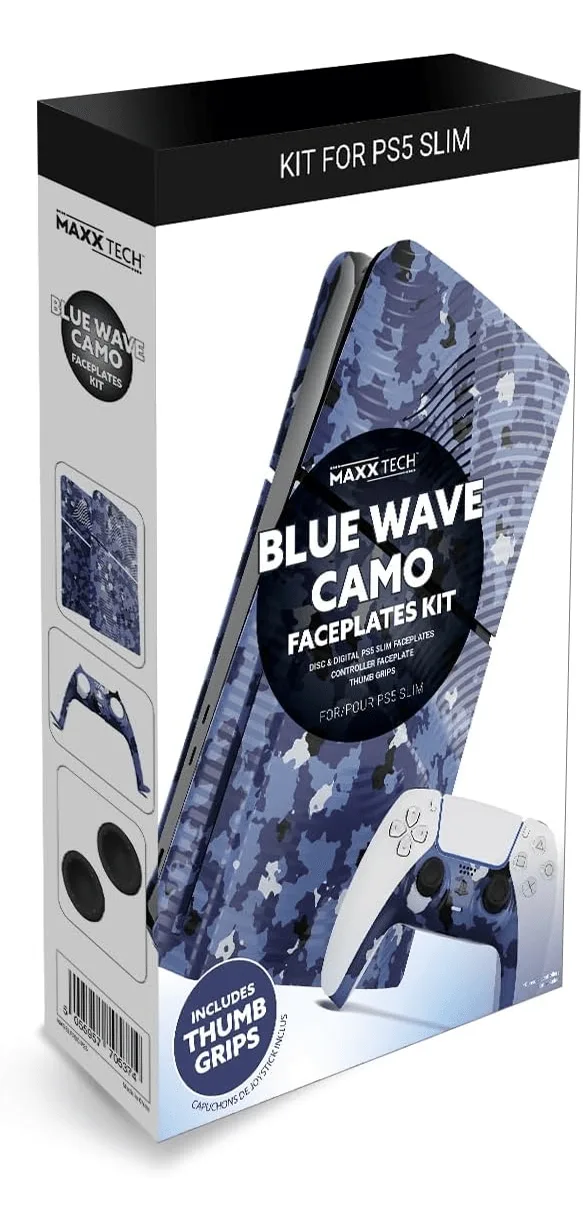
PS5 Slim Face Plates - Blue Wave Camo (PS5)
-
PS5 Slim Face Plates - Blue Wave Camo (PS5): Includes 5 console face plates, 1 controller face plate, and 2 thumb grips. You get a full matching set to customize both your console and controller.
-
PS5 Slim Face Plates - Blue Wave Camo (PS5): Easy installation – console face plates simply snap into place; controller face plate requires the included tool. No adhesive or complex steps are needed, making it a quick DIY upgrade.
Tips for a Clean Installation
Before installing, make sure your PS5 Slim is powered off and unplugged. Work on a clean, flat surface to avoid scratching the plates. The face plates are designed to match the console's curves exactly, so if a plate doesn't sit flush, double-check that you're using the correct piece for that position.
The included thumb grips can be added after installation. Simply stretch them over the thumbsticks for extra grip and a cohesive Blue Wave Camo aesthetic.