Quick Answer
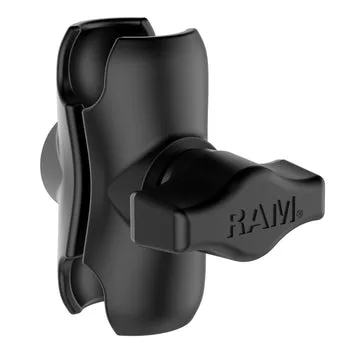
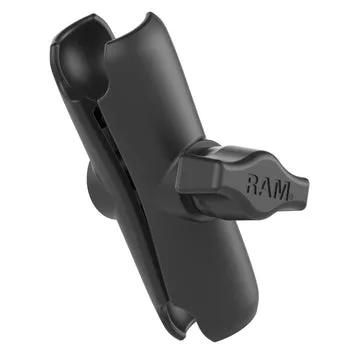
To install a RAM Double Socket Arm, attach one ball to your mounting base and the other to your device holder, then tighten the arm's socket knobs to set the angle. The key is to position the arm before fully tightening, and to check that the sockets are seated correctly to avoid slippage.
A RAM Double Socket Arm is the key to getting your phone or tablet at the perfect angle, whether you're in a truck, RV, or at a workstation. The double socket design lets you articulate the device in ways a fixed mount can't, but only if you install it correctly. Here's how to do it right the first time.
This guide walks you through the process of attaching the arm, adjusting the angle, and tightening everything down securely. We'll also point out the common mistakes that cause mounts to slip or break—so you can avoid them.
What You Need Before You Start
Before you begin, gather your RAM Double Socket Arm, the ball base you're attaching to (like a drill-down or vent mount), and the device holder—such as a RAM X-Grip holder for your tablet or phone. The arm works with any RAM mounting system that uses the standard ball-and-socket design, so compatibility is straightforward.
Check that all parts are clean and free of debris. A small grain of sand in the socket can cause the arm to slip or wear out prematurely. Also, make sure you have the right tools: most RAM mounts use hex wrenches, but the double socket arm typically has hand-tightened knobs, so you may not need any tools at all.
- Inspect the ball ends and sockets for any dirt or damage before assembly.
- Have your device holder ready so you can test the angle before tightening.
Attaching the Arm to the Base
Start by loosening the socket knobs on the arm so the ball ends can move freely. Place one ball end over the ball on your mounting base—for example, the drill-down base on a RAM X-Grip Drill-Down Mount. The arm should click or slide into place easily. If it feels tight, loosen the knob a bit more; don't force it.
Make sure the ball is fully seated in the socket before you tighten. A common mistake is to tighten the knob while the ball is only partially in, which can strip the threads or cause the arm to pop out under vibration. Once the ball is seated, hand-tighten the knob until it's snug—just enough to hold the arm in place while you adjust the angle.
- Always align the ball with the socket opening before tightening.
- Hand-tighten only at this stage; you'll do the final tightening later.
Attaching Your Device Holder
Now attach your device holder to the other ball end of the arm. If you're using a RAM X-Grip Universal Holder for 12"-13" tablets, for example, the holder's socket goes over the ball. Again, make sure the ball is fully seated before tightening the knob.
This is the time to think about your viewing angle. Position the device holder where you want it—facing the driver, passenger, or even angled for a rear-seat view. Since the double socket arm allows articulation at both ends, you can adjust the angle in two places, giving you more flexibility than a single socket.
- Test the range of motion before final tightening to see what angles are possible.
- For tablets, ensure the holder's grip doesn't block ports or buttons.
Adjusting the Angle and Final Tightening
With everything attached, adjust the arm to your desired angle. Move the device holder to the position you want, then tighten both socket knobs firmly. Use a hex wrench if the knobs have a hex fitting, but avoid over-tightening—you should be able to adjust the angle with moderate effort, not with a tool that leaves marks.
After tightening, give the device a gentle shake to test for slippage. If it moves, loosen the knobs, re-seat the balls, and tighten again. A common mistake is to leave the knobs too loose, which causes the mount to droop over time, especially with heavier tablets. A properly tightened arm should hold its position even on bumpy roads.
- Tighten both knobs equally to maintain balance.
- Check the mount after a few days and re-tighten if needed—new mounts can settle.
Step-by-Step Installation Checklist
- Loosen the socket knobs: Turn the knobs counterclockwise until the ball ends move freely. This prevents forcing the balls into the sockets. Checkpoint: The arm should articulate smoothly without resistance.
- Attach to the base ball: Slide one ball end over the ball on your mounting base. Ensure the ball is fully seated before tightening the knob. Common mistake: Tightening with the ball only partially seated can strip threads.
- Attach your device holder: Place the holder's socket over the other ball end. Position the holder where you want it before tightening. Checkpoint: Test the angle range—you should be able to tilt and rotate the device.
- Tighten both knobs firmly: Hand-tighten, then use a hex wrench if needed. Avoid over-tightening, which can damage the socket. Verdict: A firm, even tightness prevents drooping on rough roads.
- Test for slippage: Shake the mount gently. If the arm moves, loosen, re-seat the balls, and tighten again. Final check: The mount should hold its position without any play.
Products That Work with the Double Socket Arm
- https://rammounter.com/products/ram-double-socket-arm-261070RAM® Double Socket Arm: The RAM® Double Socket Arm is a versatile mounting component designed to provide secure and adjustable positioning for your devices. Its double socket design allows for flexible articulation, making it easy to achieve the perfect viewing angle. This is the core component you're installing—understanding its double socket design helps you use it to its full potential.
- RAM® X-Grip® Universal Holder for 12"-13" Tablets: The RAM® X-Grip® Universal Holder is designed to securely hold 12"-13" tablets, offering a reliable mounting solution for your device. Pair this holder with the double socket arm to mount larger tablets at custom angles without blocking ports or buttons.
- RAM® X-Grip® Universal Drill-Down Mount for 7"-8" Tablets: The RAM® X-Grip® Universal Drill-Down Mount securely holds 7"-8" tablets in place using a spring-loaded X-Grip design. This mount is designed for permanent installation via a drill-down base. If you're using a smaller tablet, this drill-down base provides a stable platform for the double socket arm to attach to.
Installing a RAM Double Socket Arm is straightforward when you follow these steps. The key is to seat the balls properly, tighten evenly, and test for slippage. With the arm correctly adjusted, you'll get the custom mounting angle you need—whether for a phone, tablet, or other device.