Quick Answer
To install the Step2 Shopping Cart Wheel 4 Pack, remove the old wheels from the axle, slide the new wheels on, and press the axle caps back into place. This replacement restores smooth rolling and fixes wobbly wheels.
Why Wheels Wear Out and When to Replace Them
Over time, the wheels on a Step2 shopping cart can wear down, crack, or become wobbly from regular play. If your child's cart drags, catches, or tips to one side, the wheels are likely the cause. The Shopping Cart Wheel 4 Pack (LE) is a direct replacement part designed for select Step2 shopping carts, so it's a simple fix once you confirm your model is compatible.
Before you start, check the product tags or your cart's model number to confirm the wheel pack fits. If the wheels look intact but the cart still wobbles, the issue may be the axle or the hub, not the wheel itself.
Step-by-Step Installation
- Gather Tools and Confirm Compatibility: You'll need a flat-head screwdriver or a small pry tool, and optionally a rubber mallet. Check the product tags or your cart's model number to confirm the Wheel 4 Pack fits your Step2 shopping cart before starting. Using the wrong wheel size can cause the axle to bind or the wheel to fall off, so verify compatibility first.
- Turn the Cart Upside Down: Place the cart on a flat, stable surface and turn it upside down so the wheels are accessible. This gives you a clear view of the axles and makes removal easier. Make sure the cart is stable and won't tip over while you work.
- Remove the Old Wheels: Locate the axle cap on the outside of each wheel. Use the flat-head screwdriver to gently pry the cap off, then slide the wheel off the axle. Repeat for all four wheels. Don't force the cap—if it's stuck, rotate the wheel slightly while prying to release pressure.
- Install the New Wheels: Slide each new wheel onto the axle, making sure the wheel hub faces outward and the wheel spins freely. Press the axle cap back on until it snaps into place. Repeat for all four wheels. After each wheel, give it a spin to confirm it rotates smoothly before moving to the next one.
- Test the Cart: Turn the cart right side up and give it a gentle push on a flat surface. Check that all wheels roll evenly and the cart doesn't wobble or drag. If a wheel still wobbles, recheck the axle cap—it may not be fully seated.
Product Info
-
Shopping Cart Wheel 4 Pack (LE) (142150): The Shopping Cart Wheel 4 Pack (LE) includes four replacement wheels designed for select Step2 shopping carts. You get all the wheels you need in one pack, so you can replace a full set or just the worn ones without buying extras.
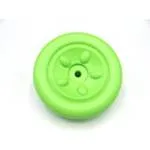
Shopping Cart Wheel 4 Pack (LE) (142150)