Start with what the PL4800 panel actually is
The Light Up Your Logo PL4800 Edition is a laser-engraved logo panel for your chair, not a self-contained light fixture. The engraving is the permanent part; the glow comes from the RGB kit, which is sold separately. That split matters for care because you are protecting two different things: the engraved surface and the lighting hardware behind or around it.
Because the supplied information does not include material specs, cleaning agents, or kit installation steps, treat any cleaning method as a general precaution rather than a manufacturer instruction. The safest approach is to keep the engraved area dry, avoid abrasive cloths, and follow the RGB kit's own guidance for the lighting components.
What the PL4800 Edition listing confirms
-
Light Up Your Logo - PL4800 Edition: High-quality laser engraving personalizes any logo of your choice as long as it fits the engraving guidelines. The engraving is the durable, visible part of the panel, so your care routine should protect it from scratches and harsh cleaners.
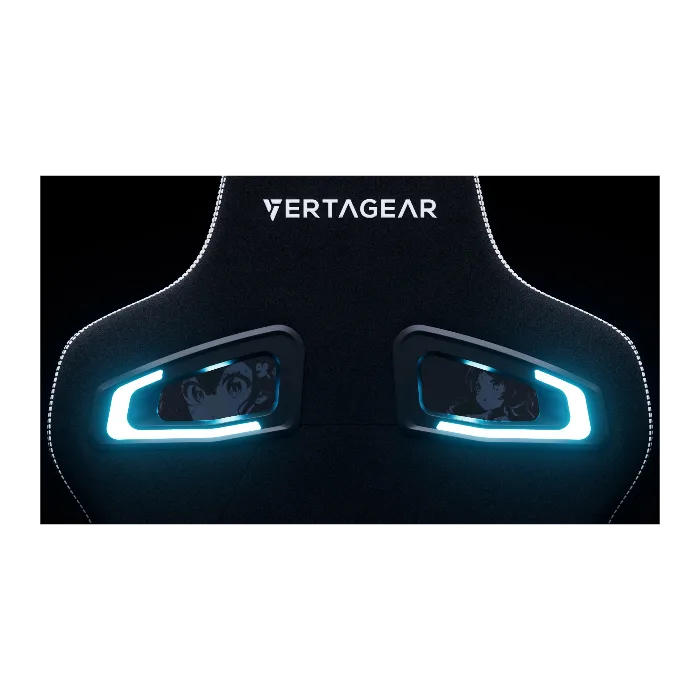
Light Up Your Logo - PL4800 Edition
-
Light Up Your Logo - PL4800 Edition: The RGB kit is sold separately. If your panel is not glowing, the first thing to check is whether the RGB kit is installed and powered, not whether the engraving is damaged.
-
Light Up Your Logo - PL4800 Edition: Once your custom logo order has been placed, changes cannot be made. Care starts before the panel arrives: approve your logo file carefully, because the engraving is final.
A simple routine for the engraved panel
- Dust first, dry: Use a soft, dry microfiber cloth to lift dust from the engraved area. Dry dusting avoids pushing grit into the engraving.
- Wipe gently with a barely damp cloth if needed: If a mark remains, use a cloth dampened with water only and wring it out well. Do not flood the panel or let liquid sit in the engraving. The supplied information does not name approved cleaners, so avoid solvents and abrasives.
- Dry immediately: Buff the area dry with a second soft cloth. Moisture left around the panel edge is the last thing you want near lighting hardware.
- Check the glow after cleaning: Turn on the RGB kit and confirm the logo still reads clearly. If the light is dim or uneven, inspect the kit connection before assuming the panel is at fault.
Where the glow actually comes from
The PL4800 Edition panel does not include a light source. The RGB kit is a separate purchase, so keep its power connection and any controller free of dust and moisture. The supplied information does not describe the kit's installation or care, so use the kit's own documentation for those steps.
A useful diagnostic order: confirm the kit is plugged in, confirm the kit's own lights work, then look at the engraved panel. If the kit works but the logo looks dull, clean the engraved surface as described above. If the kit does not work, the panel engraving is not the cause.
Habits that protect the engraving long-term
- Keep sharp objects away: Keys, tools, and desk edges can scratch the engraved surface. The engraving is permanent, but scratches are too.
- Avoid adhesive stickers over the logo: Residue can collect in the engraving and is hard to remove without harsh cleaners.
- Mind the chair's position: If the panel faces a sunny window, prolonged direct sun can fade nearby materials; the supplied information does not confirm UV resistance, so shade is a reasonable precaution.
- Recheck the logo file before ordering: Since changes are not possible after the order is placed, review the logo against the engraving guidelines before checkout.
What the supplied information does not cover
The listing does not include material specifications, approved cleaning products, RGB kit installation steps, or warranty details for the engraving. If your panel arrives damaged or the engraving looks wrong, contact support rather than attempting a repair yourself. For the lighting side, rely on the RGB kit's documentation, which is a separate product.