Quick answer
To organize cords in your tech bag, start by sorting cables by type and length, then use a dedicated organizer with soft-lined pockets to keep them tangle-free. A cord organizer for laptop bags like the Shinjuku Tech Organizer helps you separate and protect your cables, making them easy to find. Aim to pack only the cables you need for the day to reduce clutter.
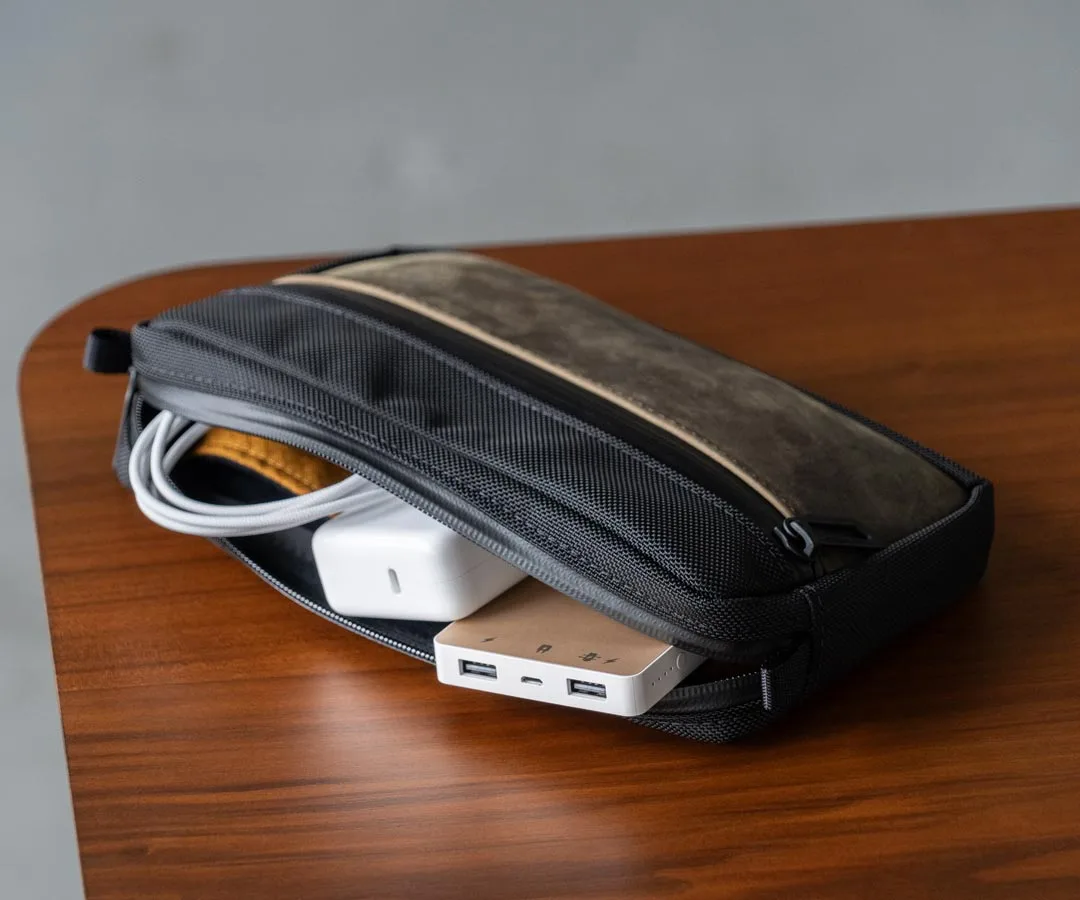
Shinjuku Tech Organizer
Tangled cords can turn a well-packed tech bag into a frustrating mess. Whether you carry a laptop, tablet, or gaming console, cable management for bags is essential to keep your gear organized and ready. The right approach saves time and protects your cables from damage.
This guide walks you through a simple, step-by-step process to organize cords in your tech bag. You'll learn how to sort, coil, and store your cables using practical solutions, including dedicated tech bag accessories for cables. By the end, you'll have a tidy, efficient setup that makes grabbing the right cord effortless.
Why Dedicated Cable Management Matters
Cables are the unsung heroes of your tech setup, but they're also the easiest to tangle and damage. When you toss them loose into a bag, they can get snagged on other items, causing frayed ends or bent connectors. A dedicated cord organizer for laptop bags prevents this by giving each cable its own padded space.
Beyond protection, organization saves time. Instead of digging through a dark bag to find the right charger, you can open a well-organized pouch and see exactly what you need. This is especially valuable when you're on the go, whether commuting, traveling, or heading to a meeting.
- Use a bright liner to make cables visible at a glance.
- Separate cables by type (charging, data, audio) to avoid confusion.
Choosing the Right Cable Organizer
When selecting a cable organizer, consider the number of cables you typically carry and the size of your tech bag. A compact pouch that fits into a backpack or briefcase is ideal for daily carry. Look for features like soft lining to cushion your cables and multiple pockets to keep them separated.
The Shinjuku Tech Organizer is a great example: it comes in two sizes, with a soft fleece-like lining and a bright gold liner for quick visibility. The Full Size even fits an iPad mini, making it versatile for those who carry a tablet. Its design helps you keep all your electronic accessories neat and organized in one place.
- Measure your bag's interior to ensure the organizer fits comfortably.
- Choose a size that matches your cable collection—don't overpack.
Step-by-Step Cable Organization Process
Follow these steps to organize cords in your tech bag efficiently. The process takes just a few minutes and will save you time every day.
Start by gathering all the cables you own and sorting them into categories: charging cables, data cables, audio cables, and adapters. This helps you see what you actually use and what can stay home. Then, coil each cable properly to prevent tangles and kinks.
- Use the over-under technique to coil cables without twisting them.
- Label cables with small tags or colored ties if you have many similar ones.
Steps to Organize Cords in Your Tech Bag
- Sort and Declutter: Empty your bag and gather all cables. Sort them into categories: charging, data, audio, and adapters. Remove cables you haven't used in the past month and set them aside. Checkpoint: You should only keep cables you use regularly.
- Coil Each Cable Properly: Use the over-under technique: hold the cable, twist your wrist alternately, and loop it into a coil. Secure with a Velcro strap or twist tie. Avoid tight wraps that stress the wire. Checkpoint: Cables should coil smoothly without kinks.
- Choose a Dedicated Organizer: Select a cord organizer for laptop bags that fits your cable collection and bag. The Shinjuku Tech Organizer offers soft-lined pockets and a bright liner for visibility. Checkpoint: The organizer should fit comfortably in your bag without bulging.
- Place Cables in the Organizer: Group similar cables together in separate pockets or compartments. Keep frequently used cables in easily accessible spots. Avoid overstuffing pockets to prevent strain on zippers. Checkpoint: You should be able to see and grab each cable without digging.
- Integrate into Your Bag: Place the organizer in a designated section of your tech bag, such as a main compartment or front pocket. Ensure it doesn't interfere with other items like your laptop or documents. Checkpoint: Your bag should close easily with the organizer inside.
Product Facts: Organizers That Help
- Shinjuku Tech Organizer: The pockets are lined with a soft, fleece-like material to cushion against nicks and bumps, and a bright gold liner helps you quickly find everything inside. The soft lining protects your cables from damage, while the gold liner makes it easy to spot the cord you need, even in low light.
- Executive Folio for Laptops and Tablets: With a laptop compartment and pockets for documents, pens, and a smartphone, it's your ideal sidekick for quick meetups. If you carry a folio, you can use its dedicated pockets to separate cables from documents, keeping your bag tidy and professional.
Organizing cords in your tech bag doesn't have to be a chore. By sorting, coiling, and using a dedicated cable organizer, you can keep your cables tangle-free and protected. Invest a few minutes upfront to save time and frustration later. With the right tech bag accessories for cables, you'll always know where your cords are and ready to use.