Start with the right Kishi V2 model
The Razer Kishi V2 comes in two distinct versions: one for Android and one for iPhone. They look similar, but they are not interchangeable. Before you try to connect anything, confirm which model you have. The Android version is designed for Android smartphones, while the iPhone version is made for iPhone. Using the wrong version will not give you the console-style controls you expect.
The supplied product information for both models describes a stable, extendable bridge that holds most popular smartphones securely. That means the controller stretches to grip your phone, but it does not list exact size limits. If you have an unusually large or thick phone, check the fit carefully before relying on it.
Android model at a glance
-
Razer Kishi V2 for Android Mobile Gaming Controller: Razer Kishi V2 for Android Mobile Gaming Controller uses your smartphone’s USB-C connection to eliminate input latency and includes passthrough charging. This tells you the connection is wired through USB-C, not a wireless pairing process, and that you can power your phone while you play.
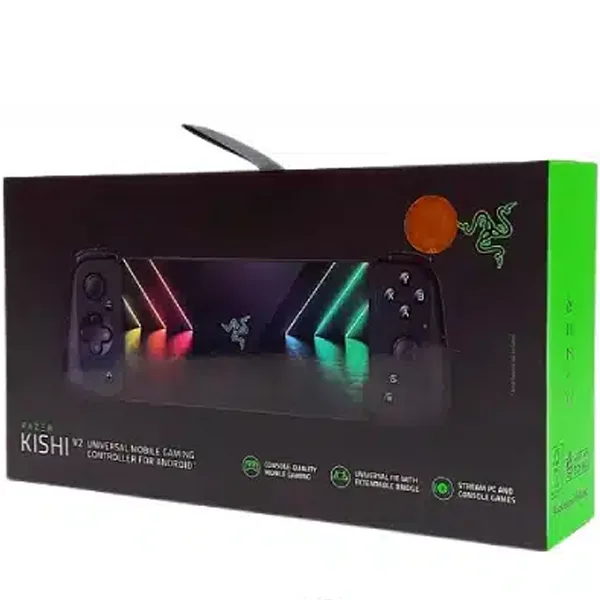
Razer Kishi V2 for Android Mobile Gaming Controller
iPhone model at a glance
-
Razer Kishi V2 for iPhone Mobile Gaming Controller: Razer Kishi V2 for iPhone Mobile Gaming Controller also uses your smartphone’s USB-C connection to eliminate input latency and features passthrough charging. The iPhone version works the same way: a direct USB-C link and the ability to charge your phone during a session.
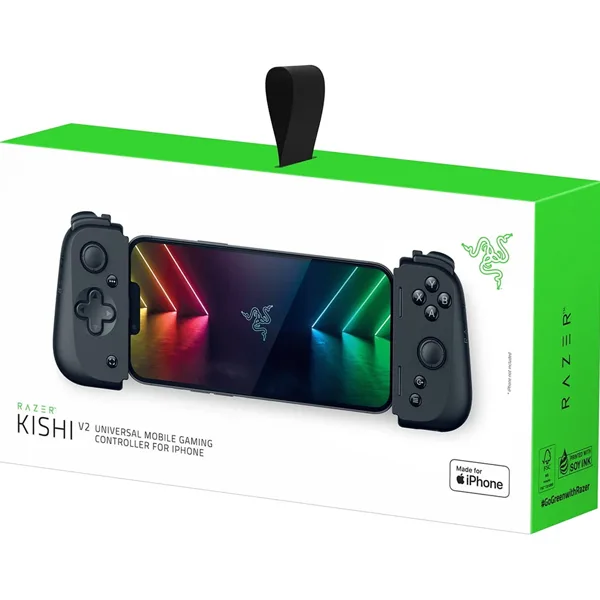
Razer Kishi V2 for iPhone Mobile Gaming Controller
How to connect the Kishi V2 to your phone
The Kishi V2 does not use Bluetooth pairing. It connects through your phone’s USB-C port, so the setup is mostly physical. The exact steps below are based on the supplied product details; your phone’s specific menu language may differ.
- 1. Check your phone has a USB-C port: Both the Android and iPhone versions of the Kishi V2 rely on a USB-C connection. If your phone uses a different connector, this controller is not the right fit.
- 2. Remove your phone case if it blocks the port: The controller plugs directly into the phone’s USB-C port. A thick case may prevent the connector from seating fully. The supplied information does not list a maximum case thickness, so test the fit with your own case.
- 3. Extend the bridge and insert your phone: Pull the two sides of the controller apart using the extendable bridge. Place your phone between the grips and align the USB-C connector with your phone’s port. The bridge is designed to hold most popular smartphones securely.
- 4. Push the connector firmly but gently: The controller’s USB-C plug should slide into your phone’s port. Do not force it. If it does not go in smoothly, check that the phone is straight and that no debris is in the port.
- 5. Launch a compatible game or streaming app: The supplied details mention support for the biggest game streaming apps, and note that third-party hardware and services may be required. The Kishi V2 does not come with a list of every supported game, so try the app you intend to use and see if it recognizes the controller.
What “pairing” means for the Kishi V2
Because the Kishi V2 connects through USB-C, there is no wireless pairing step like you would have with a Bluetooth controller. You do not need to open your phone’s Bluetooth settings or enter a code. The “pairing” is the physical connection: once the controller is plugged in, your phone should recognize it as a wired game controller.
If a game does not respond to the Kishi V2, the issue is usually with the app’s controller support rather than the connection. The supplied information does not include a compatibility list or troubleshooting guide, so we cannot confirm which specific apps work. Start with a game or streaming service you already know supports external controllers.
How passthrough charging works
Both Kishi V2 models include passthrough charging. That means the controller has a charging port that lets you plug your phone’s charger into the controller instead of directly into the phone. Your phone charges while the controller stays connected, so you can keep playing during a long session.
The supplied details do not specify the charging port type, the maximum charging speed, or whether fast charging is supported. Treat those as unknowns: use the charger and cable that came with your phone, and check the controller’s port before assuming any particular connector. Passthrough charging is a convenience, not a guarantee of fast charging.
Android vs iPhone: which Kishi V2 do you need?
The two versions are sold separately and are not cross-compatible. The table below summarizes the supplied differences and similarities.
- Razer Kishi V2 for Android: Designed for Android smartphones with a USB-C port. Uses USB-C for a low-latency connection. Includes passthrough charging. Price shown: USD 51.43 (comparison price USD 82.95).
- Razer Kishi V2 for iPhone: Designed for iPhone with a USB-C port. Uses USB-C for a low-latency connection. Includes passthrough charging. Price shown: USD 58.93 (comparison price USD 87.95).
- Shared features: Both models have microswitch buttons, analog triggers, programmable macros, an extendable bridge, and an ergonomic design slim enough to fit in a pocket.
Fit and comfort notes before you buy
The extendable bridge is described as holding most popular smartphones, but the supplied information does not give a minimum or maximum phone size. If you use a very small phone or a large flagship with a bulky case, the fit may vary. The controller is also described as slim enough to fit in a pocket, which makes it a portable option for gaming on the go.
The ergonomic design is intended for long gaming sessions, with each button placed for comfort. That said, comfort is personal, and the supplied details do not include dimensions or weight. If you are sensitive to controller size, consider how the Kishi V2 compares to a full-size console controller you already own.